• Amministratore
  •  
    Support Ukraine
    If you experience any problems with the forum (it is not visible, there is no way to post messages, or some functionality does not work), please let us know. If you have problems with registration or you did not receive confirmation letter, let us know and we will activate your account manually.
    If you get an "The submitted form was invalid. Try submitting again" error, delete cookies, then try again.
     

Amazfit GTR - watch won't connect to Amazfaces app

Archive closed topics

Moderatori: Internal error, Watchmens

Bloccato
Avatar utente
osmat
Admin
Messaggi: 278
Iscritto il: 22 mar 2018, 10:09
Località: Ukraine
Has thanked: 35 times
Been thanked: 73 times
Contatta:

Re: Amazfit GTR - watch won't connect to Amazfaces app

Messaggio da osmat »

Cutandpaste ha scritto: 22 feb 2020, 13:47
I have got my GTR connected to my phone, synchronised with the Amazfit app. I can get new faces from the Amazfit app, but whenever I try to install a new face from the Amazfaces app, and tap "discover", it fails to find the watch. I have tried rebooting the watch, restarting bluetooth etc. but no joy. Any ideas?
A small guide for interacting with watches through AmazFaces

1.Turn on discovery in Amazfit.
2.Wait for synchronization.
3.Open AmazFaces and try the installation.
4.If the clock is still not connected.
5.Open the bluetooth settings.
6.Remove the watch from the list of paired devices.
7.Start at point 1

Important AmazFaces application must receive all permissions, including access to geolocation.
br9900
Messaggi: 5
Iscritto il: 17 set 2019, 23:05
Has thanked: 2 times
Contatta:

Messaggio da br9900 »

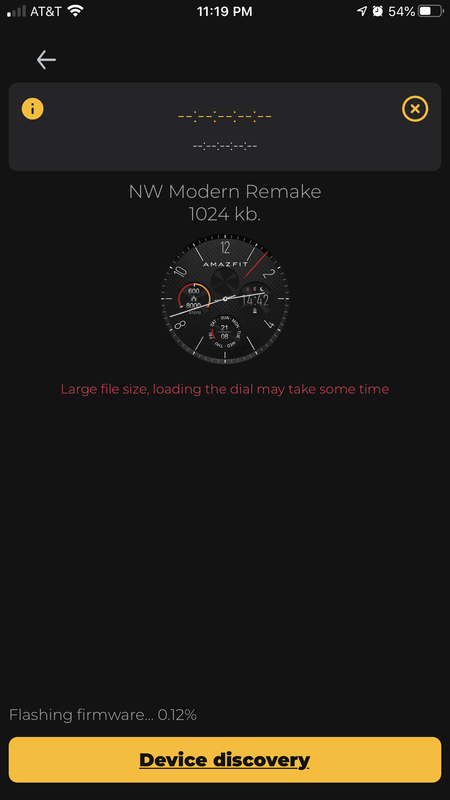
I have a Verge Lite and have been using Amazfaces for several months and love it. It seems the recent updates to the app has caused issues connecting to the device?

The screen shot is my issue. It never reaches 1% on the firmware install.


Immagine

I've tried these steps too.

1.Turn on discovery in Amazfit.
2.Wait for synchronization.
3.Open AmazFaces and try the installation.
4.If the clock is still not connected.
5.Open the bluetooth settings.
6.Remove the watch from the list of paired devices.
7.Start at point 1
Avatar utente
osmat
Admin
Messaggi: 278
Iscritto il: 22 mar 2018, 10:09
Località: Ukraine
Has thanked: 35 times
Been thanked: 73 times
Contatta:

Messaggio da osmat »

br9900 ha scritto: 24 feb 2020, 05:28
I have a Verge Lite and have been using Amazfaces for several months and love it. It seems the recent updates to the app has caused issues connecting to the device?

The screen shot is my issue. It never reaches 1% on the firmware install.


Immagine

I've tried these steps too.

1.Turn on discovery in Amazfit.
2.Wait for synchronization.
3.Open AmazFaces and try the installation.
4.If the clock is still not connected.
5.Open the bluetooth settings.
6.Remove the watch from the list of paired devices.
7.Start at point 1

https://testflight.apple.com/join/4hBEKHHg
Try the beta version
Bloccato

Torna a “Closed topics”

Chi c’è in linea

Visitano il forum: Nessuno e 3 ospiti