-
- Administrator
-
-
Support Ukraine
If you experience any problems with the forum (it is not visible, there is no way to post messages, or some functionality does not work), please let us know. If you have problems with registration or you did not receive confirmation letter, let us know and we will activate your account manually.
If you get an "The submitted form was invalid. Try submitting again" error, delete cookies, then try again.
Amazfit watchfaces Tool
Moderators: Internal error, Watchmens
-
JotaEme
- WF maker
- Posts: 8
- Joined: 26 Aug 2019, 19:11
- Has thanked: 2 times
- Been thanked: 1 time
- Contact:
Hi, first time posting. This is an amazing community! I got my Verge Lite just a week ago and I already am making lots of progress just lurking around.
I'm designing my wf and I'm facing a problem with the mini seconds handle, I hope you guys can help.
This is the preview generated by Amaztool 0.1.0.12:
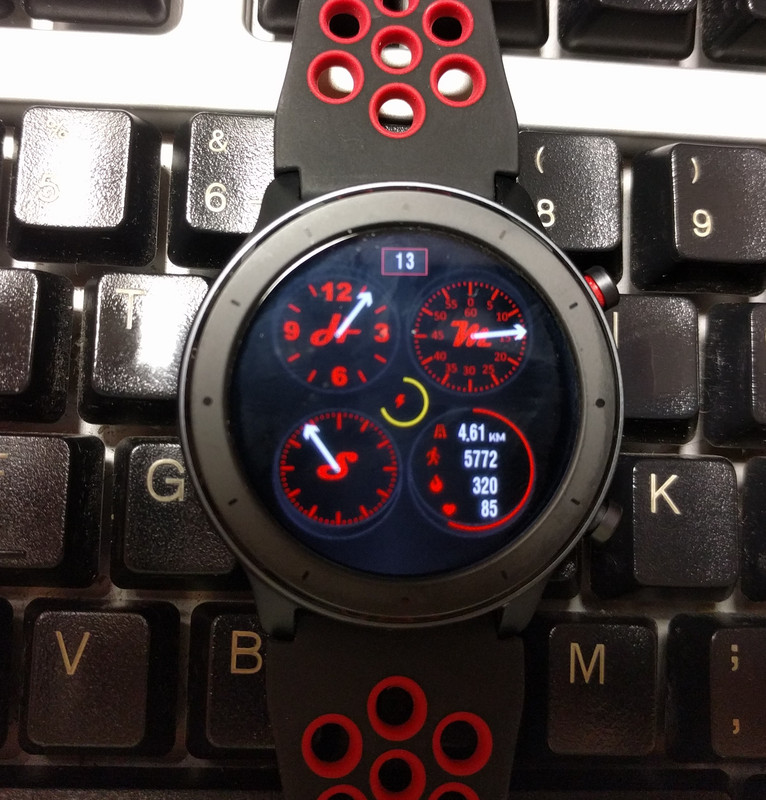
This is the result. I'm aware the color issue is a known problem, but I don't know if the missing seconds handle is caused by this, or it is not being rendered at all.
This is the result with [mention]afwafwafw[/mention] 's py tool. The seconds handle is centered on the whole face, instead of the smaller circle for it.
Can this be solved, using either tool?
Edit: Tried Amaztool again with a completely black seconds handle, and it renders in the middle of the whole watchface, just like with the py version.
I'm designing my wf and I'm facing a problem with the mini seconds handle, I hope you guys can help.
This is the preview generated by Amaztool 0.1.0.12:
This is the result. I'm aware the color issue is a known problem, but I don't know if the missing seconds handle is caused by this, or it is not being rendered at all.
This is the result with [mention]afwafwafw[/mention] 's py tool. The seconds handle is centered on the whole face, instead of the smaller circle for it.
Can this be solved, using either tool?
Edit: Tried Amaztool again with a completely black seconds handle, and it renders in the middle of the whole watchface, just like with the py version.
- NicKoehler
- WF maker
- Posts: 2
- Joined: 23 Aug 2019, 19:27
- Contact:
How do I add calories on json for the amazfit GTR? I can't find the correct structure
-
manelto
With the @afwafwafw application you can do what you intend to do. Look at the following code example:JotaEme wrote: 09 Sep 2019, 13:19Hi, first time posting. This is an amazing community! I got my Verge Lite just a week ago and I already am making lots of progress just lurking around.
I'm designing my wf and I'm facing a problem with the mini seconds handle, I hope you guys can help.
This is the preview generated by Amaztool 0.1.0.12:
AmazToolsPreview.png
This is the result. I'm aware the color issue is a known problem, but I don't know if the missing seconds handle is caused by this, or it is not being rendered at all.
AmaztoolsReal.jpg
This is the result with @afwafwafw 's py tool. The seconds handle is centered on the whole face, instead of the smaller circle for it.
PyReal.jpg
Can this be solved, using either tool?
Edit: Tried Amaztool again with a completely black seconds handle, and it renders in the middle of the whole watchface, just like with the py version.
Code: Select all
"Seconds": {
"unknown1": 0,
"unknown2": 0,
"unknown3": {
"X": 0,
"Y": 120
},
"unknown4": {
"X": 0,
"Y": 0
},
"CenterImage": {
"X": 4,
"Y": 64,
"ImageIndex": 14
}-
manelto
An example from the @afwafwafw app:NicKoehler wrote: 10 Sep 2019, 16:36How do I add calories on json for the amazfit GTR? I can't find the correct structure
Code: Select all
"Activity": {
"Calories": {
"TopLeftX": 110,
"TopLeftY": 280,
"BottomRightX": 179,
"BottomRightY": 296,
"Alignment": "TopRight",
"Spacing": 1,
"ImageIndex": 13,
"ImagesCount": 10
},- NicKoehler
- WF maker
- Posts: 2
- Joined: 23 Aug 2019, 19:27
- Contact:
I tryed this method but calories doesn't shows.manelto wrote: 10 Sep 2019, 20:08An example from the @afwafwafw app:NicKoehler wrote: 10 Sep 2019, 16:36How do I add calories on json for the amazfit GTR? I can't find the correct structure
Code: Select all
"Activity": { "Calories": { "TopLeftX": 110, "TopLeftY": 280, "BottomRightX": 179, "BottomRightY": 296, "Alignment": "TopRight", "Spacing": 1, "ImageIndex": 13, "ImagesCount": 10 },
I also tryed unpacking some watchface with calories and pack again without make changes and the calories value is vanished..
There are some issue just in the preview?
-
JotaEme
- WF maker
- Posts: 8
- Joined: 26 Aug 2019, 19:11
- Has thanked: 2 times
- Been thanked: 1 time
- Contact:
Thank you, but this is exactly what I have:manelto wrote: 10 Sep 2019, 20:03
With the @afwafwafw application you can do what you intend to do. Look at the following code example:
You can see the unknown3 tag, with the x and y coordinates. These numbers represent the displacement from the center of the sphere. In this example, the second handler is in the center of the horizontal axis but on the vertical axis it is 120 pixels below the center of the sphere.Code: Select all
"Seconds": { "unknown1": 0, "unknown2": 0, "unknown3": { "X": 0, "Y": 120 }, "unknown4": { "X": 0, "Y": 0 }, "CenterImage": { "X": 4, "Y": 64, "ImageIndex": 14 }
Code: Select all
"AnalogDialFace": {
"Seconds": {
"unknown1": 0,
"unknown2": 0,
"unknown3": {
"X": 0,
"Y": 132
},
"unknown4": {
"X": 0,
"Y": 0
},
"CenterImage": {
"X": 7,
"Y": 35,
"ImageIndex": 3
}
}
-
manelto
One thing is that what you see on the PC and a different one is what you see on your watch
-
jlsh007
I've managed to unpack my bin file, replaced the png file for the background as the color is incorrect after unpack, replaced my clock hands png file, pack it again. But when i try to upload to my GTR watch it said invalid.
It works when i just unpack and replace the background png, then pack it again without changing the clock hands png.
I just want to change the clock hands image. Any other solutions?
It works when i just unpack and replace the background png, then pack it again without changing the clock hands png.
I just want to change the clock hands image. Any other solutions?
-
manelto
My experience tells me that when I try to upload a file larger than 2 megabytes, it gives me problems.jlsh007 wrote: 12 Sep 2019, 06:28I've managed to unpack my bin file, replaced the png file for the background as the color is incorrect after unpack, replaced my clock hands png file, pack it again. But when i try to upload to my GTR watch it said invalid.
It works when i just unpack and replace the background png, then pack it again without changing the clock hands png.
I just want to change the clock hands image. Any other solutions?
Is the result of the new file larger than that size?
-
fx_advanc
- WF maker
- Posts: 19
- Joined: 25 Jul 2019, 03:47
- Location: Malaysia
- Has thanked: 7 times
- Been thanked: 3 times
- Contact:
same with mine, adjusted to exact coordinate but end up at the center of it. must be watch doesnt enable the seconds handles.JotaEme wrote: 09 Sep 2019, 13:19Hi, first time posting. This is an amazing community! I got my Verge Lite just a week ago and I already am making lots of progress just lurking around.
I'm designing my wf and I'm facing a problem with the mini seconds handle, I hope you guys can help.
This is the preview generated by Amaztool 0.1.0.12:
AmazToolsPreview.png
This is the result. I'm aware the color issue is a known problem, but I don't know if the missing seconds handle is caused by this, or it is not being rendered at all.
AmaztoolsReal.jpg
This is the result with @afwafwafw 's py tool. The seconds handle is centered on the whole face, instead of the smaller circle for it.
PyReal.jpg
Can this be solved, using either tool?
Edit: Tried Amaztool again with a completely black seconds handle, and it renders in the middle of the whole watchface, just like with the py version.
-
JotaEme
- WF maker
- Posts: 8
- Joined: 26 Aug 2019, 19:11
- Has thanked: 2 times
- Been thanked: 1 time
- Contact:
I know, I already showed on my first post what it looks like on the watch, and it is exactly the same!manelto wrote: 11 Sep 2019, 13:41One thing is that what you see on the PC and a different one is what you see on your watch
When I pack back to bin file why color display wrong? I use Amazfit GTR.
-
manelto
I don't know how you make it but to me is working. An extreme example with not one but three handles discentered: https://amazfitwatchfaces.com/gtr/view/472
The code:
Code: Select all
{
"Background": {
"Image": {
"X": 0,
"Y": 0,
"ImageIndex": 0
},
"Preview": {
"X": 0,
"Y": 0,
"ImageIndex": 1
}
},
"Date": {
"MonthAndDay": {
"Separate": {
"Day": {
"TopLeftX": 207,
"TopLeftY": 25,
"BottomRightX": 247,
"BottomRightY": 50,
"Alignment": "Center",
"Spacing": 4,
"ImageIndex": 2,
"ImagesCount": 10
}
},
"TwoDigitsMonth": true,
"TwoDigitsDay": true
}
},
"Battery": {
"Scale": {
"CenterX": 227,
"CenterY": 227,
"RadiusX": 30,
"RadiusY": 0,
"StartAngle": 0,
"EndAngle": 360,
"Width": 4,
"Color": "0x00FFD800",
"Unknown9": 180
}
},
"Activity": {
"Calories": {
"TopLeftX": 295,
"TopLeftY": 325,
"BottomRightX": 350,
"BottomRightY": 330,
"Alignment": "TopRight",
"Spacing": 1,
"ImageIndex": 2,
"ImagesCount": 10
},
"Pulse": {
"TopLeftX": 295,
"TopLeftY": 355,
"BottomRightX": 350,
"BottomRightY": 380,
"Alignment": "TopRight",
"Spacing": 1,
"ImageIndex": 2,
"ImagesCount": 10
},
"Distance": {
"Number": {
"TopLeftX": 300,
"TopLeftY": 255,
"BottomRightX": 360,
"BottomRightY": 270,
"Alignment": "TopRight",
"Spacing": 1,
"ImageIndex": 2,
"ImagesCount": 10
},
"SuffixImageIndex": 14,
"DecimalPointImageIndex": 13
},
"Steps": {
"Step": {
"TopLeftX": 280,
"TopLeftY": 290,
"BottomRightX": 350,
"BottomRightY": 320,
"Alignment": "TopRight",
"Spacing": 1,
"ImageIndex": 2,
"ImagesCount": 10
}
}
},
"StepsProgress": {
"Circle": {
"CenterX": 320,
"CenterY": 315,
"RadiusX": 78,
"RadiusY": 0,
"StartAngle": 0,
"EndAngle": 360,
"Width": 3,
"Color": "0x00FF0000",
"Unknown9": 180
}
},
"AnalogDialFace": {
"Hours": {
"unknown1": 0,
"unknown2": 0,
"unknown3": {
"X": -89,
"Y": -89
},
"unknown4": {
"X": 0,
"Y": 0
},
"CenterImage": {
"X": 10,
"Y": 72,
"ImageIndex": 12
}
},
"Minutes": {
"unknown1": 0,
"unknown2": 0,
"unknown3": {
"X": 93,
"Y": -89
},
"unknown4": {
"X": 0,
"Y": 0
},
"CenterImage": {
"X": 10,
"Y": 72,
"ImageIndex": 12
}
},
"Seconds": {
"unknown1": 0,
"unknown2": 0,
"unknown3": {
"X": -88,
"Y": 89
},
"unknown4": {
"X": 0,
"Y": 0
},
"CenterImage": {
"X": 10,
"Y": 72,
"ImageIndex": 12
}
}
}
}

-
manelto
-
manelto
https://github.com/ghtalpo/py_amazfit_toolsgid12 wrote: 13 Sep 2019, 08:31When I pack back to bin file why color display wrong? I use Amazfit GTR.
-
Horatius80
Are there any news about unpacking the newest Watchfaces from Amazfit GTR ... there are new components like Weather, and separated month... but I can not to manage out how to decompile this new watchfaces 
hi guys, is there a tool that allows you to read the changes to *json? Every time I make a change I have to generate the package with AmazTool and look at the *gif created. Is there a faster way to see the effects of json changes? Thanks
Hello,
how to use python to make a binary file from json please?
With amaztools i have a color problem !!!
how to use python to make a binary file from json please?
With amaztools i have a color problem !!!
Hello,
if you a have color problems, i found a tool in GitHub called py_amazfit_tools-master.
in release folder decompress amazfit_gtr_tools_win32
drag your json or bin file to main and thats it
if you a have color problems, i found a tool in GitHub called py_amazfit_tools-master.
in release folder decompress amazfit_gtr_tools_win32
drag your json or bin file to main and thats it
I have a problem with a BIP watchface that I downloaded in .bin format. If I unpack it and immediately repack it I lose the analog clock... I first thought I made some error during editing the watchface but it turns out this program seems to have some strange problem with this watchface.
Its this WF https://amazfitwatchfaces.com/bip/view/25608
If I send it to my watch it looks good.. but If I use this program to un- and repack it wont work...
Any suggestions?
The .gif looks so perfekt..
I zipped my small project:
Its this WF https://amazfitwatchfaces.com/bip/view/25608
If I send it to my watch it looks good.. but If I use this program to un- and repack it wont work...
Any suggestions?
The .gif looks so perfekt..
I zipped my small project:
-
Horatius80
[mention]rawraw[/mention]
I always used this for BIP´s Watchfaces and I had no issues:
https://bitbucket.org/valeronm/amazfitb ... 1.0.3.1.7z
http://www.mediafire.com/file/941xpc8ef ... 9.zip/file
I always used this for BIP´s Watchfaces and I had no issues:
https://bitbucket.org/valeronm/amazfitb ... 1.0.3.1.7z
http://www.mediafire.com/file/941xpc8ef ... 9.zip/file
I have been using AmazfitBipTools in 1.0.3.1 from bitbucket.. But it fails to repack a file that I never even touched..and if I modify something the preview gif is perfect as you can see in my zip.. But no work on watch..Horatius80 wrote: 15 Sep 2019, 04:50@rawraw
I always used this for BIP´s Watchfaces and I had no issues:
https://bitbucket/valeronm/amazfitbipto ... 1.0.3.1.7z
http://www.mediafire/file/941xpc8efce45 ... 9.zip/file
quite same issue here.
https://amazfitwatchfaces.com/verge-lite/view/264 in the preview it's all ok, but when i flash, background turns blue, no digit is shown and hour and minute hands are centered in dial and not 25 pixele up: what's wrong with it?
hello,
somebody know how to have an analog view for battery? instead of numbers i'd like watch hands
for amazfit gtr.
Tks !!!
somebody know how to have an analog view for battery? instead of numbers i'd like watch hands
for amazfit gtr.
Tks !!!
-
JotaEme
- WF maker
- Posts: 8
- Joined: 26 Aug 2019, 19:11
- Has thanked: 2 times
- Been thanked: 1 time
- Contact:
I guess it works differently on the Verge Lite... fx_advanc has the same issue! I installed his watch directly from the Android app and it has the same behaviour.manelto wrote: 13 Sep 2019, 11:38I don't know how you make it but to me is working. An extreme example with not one but three handles discentered: https://amazfitwatchfaces.com/gtr/view/472
Description
Nomoz-Blue
Originality from el_boda - /gtr/view/403
Repacked & Readjust dial version
Bug: Animation doesnt same as actual position.
Who is online
Users browsing this forum: No registered users and 1 guest