-
- Administrator
-
-
Support Ukraine
If you experience any problems with the forum (it is not visible, there is no way to post messages, or some functionality does not work), please let us know. If you have problems with registration or you did not receive confirmation letter, let us know and we will activate your account manually.
If you get an "The submitted form was invalid. Try submitting again" error, delete cookies, then try again.
how to get a watchface version number so it shows up in the Versions Available on the server list?
Moderator: Internal error
how to get a watchface version number so it shows up in the Versions Available on the server list?
When I upload/update a version of a watch face, I cannot find how to get the version of the face in the list of versions available for download. The ways I've tried don't do the job. Such as putting version number in the name of the zip file, or in the watchface name field in the update page. Does the watchface update page have a place to put that info? Or do I have to embed the version in the editor that watchface update can retrieve from the zip file?
-
GIK-Team

- root
- Posts: 1031
- Joined: 22 Mar 2018, 10:00
- Location: Ukraine
- Has thanked: 1162 times
- Been thanked: 279 times
- Contact:
Right now the system simply uses the file name as the version label.rjdprkns wrote: 22 May 2026, 21:41When I upload/update a version of a watch face, I cannot find how to get the version of the face in the list of versions available for download. The ways I've tried don't do the job. Such as putting version number in the name of the zip file, or in the watchface name field in the update page. Does the watchface update page have a place to put that info? Or do I have to embed the version in the editor that watchface update can retrieve from the zip file?
So if all uploaded files have the same name, the versions list will look exactly like in screenshot
Spoiler
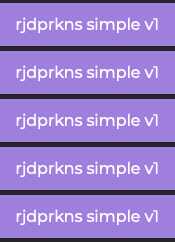
So for now the recommended way is simply to rename the uploaded file, for example:
- simple_v1.zip
- simple_v2.zip
- simple_v3.zip
"sometimes it's scary but it's still just you and me” — Leaving Laurel
Thank you! I'll rename the zip files; upload again. What happens if I add _v1 etc to all the other files in the folder?
-
GIK-Team
- root
- Posts: 1031
- Joined: 22 Mar 2018, 10:00
- Location: Ukraine
- Has thanked: 1162 times
- Been thanked: 279 times
- Contact:
That’s completely fine — on the server all uploaded files get unique internal names anyway, so nothing will overwrite existing files even if you rename them with _v1, _v2, etc.rjdprkns wrote: 23 May 2026, 20:49Thank you! I'll rename the zip files; upload again. What happens if I add _v1 etc to all the other files in the folder?
"sometimes it's scary but it's still just you and me” — Leaving Laurel
Who is online
Users browsing this forum: No registered users and 1 guest