• Administrador
  •  
    Support Ukraine
    If you experience any problems with the forum (it is not visible, there is no way to post messages, or some functionality does not work), please let us know. If you have problems with registration or you did not receive confirmation letter, let us know and we will activate your account manually.
    If you get an "The submitted form was invalid. Try submitting again" error, delete cookies, then try again.
     

Watch Face Upload Error

Topics related to the creation, development, and designing of the watch faces.

Moderadores: asoo, Watchmens

Regras do fórum
When adding a new topic, use the template: Topic title [device name]
For example: How to create watch face [Bip U]
All communication in this branch should only be in English.
Edi
Mensagens: 2
Registrado em: 03 Mai 2021, 17:56
Localização: Sg
Contato:

Watch Face Upload Error

Mensagem por Edi »

Hi,

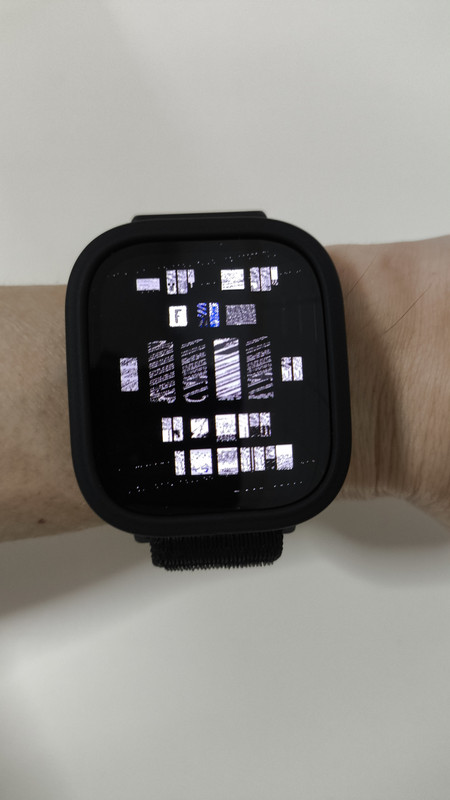
I have converted a watch face from t-rex3 to bip 6 form, but it has issues after uploading it to amazfaces.com. It appears distorted after I test downloading it via scanning mode after uploading it to the site.

The link is at https://amazfitwatchfaces.com/bip/view/44159

I made the watch face from zepp OS site watchface.zepp.com and have installed it to my bip 6 watch via direct install from the zepp OS site with no issues. The wf appears normal and functional.

I also have downloaded and installed various watch faces from amazfaces and other sites to my bip 6 with no issues with all the them except my own uploaded one.

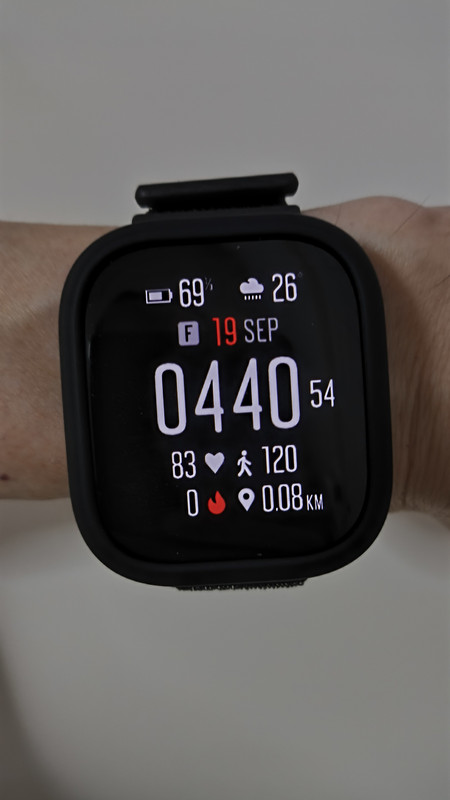
Attached are the pictures of the distorted error and how it should look like after direct install from zepp OS site.

Spoiler
Imagem

Imagem
Avatar do usuário
asoo
Mensagens: 2128
Registrado em: 03 Jan 2019, 01:48
Localização: ͼͽ Thailand ͼͽ
Has thanked: 411 times
Been thanked: 2046 times

Mensagem por asoo »

Edi escreveu: 18 Set 2025, 20:46
Hi,

I have converted a watch face from t-rex3 to bip 6 form, but it has issues after uploading it to amazfaces.com. It appears distorted after I test downloading it via scanning mode after uploading it to the site.

The link is at https://amazfitwatchfaces.com/bip/view/44159

I made the watch face from zepp OS site watchface.zepp.com and have installed it to my bip 6 watch via direct install from the zepp OS site with no issues. The wf appears normal and functional.

I also have downloaded and installed various watch faces from amazfaces and other sites to my bip 6 with no issues with all the them except my own uploaded one.

Attached are the pictures of the distorted error and how it should look like after direct install from zepp OS site.

Spoiler
Imagem

Imagem
The problem is not caused by the web upload.
I've downloaded your file for review.
The problem you're having aftre installed to Bip6 and the image not displaying properly is due to the image file you installed being encoded in "Active" format, which is different from "Bip6".
I'm not sure what the problem is. It could be that you didn't select Bip6 when you imported the file from watchface.zepp.com , or something else.
However, I converted it to Bip6 using the program:
"Watch face editor for Amazfit watch on ZeppOS"
viewtopic.php?p=11643#p11643
Version 15.1 on Ms Store
viewtopic.php?p=21173#p21173
Tested on my Bip6, it works properly.
Suunto7_Fix_For_Bip6.zip
(236.92 KiB) Baixado 63 vezes

PS.
If you're using Windows, I recommend using
"Watch face editor for Amazfit watch on ZeppOS"
viewtopic.php?p=11643#p11643
Version 15.1 on Ms Store
viewtopic.php?p=21173#p21173
to create a watch face. It should be more convenient.
ͼͽ To request please use the interrelated forum in action ͼͽ
Please do not PM to me for requests ported watchface.
Edi
Mensagens: 2
Registrado em: 03 Mai 2021, 17:56
Localização: Sg
Contato:

Mensagem por Edi »

Hi asoo, thanks for your help. I realized the issue was from the exporting of the file from the watchface.zepp.com site, although it stated bip6 option when exporting but it actually gave me the active-390 version, so it shows the screen error when installed in my watch. Also the exported file didn't show the 4 icons but the 4 icons shows up when I installed the wf directly from the zeppOS site to my watch. I will also use the watch editor that you mentioned in the future instead of the zeppOS website. Thank you again!
Responder

Voltar para “Watchfaces discussion”

Quem está online

Usuários navegando neste fórum: Nenhum usuário registrado e 1 visitante