-
- Administrator
-
-
Support Ukraine
If you experience any problems with the forum (it is not visible, there is no way to post messages, or some functionality does not work), please let us know. If you have problems with registration or you did not receive confirmation letter, let us know and we will activate your account manually.
If you get an "The submitted form was invalid. Try submitting again" error, delete cookies, then try again.
Watchface image generator (web app tool)
Moderators: asoo, lvpokka, Internal error, Watchmens
Forum rules
All communication in this branch should only be in English.
To discuss tools that are not in this section, use the “Watchfaces tools (discussion)” forum.
All communication in this branch should only be in English.
To discuss tools that are not in this section, use the “Watchfaces tools (discussion)” forum.
-
gingerbeardman
- Posts: 17
- Joined: 23 Mar 2025, 21:16
- Location: Liverpool, United Kingdom
- Has thanked: 2 times
- Been thanked: 11 times
- Contact:
Watchface image generator (web app tool)
I wanted to create my own watch face mostly consisting of text, but I didn't want to spend time exporting or regenerating lots of images over and over. I want the computer to do the hard work!
So I made an image generator web app. I have a Band 7, so it's mostly focused on that but you can generate images for any size watch face if you know the sizes.
https://www.gingerbeardman.com/amazfit/
Hopefully this little website is useful for other people!
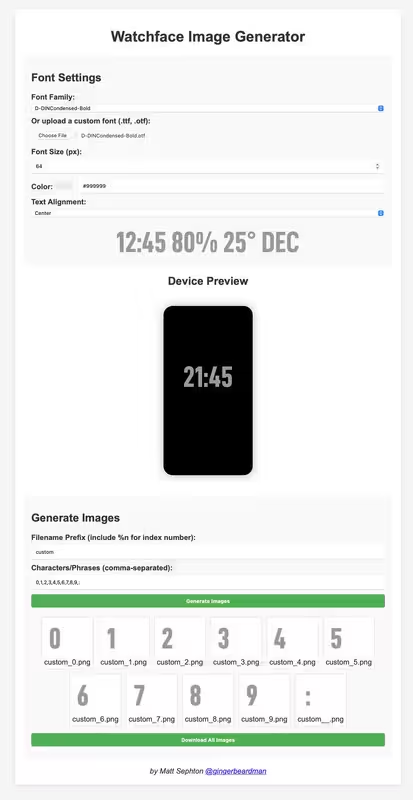
You can create digits and icons by specifying font, size, colour
And which text/digits/symbols to render.
Once you are happy you can decide on filename and export all images at once.
I used it to generate the following sets of images:
- #FFFFFF white @ 128px: 0,1,2,3,4,5,6,7,8,9,:
- #222222 grey @ 64px: 0,1,2,3,4,5,6,7,8,9,JAN,FEB,MAR,APR,MAY,JUN,JUL,AUG,SEP,OCT,NOV,DEC
- #222222 grey @ 32px: %,♥
Sometimes I crop the images afterwards, but mostly I just use them as they come out of the tool.
I use the exported images with SashaCX75 watch face editor for Windows viewtopic.php?t=2743
And finally I tested the face using this method viewtopic.php?t=3873
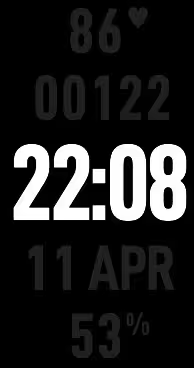
Here's a watch face I made using images from the tool
Here's what the tool looks like
So I made an image generator web app. I have a Band 7, so it's mostly focused on that but you can generate images for any size watch face if you know the sizes.
https://www.gingerbeardman.com/amazfit/
Hopefully this little website is useful for other people!
You can create digits and icons by specifying font, size, colour
And which text/digits/symbols to render.
Once you are happy you can decide on filename and export all images at once.
I used it to generate the following sets of images:
- #FFFFFF white @ 128px: 0,1,2,3,4,5,6,7,8,9,:
- #222222 grey @ 64px: 0,1,2,3,4,5,6,7,8,9,JAN,FEB,MAR,APR,MAY,JUN,JUL,AUG,SEP,OCT,NOV,DEC
- #222222 grey @ 32px: %,♥
Sometimes I crop the images afterwards, but mostly I just use them as they come out of the tool.
I use the exported images with SashaCX75 watch face editor for Windows viewtopic.php?t=2743
And finally I tested the face using this method viewtopic.php?t=3873
Here's a watch face I made using images from the tool
Here's what the tool looks like
-
gingerbeardman
- Posts: 17
- Joined: 23 Mar 2025, 21:16
- Location: Liverpool, United Kingdom
- Has thanked: 2 times
- Been thanked: 11 times
- Contact:
- asoo
- Posts: 2106
- Joined: 03 Jan 2019, 01:48
- Location: ͼͽ Thailand ͼͽ
- Has thanked: 404 times
- Been thanked: 2022 times
Thank you very much.
I think it is another useful tool for me to create font sets.
ͼͽ To request please use the interrelated forum in action ͼͽ
Please do not PM to me for requests ported watchface.
-
gingerbeardman
- Posts: 17
- Joined: 23 Mar 2025, 21:16
- Location: Liverpool, United Kingdom
- Has thanked: 2 times
- Been thanked: 11 times
- Contact:
Let me know what you like or don't like about it, and I will improve the tool.
- asoo
- Posts: 2106
- Joined: 03 Jan 2019, 01:48
- Location: ͼͽ Thailand ͼͽ
- Has thanked: 404 times
- Been thanked: 2022 times
Personally, I like it.gingerbeardman wrote: 12 Apr 2025, 13:13Let me know what you like or don't like about it, and I will improve the tool.
I like the part where you can input your own words, making it very convenient to create a set of characters that you only want to use.
What should be added is in the setting of
- Left - Right margin
- Top - Botton margin
- Setting the background color as transparent or color and font
- And the function that combines the created files into a single zip file for easy downloading and use.
I usually use
https://mmk.pw/en/font_extract/
to create fonts, but this one cannot enter the desired words to create an image.
It will only create images according to the managed script.
ͼͽ To request please use the interrelated forum in action ͼͽ
Please do not PM to me for requests ported watchface.
-
gingerbeardman
- Posts: 17
- Joined: 23 Mar 2025, 21:16
- Location: Liverpool, United Kingdom
- Has thanked: 2 times
- Been thanked: 11 times
- Contact:
I can't promise all of these features but I'll add some of them soon!
Currently margins are present but preset.
Background colour should be easy.
ZIP file I will try, but I think it's complicated—is it an important requirement?
Currently margins are present but preset.
Background colour should be easy.
ZIP file I will try, but I think it's complicated—is it an important requirement?
- asoo
- Posts: 2106
- Joined: 03 Jan 2019, 01:48
- Location: ͼͽ Thailand ͼͽ
- Has thanked: 404 times
- Been thanked: 2022 times
As far as I've tried it, I think what I have is good enough to use.gingerbeardman wrote: 12 Apr 2025, 14:28I can't promise all of these features but I'll add some of them soon!
Currently margins are present but preset.
Background colour should be easy.
ZIP file I will try, but I think it's complicated—is it an important requirement?
But the recommendations I have made, I think if there were more, it would make the page more interesting and more usable.
In the zip section I tried to make chatgpt create an example using your script as a base. It works fine. I have sent you a private message. Hope it will be useful for you.
ͼͽ To request please use the interrelated forum in action ͼͽ
Please do not PM to me for requests ported watchface.
-
gingerbeardman
- Posts: 17
- Joined: 23 Mar 2025, 21:16
- Location: Liverpool, United Kingdom
- Has thanked: 2 times
- Been thanked: 11 times
- Contact:
Got it, thanks that was very useful!
I've added background colour (default: transparent) and zip download.
- TRK88PL
- Posts: 116
- Joined: 17 Jan 2023, 08:23
- Location: Poland
- Has thanked: 67 times
- Been thanked: 40 times
- Contact:
Nice, but You can't generate just , if You want this type of separator, also will be awesome to have option to change preview shape from square to round maybe?
One more think... Maybe You can add option to set font as transparent with background (cutted / not filled) ?
Like this - >
Sometimes this is very useful - especially for wf's with many colors.
Anyway... Good job!
One more think... Maybe You can add option to set font as transparent with background (cutted / not filled) ?
Like this - >

Sometimes this is very useful - especially for wf's with many colors.
Anyway... Good job!
-
gingerbeardman
- Posts: 17
- Joined: 23 Mar 2025, 21:16
- Location: Liverpool, United Kingdom
- Has thanked: 2 times
- Been thanked: 11 times
- Contact:
I'll put these on my to-do list. I can't promise or give an estimate when I might get to them.
- asoo
- Posts: 2106
- Joined: 03 Jan 2019, 01:48
- Location: ͼͽ Thailand ͼͽ
- Has thanked: 404 times
- Been thanked: 2022 times
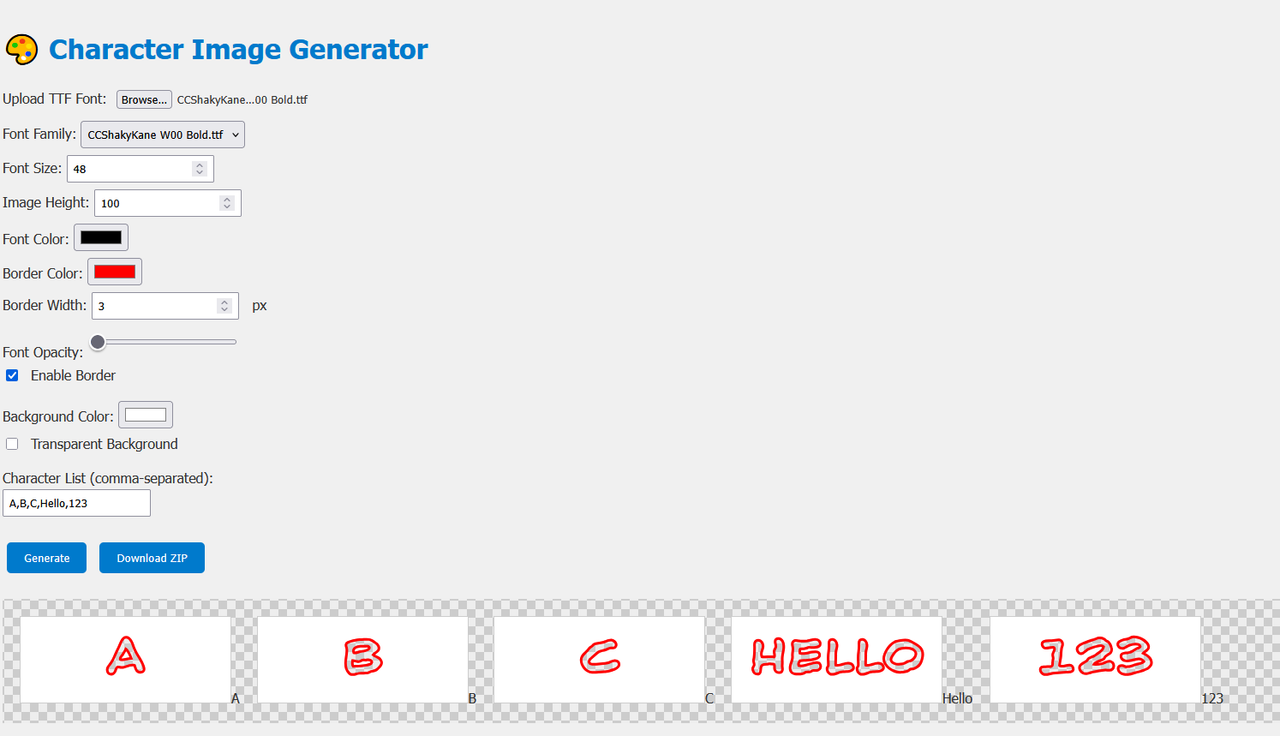
This file is gen. by ChatGPT. It can work to some extent. It can create a text outline and can choose the color and thickness. It can also create "cut out" style by choosing the transparency and color level using Font Opacity.
As far as I have checked the script and tested its usage, it works fine.
index.html can be enabled offline using on Firefox browser (including Chrome, Edge, Brave, etc.)
No need to install anything else because it uses:
Pure HTML + CSS + JavaScript
Use system fonts or fonts selected from TTF files
Use <canvas> which is supported by all modern browsers
Use JSZip loaded via CDN (no installation required)
I hope it will be useful for those who are interested in modifying it further.
As far as I have checked the script and tested its usage, it works fine.
index.html can be enabled offline using on Firefox browser (including Chrome, Edge, Brave, etc.)
I hope it will be useful for those who are interested in modifying it further.
ͼͽ To request please use the interrelated forum in action ͼͽ
Please do not PM to me for requests ported watchface.
- TRK88PL
- Posts: 116
- Joined: 17 Jan 2023, 08:23
- Location: Poland
- Has thanked: 67 times
- Been thanked: 40 times
- Contact:
Interesting... So maybe I can put more colors and few extra things?
Download file and check how this look - should be responsive, darken, and with extra tricks 
Changelog compared to asoo work
//Edit 13:07:
Added v2 version with font shadow and Moore...
Demo of this version it's no longer available. New version it's available on amazfitwatchfaces.com/gen/
Changelog compared to asoo work
Spoiler
Visual & Layout Enhancements
1. Dark Theme: Changed background and foreground colors to dark mode (dark gray backgrounds, light text).
2. Modern Buttons: Updated button styling with gradient backgrounds, transitions, hover effects, rounded corners.
3. Responsive Design: Layout made fully responsive using Flexbox and media queries to adapt to different screen sizes.
4. Google Font - Lato: Replaced the default font with the Lato font from Google Web Fonts.
5. Input Styling: Enhanced appearance of <input>, <select>, and <label> elements for better readability and usability.
---
Functional Changes
6. Animated UI: Added smooth transitions and animations to buttons and field highlights for a modern user experience.
7. ZIP Filename Generator: Each ZIP file downloaded now gets a unique name like characters0001.zip, characters0002.zip, etc., to avoid overwriting.
8. Improved Font Border (Stroke Width) Display:
Converted stroke width input from number to range input with dynamic percentage label.
9. Color Picker Upgrades:
Replaced basic color pickers with enhanced input using better styling for usability (can later be swapped with external color picker libraries if needed).
10. Added hex fields.
---
Accessibility & Usability
11. Improved Labels: Labels have better spacing and visibility, ensuring users can easily identify input fields.
12. Preview Area Enhancements: The preview section has a darker background with padding and cleaner layout for generated images.
1. Dark Theme: Changed background and foreground colors to dark mode (dark gray backgrounds, light text).
2. Modern Buttons: Updated button styling with gradient backgrounds, transitions, hover effects, rounded corners.
3. Responsive Design: Layout made fully responsive using Flexbox and media queries to adapt to different screen sizes.
4. Google Font - Lato: Replaced the default font with the Lato font from Google Web Fonts.
5. Input Styling: Enhanced appearance of <input>, <select>, and <label> elements for better readability and usability.
---
Functional Changes
6. Animated UI: Added smooth transitions and animations to buttons and field highlights for a modern user experience.
7. ZIP Filename Generator: Each ZIP file downloaded now gets a unique name like characters0001.zip, characters0002.zip, etc., to avoid overwriting.
8. Improved Font Border (Stroke Width) Display:
Converted stroke width input from number to range input with dynamic percentage label.
9. Color Picker Upgrades:
Replaced basic color pickers with enhanced input using better styling for usability (can later be swapped with external color picker libraries if needed).
10. Added hex fields.
---
Accessibility & Usability
11. Improved Labels: Labels have better spacing and visibility, ensuring users can easily identify input fields.
12. Preview Area Enhancements: The preview section has a darker background with padding and cleaner layout for generated images.
Added v2 version with font shadow and Moore...
Demo of this version it's no longer available. New version it's available on amazfitwatchfaces.com/gen/
- Attachments
-
image generator for amazfit characters modded with fix for font opacity.zip- Latest version like on my demo
- (3.14 KiB) Downloaded 118 times
-
image characters generator modded v2.zip- Versiin with some improvements...
- (3.09 KiB) Downloaded 106 times
-
character_image_generator_modded_with_values.zip- First version
- (2.89 KiB) Downloaded 89 times
Last edited by TRK88PL on 20 May 2025, 18:12, edited 1 time in total.
-
gingerbeardman
- Posts: 17
- Joined: 23 Mar 2025, 21:16
- Location: Liverpool, United Kingdom
- Has thanked: 2 times
- Been thanked: 11 times
- Contact:
Should I put my version on GitHub so we can all work on the same code?
- TRK88PL
- Posts: 116
- Joined: 17 Jan 2023, 08:23
- Location: Poland
- Has thanked: 67 times
- Been thanked: 40 times
- Contact:
This decision is Yours but I don't think there is a lot to do with this generator and need many new options to implement in...
For me this my current, final version. Demo on the same page as before
PS. If You still see old demo version - clear Your browser cache ( shortcuts: Ctrl +F5 / Ctrl + R) or use other browser.
New version available below in newer post!
For me this my current, final version. Demo on the same page as before
PS. If You still see old demo version - clear Your browser cache ( shortcuts: Ctrl +F5 / Ctrl + R) or use other browser.
New version available below in newer post!
- Attachments
-
current version by me.zip- (3.35 KiB) Downloaded 109 times
Last edited by TRK88PL on 29 Apr 2025, 10:33, edited 2 times in total.
- TRK88PL
- Posts: 116
- Joined: 17 Jan 2023, 08:23
- Location: Poland
- Has thanked: 67 times
- Been thanked: 40 times
- Contact:
No problem I even have a newer version @rush2112
take a look attachments section below*. Demo on https://trk88pl.7m.pl/gen/old.html
*Language switcher not included - if You really need this let me know.
- Attachments
-
new version 260425 by TRK88PL.zip- New version from 26.04.2025 - EN
- (4.34 KiB) Downloaded 133 times
Last edited by TRK88PL on 11 May 2025, 14:33, edited 1 time in total.
- TRK88PL
- Posts: 116
- Joined: 17 Jan 2023, 08:23
- Location: Poland
- Has thanked: 67 times
- Been thanked: 40 times
- Contact:
Hello! The latest version of the generator is now available on my website.
Here’s what’s new: a completely redesigned and more polished interface, support for text rendering with or without gradients, more precise control over angles (for shadows and gradients), and several other improvements.
The generator is available at
https://amazfitwatchfaces.com/gen/

Here’s what’s new: a completely redesigned and more polished interface, support for text rendering with or without gradients, more precise control over angles (for shadows and gradients), and several other improvements.
The generator is available at
https://amazfitwatchfaces.com/gen/
Preview

Last edited by TRK88PL on 11 May 2025, 18:52, edited 1 time in total.
- GIK-Team
- root
- Posts: 1014
- Joined: 22 Mar 2018, 10:00
- Location: Ukraine
- Has thanked: 1108 times
- Been thanked: 267 times
- Contact:
Thanks for sharing the updated version — it looks great!TRK88PL wrote: 11 May 2025, 14:21PS. Sorry for ads on website, unfortunately this is free hosting with ads... Maybe someday I will change this.
Right now if You don't like this ads I highly recommend you use Ublock or other ads blocker.
If you’d like, we can host the generator directly on our website (without ads) to make it more accessible to users. Just let us know — we’d be happy to help you with that.
"sometimes it's scary but it's still just you and me” — Leaving Laurel
- TRK88PL
- Posts: 116
- Joined: 17 Jan 2023, 08:23
- Location: Poland
- Has thanked: 67 times
- Been thanked: 40 times
- Contact:
Wow, thank you so much, I really didn’t expect thatGIK-Team wrote: 11 May 2025, 16:58Thanks for sharing the updated version — it looks great!TRK88PL wrote: 11 May 2025, 14:21PS. Sorry for ads on website, unfortunately this is free hosting with ads... Maybe someday I will change this.
Right now if You don't like this ads I highly recommend you use Ublock or other ads blocker.
If you’d like, we can host the generator directly on our website (without ads) to make it more accessible to users. Just let us know — we’d be happy to help you with that.
- GIK-Team
- root
- Posts: 1014
- Joined: 22 Mar 2018, 10:00
- Location: Ukraine
- Has thanked: 1108 times
- Been thanked: 267 times
- Contact:
No problem at all — we’ll be happy to hear from you! Looking forward to your messageTRK88PL wrote: 11 May 2025, 17:06Wow, thank you so much, I really didn’t expect thatI’ll message you privately if that’s okay — I’ll also send you a non-public version, which is even more advanced. In short, I’m not sure if anyone will even need Photoshop or any other tool for creating graphics and basic watch faces anymore
I’ll explain everything in a private message
![]()
"sometimes it's scary but it's still just you and me” — Leaving Laurel
- TRK88PL
- Posts: 116
- Joined: 17 Jan 2023, 08:23
- Location: Poland
- Has thanked: 67 times
- Been thanked: 40 times
- Contact:
I'm very pleased to share that my generator has now found a home on the AmazfitWatchFaces servers! From now on, link to page is available in the Tools section on the website, as well as directly at: https://amazfitwatchfaces.com/gen/
Enjoy using it — and once again, thank you for providing the space @GIK-Team!
// Edit 13.05.25
Added background generator for rounded watch faces!

Enjoy using it — and once again, thank you for providing the space @GIK-Team!
// Edit 13.05.25
Added background generator for rounded watch faces!

-
taw_bip
- WF maker
- Posts: 130
- Joined: 12 Apr 2018, 16:29
- Has thanked: 123 times
- Been thanked: 19 times
- Contact:
Very cool @TRK88PL I haven't made a watchface for a while but I remember thinking it would be excellent to get a generator to make outlines and here it is! These people don't know the struggle we had making all our elements by hand. hahaha
- TRK88PL
- Posts: 116
- Joined: 17 Jan 2023, 08:23
- Location: Poland
- Has thanked: 67 times
- Been thanked: 40 times
- Contact:
Yeah @taw_bip, now they can feel half of "our pain"
, unfortunately for now they still need to create own watch face with editor from @SashaCX75 to implement all graphics, move them on correct place etc but still... This generator make life easier 
Who is online
Users browsing this forum: awesome1123 and 1 guest