-
- Administrator
-
-
Support Ukraine
If you experience any problems with the forum (it is not visible, there is no way to post messages, or some functionality does not work), please let us know. If you have problems with registration or you did not receive confirmation letter, let us know and we will activate your account manually.
If you get an "The submitted form was invalid. Try submitting again" error, delete cookies, then try again.
Mi Band 4 faces Not appearing in Mi fit's local displays.
Moderators: Internal error, Watchmens
-
Stupidiputs
- WF maker
- Posts: 6
- Joined: 04 Jul 2019, 09:58
- Has thanked: 1 time
- Contact:
Mi Band 4 faces Not appearing in Mi fit's local displays.
Yesterday I downloaded nearly 20 mi band faces and only 4 worked for me. The other ones doesnt appear in local faces in mi fit app. Im android user. Anyone has any info about it, maybe is it incompability with global version? Noone of the animated faces works for example.

-
Stupidiputs
- WF maker
- Posts: 6
- Joined: 04 Jul 2019, 09:58
- Has thanked: 1 time
- Contact:
Ive copied all faces and png this way: (i cant post a video link faak xdd, search in youtube "cara install custom watch face mi band 4" its in hindi I thinl but its the only video Ive found)
In summary, I created new folder for each band face in the "watch_skin_local" and copied in there the face and png/gif file.
-
osmat

- Admin
- Posts: 278
- Joined: 22 Mar 2018, 10:09
- Location: Ukraine
- Has thanked: 35 times
- Been thanked: 73 times
- Contact:
Animated can not be installed from the local folder. Try to do a substitutionStupidiputs wrote: 04 Jul 2019, 10:27Ive copied all faces and png this way: (i cant post a video link faak xdd, search in youtube "cara install custom watch face mi band 4" its in hindi I thinl but its the only video Ive found)
In summary, I created new folder for each band face in the "watch_skin_local" and copied in there the face and png/gif file.
-
Stupidiputs
- WF maker
- Posts: 6
- Joined: 04 Jul 2019, 09:58
- Has thanked: 1 time
- Contact:
Finally It works by making a substitution, but its a headache xdd
-
Kpochmx
Thank you, we are waiting for Quality watchfaces with really good animations.
=)

viewtopic.php?f=14&t=709
If you are unable to use Hex program, you can try this program to patch bytes 17 to 24 in one click
Small program for patch file.bin on bytes 17 to 24 edit FF FF FF FF FF FF FF FF to 24 00 d0 03 00 00 3d 78 ( for PC )
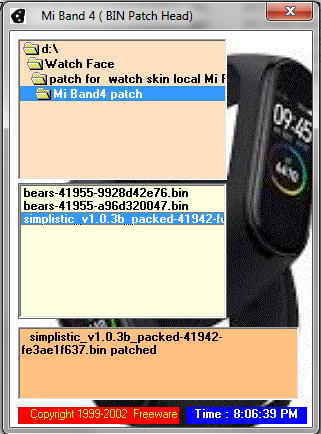
If you are unable to use Hex program, you can try this program to patch bytes 17 to 24 in one click
Small program for patch file.bin on bytes 17 to 24 edit FF FF FF FF FF FF FF FF to 24 00 d0 03 00 00 3d 78 ( for PC )
 Mi Band4 patch.zip
- (738.96 KiB) Downloaded 202 times
Who is online
Users browsing this forum: No registered users and 3 guests