• Administrator
  •  
    Support Ukraine
    If you experience any problems with the forum (it is not visible, there is no way to post messages, or some functionality does not work), please let us know. If you have problems with registration or you did not receive confirmation letter, let us know and we will activate your account manually.
    If you get an "The submitted form was invalid. Try submitting again" error, delete cookies, then try again.
     

Watchfaces Editor does not recognize some watchface

This forum is designed to discuss existing tools for creating watch faces.

Moderators: asoo, lvpokka, Internal error, Watchmens

Forum rules
All communication in this branch should only be in English.
Post Reply
Omaradsl
Posts: 41
Joined: 02 Oct 2023, 21:07
Location: Italia
Has thanked: 16 times
Been thanked: 8 times
Contact:

Watchfaces Editor does not recognize some watchface

Post by Omaradsl »

Good Morning to all
I have a problem with Sasha editor.
There are some watchface, it happens very rarely, that when unpacked with the editor they are not expanded in all their functions, but only show the background function.
It happens to me with many gtr 3 pro, or gt3 watchface.
I'll explain better with images:

This is when editor work fine:
Spoiler
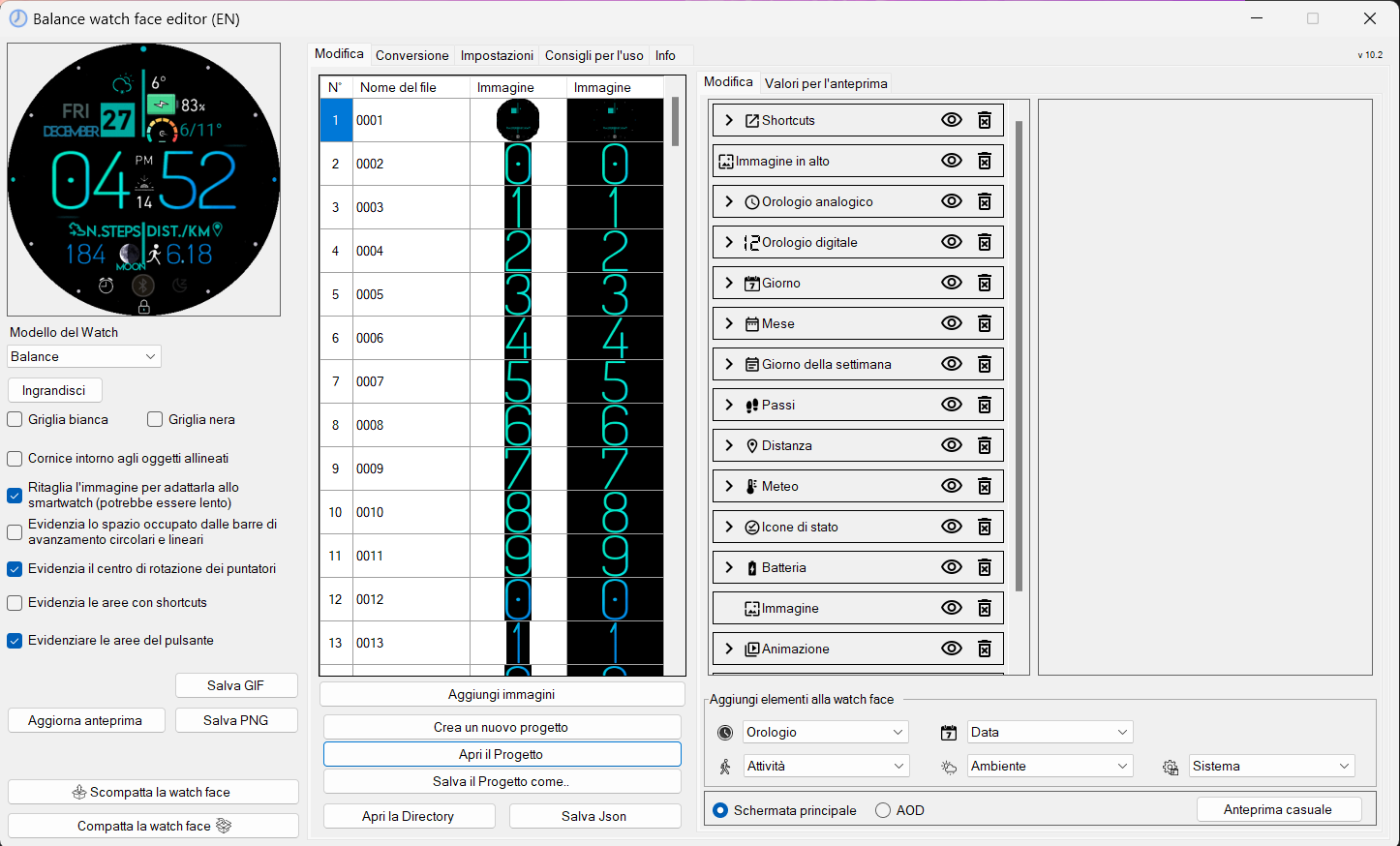
Image
as you can see all the images are unpacked and the functions can be modified

This image instead demonstrates what happens to me with some watchfaces:
Spoiler
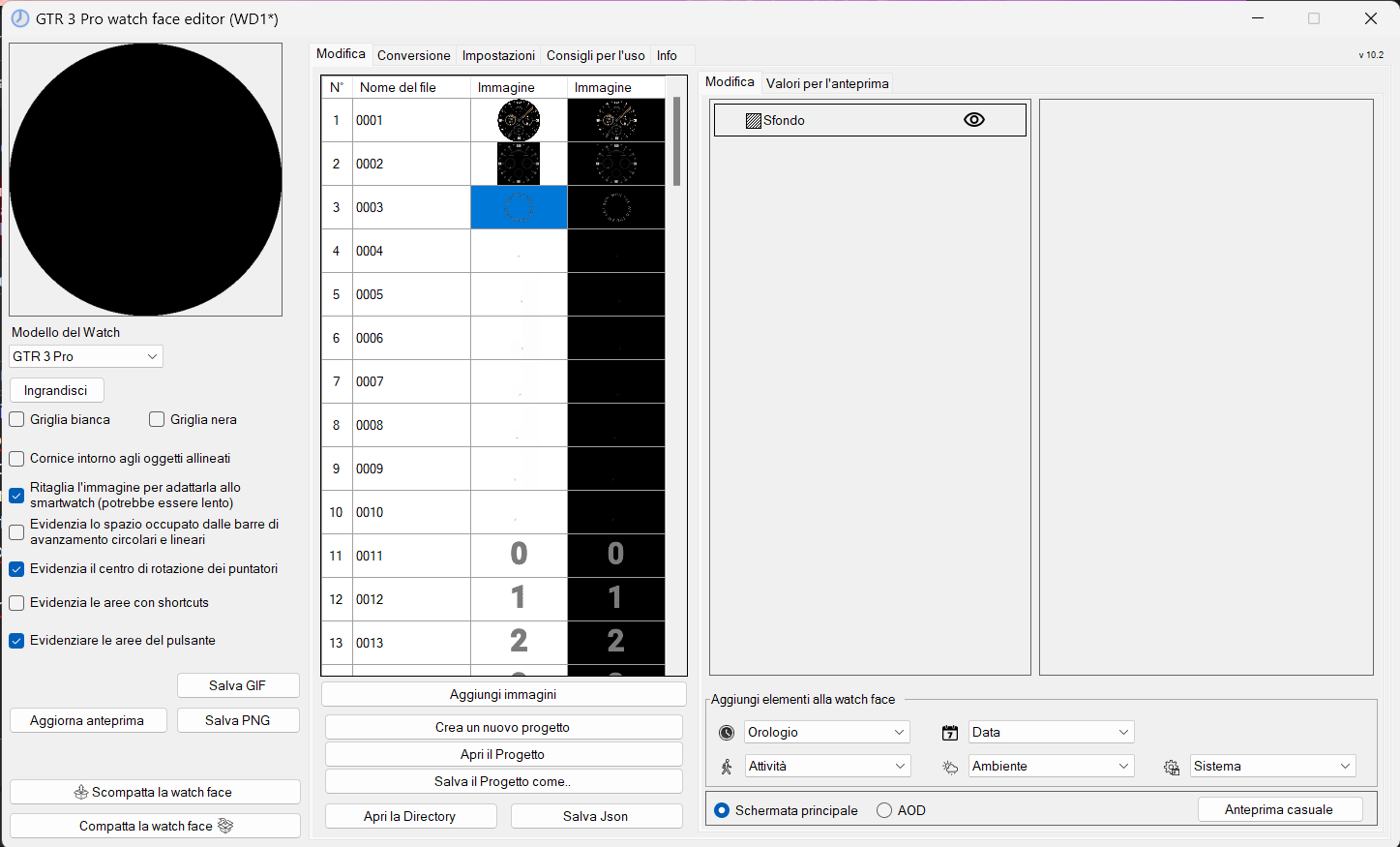
Image
Only background is extracted and not all components of the watchface. Where am I wrong?
User avatar
asoo
Posts: 2104
Joined: 03 Jan 2019, 01:48
Location: ͼͽ Thailand ͼͽ
Has thanked: 404 times
Been thanked: 2018 times

Post by asoo »

If you want the correct answer
You should also attach the file you are referring to.
But if I had to guess There could be many reasons.
1. The dial is encrypted in the index file, probably because the author doesn't want his work to be edited. Therefore, normal unpacking will not allow access to the script, so the editor cannot unpack it.

2. The watch face uses a custom script to create and the custom script does not meet the editor standards, or Or the watch face was created with another editor and the script creation does not follow the format of Sasha's editor. so unpacking may not be possible or only partially possible.

3. The watch face was created with a newer version of the editor more than you are using .
In this case, unpacking may work, but may not handle new elements added in the new editor version.

If you want to edit The aforementioned dial You can do it like this:
1. In the case where the script is coded You must try contacting the owner of the work. for him to do it for you

2. In the case of custom script, you can view and edit the script by looking at the index.js file.

3. In the case of a newer version, you just update your editor.

4. If you really want to edit that watchface, you can use the image after unpack and bring it to make new by yourself
ͼͽ To request please use the interrelated forum in action ͼͽ
Please do not PM to me for requests ported watchface.
Omaradsl
Posts: 41
Joined: 02 Oct 2023, 21:07
Location: Italia
Has thanked: 16 times
Been thanked: 8 times
Contact:

Post by Omaradsl »

Thanks Asoo....
In my opion the option correct is number one :)

This is wathface:
https://amazfitwatchfaces.com/gtr/view/38176

I see that all watchfaces of this autor is locked.
Maxi04
Posts: 2
Joined: 04 May 2024, 13:08
Location: Rendsburg
Contact:

Post by Maxi04 »

is the watch face editor fitted the new watch t rex 3?
User avatar
asoo
Posts: 2104
Joined: 03 Jan 2019, 01:48
Location: ͼͽ Thailand ͼͽ
Has thanked: 404 times
Been thanked: 2018 times

Post by asoo »

Maxi04 wrote: 18 Sep 2024, 12:07
is the watch face editor fitted the new watch t rex 3?
You can use the official zepp editor to create a watch face for T-rex 3 ( https://watchface.zepp.com ). You must register as required by zepp.
Information about using Zepp's Editor to create a watch face for
T-Rex3
viewtopic.php?p=19037#p19037

Or you can try using Sasha's editor to create a watch face for T-Rex3
You select Device as Balance (which has the same screen size and OS Version as T-Rex3)
Watch face editor for Amazfit watch on ZeppOS
viewtopic.php?p=11643#p11643

However, some parts of the image management may have slight differences But it should not be a problem to use. (According to sasha)
SashaCX75 wrote: 15 Sep 2024, 16:29
https://watchface.zepp.com (WatchfaceMaker) creates two different packages for T-Rex 3 and for Balance. The images in them are also different. But the way of encoding images in them is similar. Perhaps T-Rex 3 does not support ARGB images, so some of the images for it were packaged differently. Only watch owners will be able to fully check the compatibility of watch faces. But I think there should be no problems.

This is "Watch face editor for Amazfit watch on ZeppOS" Versin 11.2 that I added data of T-Rex 3 to
model_config by myself (not official update from Sasha) can select device T-REX 3 in the editor
T-Rex 3 users who are interested can try to use it temporarily before the official update from Sasha
Download
ͼͽ To request please use the interrelated forum in action ͼͽ
Please do not PM to me for requests ported watchface.
User avatar
SashaCX75
Posts: 812
Joined: 26 Oct 2019, 15:18
Location: Ukraine
Has thanked: 13 times
Been thanked: 1006 times
Contact:

Post by SashaCX75 »

asoo wrote: 19 Sep 2024, 01:58
This is "Watch face editor for Amazfit watch on ZeppOS" Versin 11.2 that I added data of T-Rex 3 to
model_config by myself (not official update from Sasha) can select device T-REX 3 in the editor
T-Rex 3 users who are interested can try to use it temporarily before the official update from Sasha
I'm not quite sure yet that my editor works properly with T-REX 3. There are unconfirmed reports that sometimes shortcuts are not displayed correctly.
Post Reply

Return to “Watchfaces tools (discussion)”

Who is online

Users browsing this forum: No registered users and 0 guests
