I love my new Bip, and I got one for the wife, too.
We both want bigger fonts, without having to hack this and alter that.
Any help?
If you experience any problems with the forum (it is not visible, there is no way to post messages, or some functionality does not work), please let us know.
If you have problems with registration or you did not receive confirmation letter, let us know and we will activate your account manually.
If you get an "The submitted form was invalid. Try submitting again" error, delete cookies, then try again.
If you have problems with registration or you did not receive confirmation letter, let us know and we will activate your account manually.
If you get an "The submitted form was invalid. Try submitting again" error, delete cookies, then try again.
New to Bip - HOw do I change the font size
Moderatori: Internal error, Watchmens
-
N1njaDerp
You should maybe change the size of the image for each text file. It takes a lot of work, but making a watchface is a lot of work in general.
Cheers,
N1njaDerp
Cheers,
N1njaDerp
I think revjim2000 asked for general font size for better readability of eg. notifications.
It would be absolutely great if there would be a way to change this.
I'd also love to have a slightly bigger font in menues and especially notifications.
Sadly this hasn't anything to do with the watchface and should be directed to huami/amazfit directly.
It would be absolutely great if there would be a way to change this.
I'd also love to have a slightly bigger font in menues and especially notifications.
Sadly this hasn't anything to do with the watchface and should be directed to huami/amazfit directly.
HEUREKA! I just googled it and the very first hit was the solution:
https://forum.xda-developers.com/showpo ... stcount=13
- install Gadgetbridge
- download and unpack the "Bip fonts.zip" on your phone.
- I then use ES file browser to "open with" the FONT_BOLD_v4e.ft file with Gadgetbridge's "FW/App Installer"
- You read and ignore the warning (this is NOT messing with the firmware itself) and hit install and wait a few secconds.
- Voilá ... a much more readable font. (I have 1.5 diopter aged eyes
https://forum.xda-developers.com/showpo ... stcount=13
- install Gadgetbridge
- download and unpack the "Bip fonts.zip" on your phone.
- I then use ES file browser to "open with" the FONT_BOLD_v4e.ft file with Gadgetbridge's "FW/App Installer"
- You read and ignore the warning (this is NOT messing with the firmware itself) and hit install and wait a few secconds.
- Voilá ... a much more readable font. (I have 1.5 diopter aged eyes
-
TXK

- Messaggi: 302
- Iscritto il: 10 apr 2018, 05:15
- Località: china
- Has thanked: 150 times
- Been thanked: 99 times
- Contatta:
Can you paste a photo of the font size of the notification interface to see the effect? Thank you!funkateer ha scritto: 27 dic 2018, 12:58HEUREKA! I just googled it and the very first hit was the solution:
https://forum.xda-developers.com/showpo ... stcount=13
- install Gadgetbridge
- download and unpack the "Bip fonts.zip" on your phone.
- I then use ES file browser to "open with" the FONT_BOLD_v4e.ft file with Gadgetbridge's "FW/App Installer"
- You read and ignore the warning (this is NOT messing with the firmware itself) and hit install and wait a few secconds.
- Voilá ... a much more readable font. (I have 1.5 diopter aged eyes
Here you go:
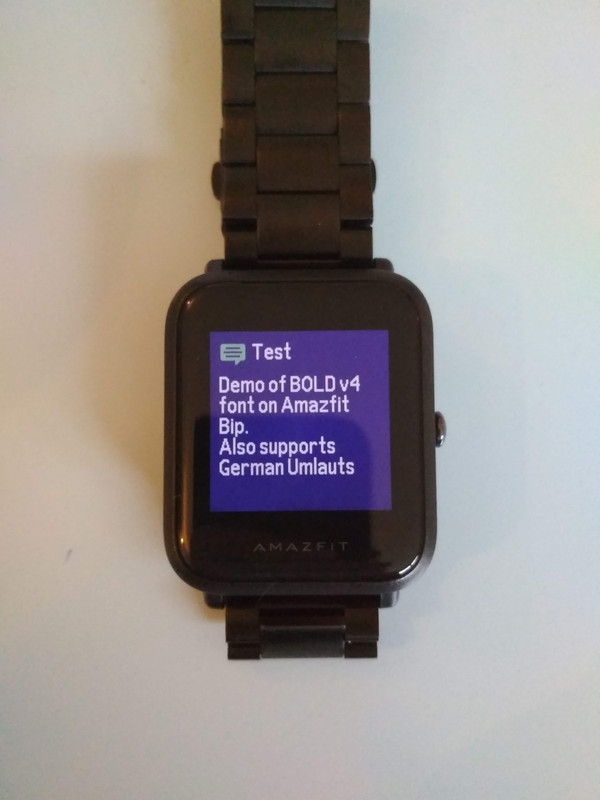
Some special characters are not made bold but at least show up:
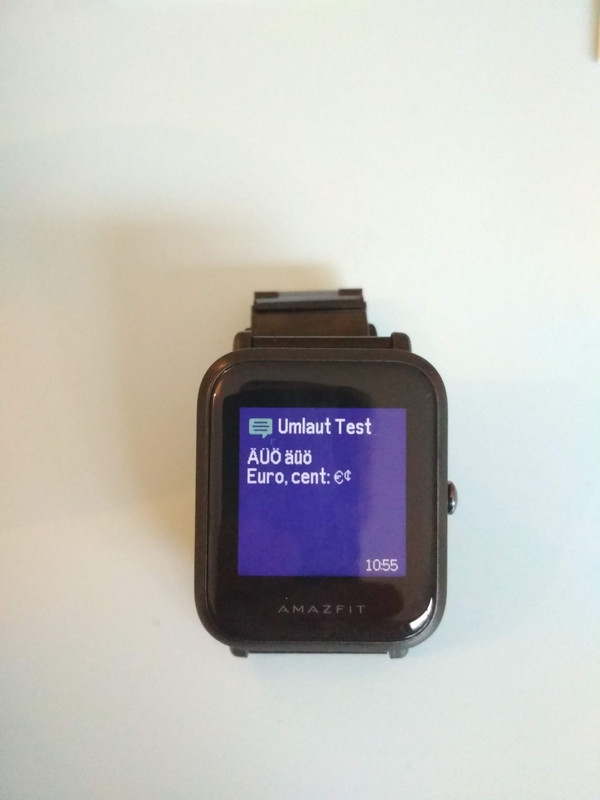
Bold v4 is a bit wider too, so some menues might be a mm too long.
On the Russian Forum there also is a BOLD v5, which has the same width as the original (but lower case Umlauts jump up).
However I find the v4 to be the one with better overall legibility.
Some special characters are not made bold but at least show up:
Bold v4 is a bit wider too, so some menues might be a mm too long.
On the Russian Forum there also is a BOLD v5, which has the same width as the original (but lower case Umlauts jump up).
However I find the v4 to be the one with better overall legibility.
Newest Version of this font is v4o which can be found here:
https://myamazfit.ru/threads/bip-cor-sh ... sija-4.75/
... but you'd need to sign up on the Forum to download it.
I decided to put both the newest v4o and v5o bold fonts in a shared folder of my Google Drive
https://myamazfit.ru/threads/bip-cor-sh ... sija-4.75/
... but you'd need to sign up on the Forum to download it.
I decided to put both the newest v4o and v5o bold fonts in a shared folder of my Google Drive
-
TXK
- Messaggi: 302
- Iscritto il: 10 apr 2018, 05:15
- Località: china
- Has thanked: 150 times
- Been thanked: 99 times
- Contatta:
Thanks you!funkateer ha scritto: 29 dic 2018, 10:03Here you go:
Some special characters are not made bold but at least show up:
Bold v4 is a bit wider too, so some menues might be a mm too long.
On the Russian Forum there also is a BOLD v5, which has the same width as the original (but lower case Umlauts jump up).
However I find the v4 to be the one with better overall legibility.
-
Rush2112
Thank you Friend I did install FONT BOLD V4 with no problem question can you have FONT_BOLD_v5e.ft and can you tell me how to have real emoji faces ????
-
centrinum
Hello,
I hope somebody here can help me.
After the last update of Mi Fit, the font seems even smaller and harder to read.
In my search for a way to enlarge the font, I came across this entry here.
Unfortunately, the procedure (see link obove to the russian forum) does not work for me.
After the ft-file was uploaded with the GB APP/FW-installer, the clock stops responding. The display shows "Connect APP to update".
I delete the connection in GB, terminate GB and start Mi Fit.
Mi Fit connects to the clock and begins with an update of the fonts. After that I have the small font again.
GB v. 1:48
Mi Fit v. 4.0.0
FW v. 1.1.5.36
Greetings from Berlin
I hope somebody here can help me.
After the last update of Mi Fit, the font seems even smaller and harder to read.
In my search for a way to enlarge the font, I came across this entry here.
Unfortunately, the procedure (see link obove to the russian forum) does not work for me.
After the ft-file was uploaded with the GB APP/FW-installer, the clock stops responding. The display shows "Connect APP to update".
I delete the connection in GB, terminate GB and start Mi Fit.
Mi Fit connects to the clock and begins with an update of the fonts. After that I have the small font again.
GB v. 1:48
Mi Fit v. 4.0.0
FW v. 1.1.5.36
Greetings from Berlin
I have the same problem.
As bigger fonts are more important for me than german languade, I tried to go back to 3.6 APK, made a factory reset of the Bip, but no chance.
No connection possible unless using Mi Fit v. 4.0 and after connecting it starts updating and the fonts are small again
Is there any chance to get bigger fonts?
As bigger fonts are more important for me than german languade, I tried to go back to 3.6 APK, made a factory reset of the Bip, but no chance.
No connection possible unless using Mi Fit v. 4.0 and after connecting it starts updating and the fonts are small again
Is there any chance to get bigger fonts?
-
osmat

- Admin
- Messaggi: 278
- Iscritto il: 22 mar 2018, 10:09
- Località: Ukraine
- Has thanked: 35 times
- Been thanked: 73 times
- Contatta:
All the necessary information is on this forum in the posts above.
- install Gadgetbridge
- download and unpack the "Bip fonts.zip" on your phone.
- I then use ES file browser to "open with" the FONT_BOLD_v4e.ft file with Gadgetbridge's "FW/App Installer"
- You read and ignore the warning (this is NOT messing with the firmware itself) and hit install and wait a few secconds.
- Voilá ... a much more readable font. (I have 1.5 diopter aged eyes
I decided to put both the newest v4o and v5o bold fonts in a shared folder of my Google Drive
- install Gadgetbridge
- download and unpack the "Bip fonts.zip" on your phone.
- I then use ES file browser to "open with" the FONT_BOLD_v4e.ft file with Gadgetbridge's "FW/App Installer"
- You read and ignore the warning (this is NOT messing with the firmware itself) and hit install and wait a few secconds.
- Voilá ... a much more readable font. (I have 1.5 diopter aged eyes
I decided to put both the newest v4o and v5o bold fonts in a shared folder of my Google Drive
For me it's the same, with the new firmware 1.1.5.36 there's no *.ft file that work. Like Centrinum after installing every file I have display shows "Connect app to update" and the only way is to re-install the built-in font v.73......but are to small for me.
Any file that are compatible?
Any file that are compatible?
-
fabris
Hello, I had to go back to firmware 1.1.5.27Crileo ha scritto: 31 mag 2019, 07:31For me it's the same, with the new firmware 1.1.5.36 there's no *.ft file that work. Like Centrinum after installing every file I have display shows "Connect app to update" and the only way is to re-install the built-in font v.73......but are to small for me.
Any file that are compatible?
The new font was terrible (not even all the emojis) and I couldn't install any other font
Once I downgraded I could change fonts again
OK, I've done it! Now all is OK for me with firmware 1.1.5.27.
-
osmat
- Admin
- Messaggi: 278
- Iscritto il: 22 mar 2018, 10:09
- Località: Ukraine
- Has thanked: 35 times
- Been thanked: 73 times
- Contatta:
-
Dacoco
Hey,
i first tried the fonts from the first page with firmware .36 and encountered the same as you guys (connect to phone message). I should have read till the end
After that i installed the one from osmat (thx!) and it works great. Mi Fit doesn't overwrite it (which is great) BUT German "umlauts" aren't shown properly (a instead of ä, o instead of ö, b instead of ß). At least when showing messages. The DND message ("nicht stören") works.
Do you have a font with "umlauts"?
i first tried the fonts from the first page with firmware .36 and encountered the same as you guys (connect to phone message). I should have read till the end
After that i installed the one from osmat (thx!) and it works great. Mi Fit doesn't overwrite it (which is great) BUT German "umlauts" aren't shown properly (a instead of ä, o instead of ö, b instead of ß). At least when showing messages. The DND message ("nicht stören") works.
Do you have a font with "umlauts"?
-
Sami121
I just got the new Bip Light model and want to update the font. I unpaired the watch, paired with "GadgetBridge Unofficial" that I downloaded from Playstore. When I tried to open the bold font with it, I got the error message "Element cannot be installed". Since Bip Light is very similar to Bip except for the lack of some sensors, shouldn't this work? Could I be missing some step?
Update: Never mind... I did miss the "extract the zip" part
Update: Never mind... I did miss the "extract the zip" part
OK, now I am seeing the issue reported by centrinum. Right after I updated, I lost connection with GB and when I connected back to MiFit, it took sometime "Updating fonts" and effectively there was no change
For me with the firmware 1.1.5.56 doesn't work....fabris ha scritto: 02 giu 2019, 10:14Hello, I had to go back to firmware 1.1.5.27Crileo ha scritto: 31 mag 2019, 07:31For me it's the same, with the new firmware 1.1.5.36 there's no *.ft file that work. Like Centrinum after installing every file I have display shows "Connect app to update" and the only way is to re-install the built-in font v.73......but are to small for me.
Any file that are compatible?
The new font was terrible (not even all the emojis) and I couldn't install any other font
Once I downgraded I could change fonts again
-
osmat
- Admin
- Messaggi: 278
- Iscritto il: 22 mar 2018, 10:09
- Località: Ukraine
- Has thanked: 35 times
- Been thanked: 73 times
- Contatta:
Crileo ha scritto: 30 ott 2019, 05:58osmat ha scritto: 05 giu 2019, 10:31Try this should work on the latest firmware.
BOLD_v6.9_9.ft.zipFor me with the firmware 1.1.5.56 doesn't work....fabris ha scritto: 02 giu 2019, 10:14Hello, I had to go back to firmware 1.1.5.27Crileo ha scritto: 31 mag 2019, 07:31For me it's the same, with the new firmware 1.1.5.36 there's no *.ft file that work. Like Centrinum after installing every file I have display shows "Connect app to update" and the only way is to re-install the built-in font v.73......but are to small for me.
Any file that are compatible?
The new font was terrible (not even all the emojis) and I couldn't install any other font
Once I downgraded I could change fonts again
Try this one
 BOLD_v5s.zip
- (28.37 KiB) Scaricato 679 volte
Will this work with the latest firmware on Bip Lite?
-
Cdhnbch
Can someone post a youtube video on how to increase the font size. I keep trying to follow the written instructions and it not working. Maybe the instructions are out of date?
-
Cdhnbch
Any chance someone could post a youtube video on the most current way to increase the font size. I'm just not figuring it out.
Chi c’è in linea
Visitano il forum: Nessuno e 1 ospite