• Administrator
  •  
    Support Ukraine
    If you experience any problems with the forum (it is not visible, there is no way to post messages, or some functionality does not work), please let us know. If you have problems with registration or you did not receive confirmation letter, let us know and we will activate your account manually.
    If you get an "The submitted form was invalid. Try submitting again" error, delete cookies, then try again.
     

AmazFit WatchFace editor 2 for Windows

This forum is designed to discuss and develop tools creating watch faces.

Moderators: asoo, lvpokka, Internal error, Watchmens

Forum rules
All communication in this branch should only be in English.
To discuss tools that are not in this section, use the “Watchfaces tools (discussion)” forum.
User avatar
SashaCX75
Posts: 820
Joined: 26 Oct 2019, 15:18
Location: Ukraine
Has thanked: 13 times
Been thanked: 1029 times
Contact:

AmazFit WatchFace editor 2 for Windows

Post by SashaCX75 »

Graphics editor for working with dials Amazfit
The editor supports watch faces from GTR 2(e), GTS 2 (GTS 2e / Zepp E Square), T-Rex Pro, Zepp E Circle.
Screenshot
Screenshot
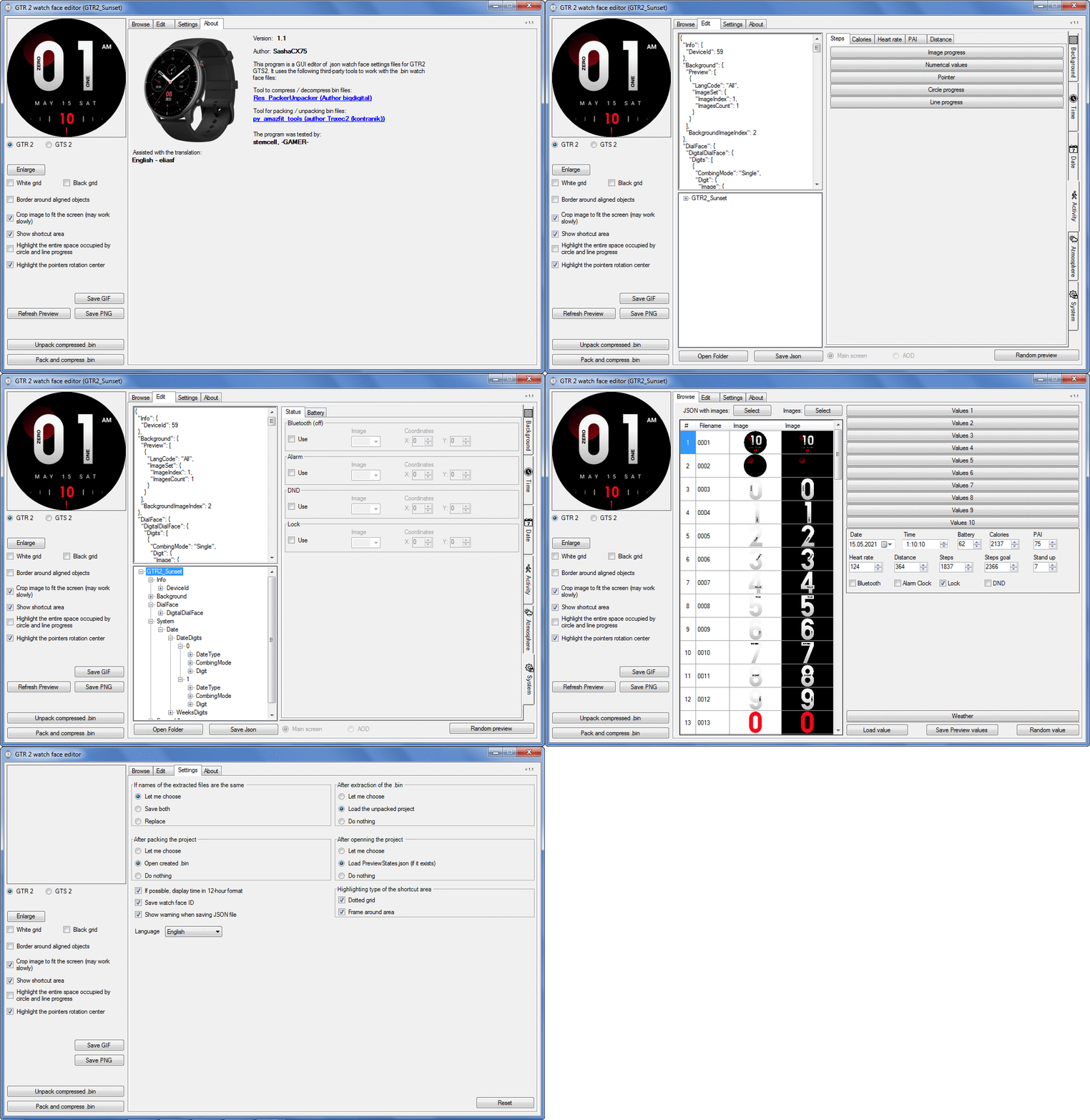
Image
Note: It is advisable to unpack the program to the root of the disk.
Not all dials can be unpacked.

The drawing order of elements cannot be changed. The only exception is if you move the second hand from the center, it will be drawn under the hour and minute hands.

If the .bin file is not created, then you need to look for errors in the .log file. Most often this happens when images have the wrong format.

Version 7.3
List of changes
Fixed known display bugs.
v 7.2
Fixed date display errors in editable zones.
Added support for the Hungarian language.
v 7.1
For distance added support for separate images for miles and kilometers.
v 7.0
Added support for independent coordinates for a set of pictures (segments).
v 6.0
Added support for Zepp E Circle
Added the ability to convert watch faces between different models (GTR 2 (e), Zepp E Circle, T-Rex Pro)
v 5.1
Added the ability to create and update preview images of editable zones.
v 5.0
Added support for editable zones.
v 4.1
Added the ability to display the time in the system font.
Added the ability to display the date in the system font.
Added the ability to change the order of layers.
Added the ability to overlay the clock image on the saved png and gif files (enabled in the settings).
v 4.0
Added support for the system font (inscription at an angle and in a circle).
Added support for the Sunrise parameter (not working correctly for all cities).
Added support for ActivityGoal parameter.
Added the ability to display the goal of steps.
Added support for the Icon parameter.
Added the ability to display circular and linear progress at the same time.
v 3.1
Fixed errors when displaying the distance.
Fixed errors when displaying temperature.
Added French.
Added Italian language.
v 3.0
Added support for T-Rex Pro.
Added support for new elements (StandUp, fat burning, UV index, humidity, wind, pressure).
Found bugs fixed.
v 2.1
Fixed bugs in display AOD.
Fixed bug when using pictures for circular progress.
v 2.0
Added support for AOD.
Added Chinese translation.
v 1
It can work with elements: time, date, statuses, weather, battery, steps, calories, heart rate, PAI, path.
Added English translation.
v 1.2 Added Spanish language
Old versions
Pictures created when unpacking and unpacking bin files are created by the parser and may differ from the images created in the editor. I have nothing to do with these files and am not responsible for their content.

When you turn on the "Follow ..." radio button, the right alignment and center alignment in the editor is displayed incorrectly.
The preview in the editor may differ from the image on the watch. I advise you to check the dial on a real device.

Editable zones do not work on the T-Rex Pro.

The editor does not work with GTS 2 mini (GTS U) watch faces and I do not know how to make such watch faces.

Until the Zepp app has an official watch face with animations or shortcuts, these features cannot be added to the editor.
Shortcuts work on dials converted from GTR (GTS) to GTR 2 (GTS 2). But with this method of creating dials, not all functions work correctly.

GTR (GTS, T-Rex) to GTR2 (GTS 2, T-Rex Pro) converter
GTR (GTS, T-Rex) to GTR2 (GTS 2, T-Rex Pro) Converter & Editor

Because I bought a GTR 3, the program will no longer be updated.

Donate to the author - PayPal: [email protected].
Last edited by SashaCX75 on 01 Jun 2022, 07:19, edited 32 times in total.
mira.vorlik
Posts: 2
Joined: 08 Nov 2022, 06:42
Location: Teplice, Czech Republic
Contact:

Post by mira.vorlik »

RTMhun wrote: 15 Nov 2022, 10:14
whitch project of me?
Ihave not made watchface for T-Rex only GTR2 ...
Sorry, that was meant for another post.
NanR20
WF maker
Posts: 5
Joined: 16 Sep 2022, 08:24
Location: Essen
Been thanked: 1 time
Contact:

Post by NanR20 »

Big thanks to SashaCX75 for this awesome tool.
Keep it up with the great work.

Cheers buddy!!! ;)
Evergreen777
Posts: 2
Joined: 07 Sep 2022, 18:49
Location: France
Contact:

Post by Evergreen777 »

Hello and thanks for this program! I'm new to making watchfaces. I decompiled and edited a few to see how it works.
I am now working on a watchface from scratch to get the hang of it.
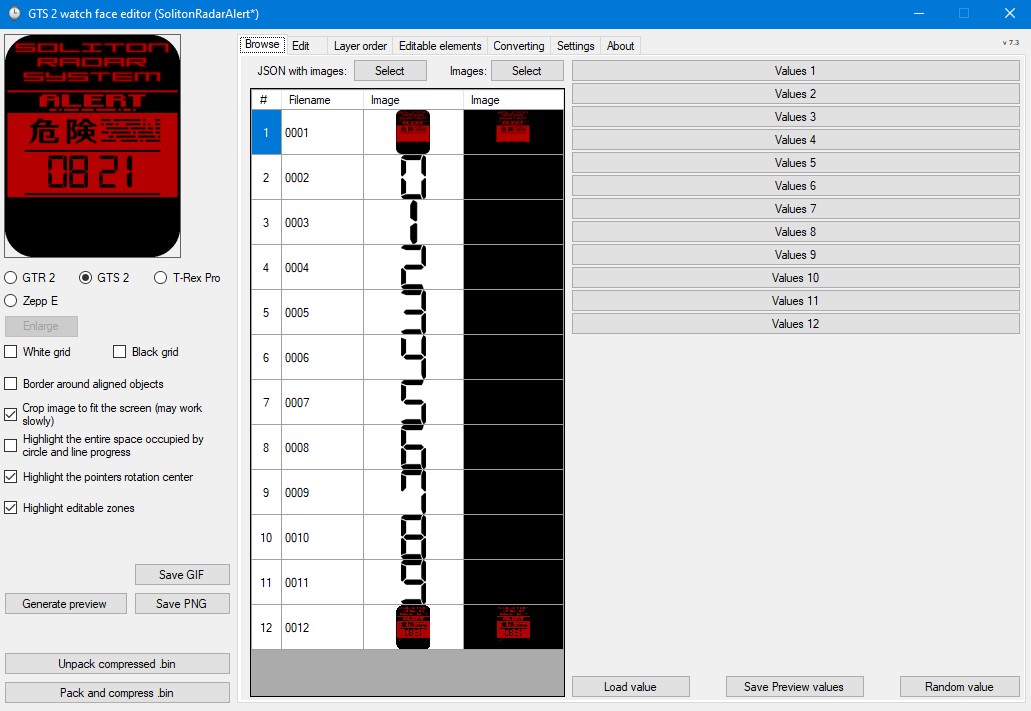
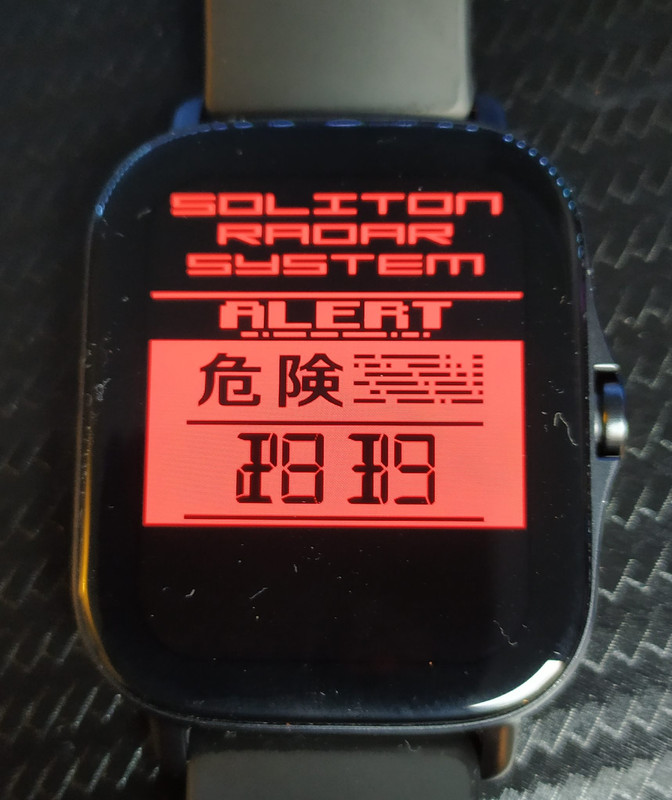
I only have a background image and a couple of numbers and it looks fine in the editor, but when I export it to my GTS2e the "preview" image that already has a static Time on it is used as background, meaning the actual Time display is overlayed on top. I must be doing something wrong, but I don't know what :( .

Below is a screenshot of the editor, a picture of how it looks on the GTS2e itself and the packed .bin is attached to this post.
Spoiler
Image
Image
Thanks in advance and may you all have a nice day :)
Attachments
SolitonRadarAlert_packed.bin
bin file
(51.15 KiB) Downloaded 847 times
Last edited by Evergreen777 on 22 Nov 2022, 15:43, edited 1 time in total.
User avatar
asoo
Posts: 2147
Joined: 03 Jan 2019, 01:48
Location: ͼͽ Thailand ͼͽ
Has thanked: 414 times
Been thanked: 2072 times

Post by asoo »

Evergreen777 wrote: 22 Nov 2022, 09:44
Spoiler
Hello and thanks for this program! I'm new to making watchfaces. I decompiled and edited a few to see how it works.
I am now working on a watchface from scratch to get the hang of it.
I only have a background image and a couple of numbers and it looks fine in the editor, but when I export it to my GTS2e the "preview" image that already has a static Time on it is used as background, meaning the actual Time display is overlayed on top. I must be doing something wrong, but I don't know what :( .

I attached a screenshot of the editor to this post, as well as a picture of how it looks on the GTS2e itself:
Spoiler
Image
Image
Thanks in advance and may you all have a nice day :)
I think it those interested in helping you would be difficult to answer the question asked.
I suggest you attach a file of your work.
or the job's .json file
ͼͽ To request please use the interrelated forum in action ͼͽ
Please do not PM to me for requests ported watchface.
rodblochon
Posts: 2
Joined: 14 Oct 2022, 17:32
Location: here
Contact:

Post by rodblochon »

Hi

Is there a way to test a watchface on GTR2 before uploading on your website then downloading back on the mobile phone ? It is important when I develop new watchface that sometimes have bugs...

thank you for your incredible software !!
Evergreen777
Posts: 2
Joined: 07 Sep 2022, 18:49
Location: France
Contact:

Post by Evergreen777 »

asoo Thanks, I'm going to add the packed .bin. What would be the most convenient way to add the .json? I cannot attach it to my post, the forum won't allow it.
User avatar
asoo
Posts: 2147
Joined: 03 Jan 2019, 01:48
Location: ͼͽ Thailand ͼͽ
Has thanked: 414 times
Been thanked: 2072 times

Post by asoo »

Evergreen777 wrote: 22 Nov 2022, 15:42
@asoo Thanks, I'm going to add the packed .bin. What would be the most convenient way to add the .json? I cannot attach it to my post, the forum won't allow it.
If you can send a BIN file, that's enough.
json is already in BIN

But is the file you sent is the one that caused the problem as you stated?
Because from the picture that you have attached before, there are 12 image files.
But the BIN file you attached contains only 11 images.
Since I don't have GTR2, I can only verify the json file.
As far as looking at the json there shouldn't be any problem in the file you attached.


PS.
little introduction
if possible
I suggest that the main screen and preview files should be
0001 and 0002 respectively.
ͼͽ To request please use the interrelated forum in action ͼͽ
Please do not PM to me for requests ported watchface.
Imran_00_7
Posts: 15
Joined: 02 Nov 2022, 01:25
Location: India
Has thanked: 6 times
Contact:

Post by Imran_00_7 »

Hello!
Can anyone help me in converting watchface of gtr 2 to zepp e circle?
How to convert it & how to unpack .bin file?
rodblochon
Posts: 2
Joined: 14 Oct 2022, 17:32
Location: here
Contact:

Post by rodblochon »

Hello

On GTR2, When you long-press the screen, you can swipe between your installed watchfaces.
For my creations, the preview is always too large or not centered. How to properly generate it with the editor ? and what is the line in the JSON ?

I created a 306x306px preview, saved as 0065.png and specified in the very first line of the JSON

Code: Select all

"Background": {
    "Preview": [
      {
        "LangCode": "All",
        "ImageSet": {
          "ImageIndex": 65,
          "ImagesCount": 1
        }
      }
    ],
    "BackgroundImageIndex": 1
  },
What's wrong ?

Thank you :-)
fertrema
Posts: 4
Joined: 02 Dec 2020, 14:45
Location: Franca
Contact:

Post by fertrema »

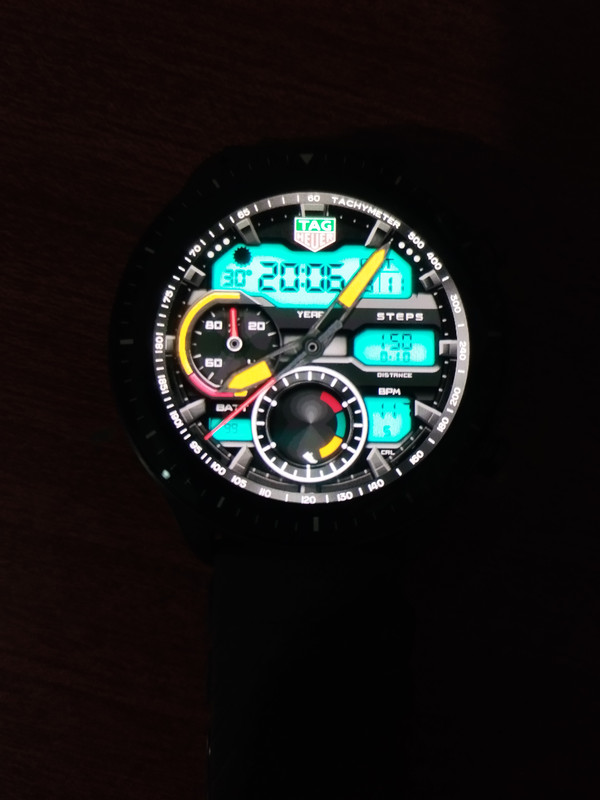
SashaCX75, firstly, congratulations on the beautiful work, intended for the various versions of the Amazfit gtr. I liked this watch face (image attached) on my gtr 47mm, and because it is sensational, and created by the brilliant me el-professor, I decided to use it on my gtr 2. Ok, I did the conversion using your program, but the analog step pointer, It didn't appear on the clock. Do you know what happened? Is there a way to resolve this? Thank you again, and success always!!
Spoiler
Image
1696785379752.gif
1696785379752.gif (2.85 MiB) Viewed 71487 times
IMG_20231011_200638.jpg
IMG_20231011_200638.jpg (1.71 MiB) Viewed 71487 times
1696785379752.gif
1696785379752.gif (2.85 MiB) Viewed 71487 times
User avatar
asoo
Posts: 2147
Joined: 03 Jan 2019, 01:48
Location: ͼͽ Thailand ͼͽ
Has thanked: 414 times
Been thanked: 2072 times

Post by asoo »

fertrema wrote: 11 Oct 2023, 23:08
SashaCX75, firstly, congratulations on the beautiful work, intended for the various versions of the Amazfit gtr. I liked this watch face (image attached) on my gtr 47mm, and because it is sensational, and created by the brilliant me el-professor, I decided to use it on my gtr 2. Ok, I did the conversion using your program, but the analog step pointer, It didn't appear on the clock. Do you know what happened? Is there a way to resolve this? Thank you again, and success always!!
Spoiler
Image

1696785379752.gifIMG_20231011_200638.jpg1696785379752.gif
If you use program".AmazFit_Watchface_Editor_(GTR47ToGTR2)" to convert GTR47 to GTR2
SashaCX75 has already stated that There may be some components not working.
According to this topic
viewtopic.php?p=8844#p8844
ͼͽ To request please use the interrelated forum in action ͼͽ
Please do not PM to me for requests ported watchface.
fertrema
Posts: 4
Joined: 02 Dec 2020, 14:45
Location: Franca
Contact:

Post by fertrema »

👍
User avatar
SashaCX75
Posts: 820
Joined: 26 Oct 2019, 15:18
Location: Ukraine
Has thanked: 13 times
Been thanked: 1029 times
Contact:

Post by SashaCX75 »

@fertrema Converting watch faces uses undocumented features of watch faces and therefore may not work properly. The most reliable way is to make a new watch face for the desired model in the appropriate editor.
fertrema
Posts: 4
Joined: 02 Dec 2020, 14:45
Location: Franca
Contact:

Post by fertrema »

@SashaCX75, thank you very much for your willingness to respond, and I would really like to learn how to make a watch face, but I don't know where to start. Could you direct me, brilliant professional!! Thank you and have a great day!!
User avatar
SashaCX75
Posts: 820
Joined: 26 Oct 2019, 15:18
Location: Ukraine
Has thanked: 13 times
Been thanked: 1029 times
Contact:

Post by SashaCX75 »

@fertrema Unpack some finished watch faces and see how they are arranged. Change the parameters and see the result.
fertrema
Posts: 4
Joined: 02 Dec 2020, 14:45
Location: Franca
Contact:

Post by fertrema »

@SashaCX75, Thank you very much once again for yours kindness, I will do as for yours guidance and have a great weekend!!
domenicopardo
WF maker
Posts: 38
Joined: 04 Sep 2021, 18:09
Location: Bologna
Contact:

Post by domenicopardo »

Unfortunately I'm terrible at using forums and I hope this post is read as much as possible.
Can someone explain to me how to draw and position the hands of an analogue dial?
Thank you
Dw_p
WF maker
Posts: 7
Joined: 30 Sep 2019, 10:56
Location: Maharashtra, India
Has thanked: 1 time
Contact:

Post by Dw_p »

domenicopardo wrote: 18 Nov 2023, 16:55
Unfortunately I'm terrible at using forums and I hope this post is read as much as possible.
Can someone explain to me how to draw and position the hands of an analogue dial?
Thank you
Go into the edit menu then the time menu from the right and then in the analog clock section you will see the rotation center coords and rotation point offset as options to change so the rotation point offset requires the coords of where on the dial image your axis/centre will be and the rotation center coords will move the image around with the axis/centre as its anchor.

this might not be most best explaination so if you are still confused you could dm me on discord at @.dweep.
domenicopardo
WF maker
Posts: 38
Joined: 04 Sep 2021, 18:09
Location: Bologna
Contact:

Post by domenicopardo »

Perfect ! Thank you so much. Works very well, thanks again.
Royalka
Posts: 2
Joined: 29 Jun 2022, 18:52
Location: Deutsch
Contact:

Post by Royalka »

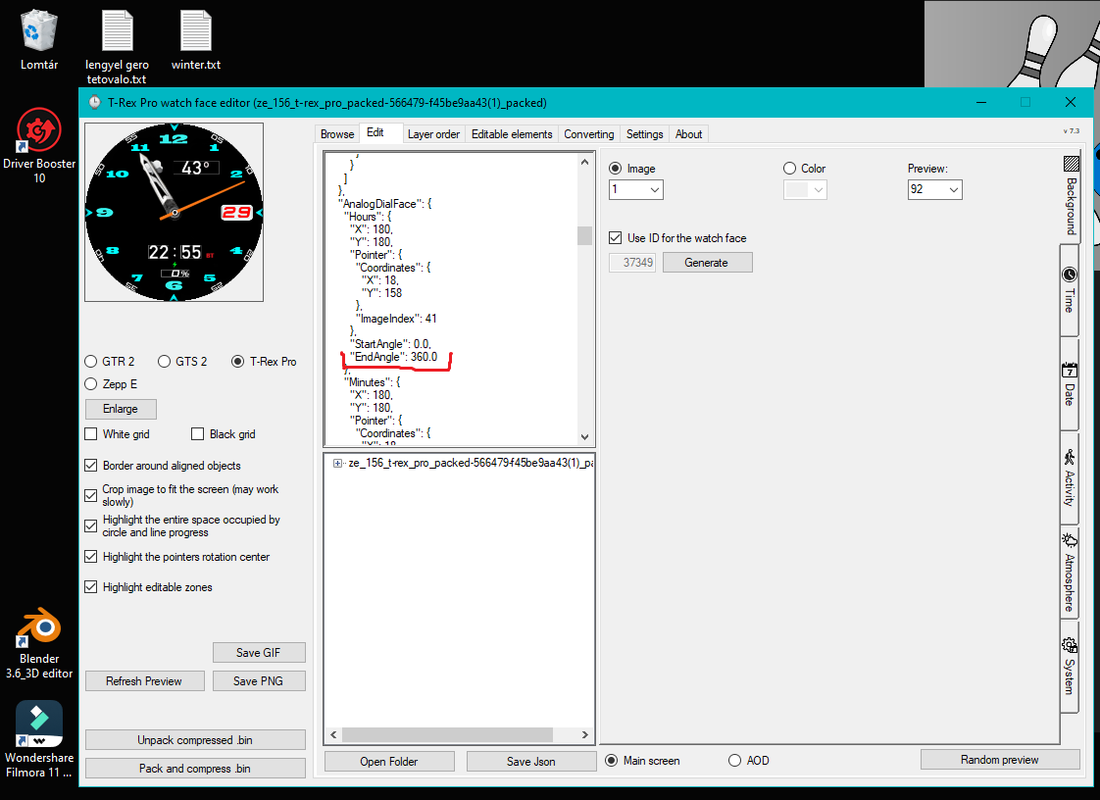
Hello. Please help me. I can't change it so that the hour clock hand doesn't move 360 degrees, I would need less. I try to make changes to the program during editing, but it always writes it back. Or do I want to modify it in the wrong place?
Spoiler
Image
User avatar
SashaCX75
Posts: 820
Joined: 26 Oct 2019, 15:18
Location: Ukraine
Has thanked: 13 times
Been thanked: 1029 times
Contact:

Post by SashaCX75 »

@Royalka This is not possible for these watch models.
Royalka
Posts: 2
Joined: 29 Jun 2022, 18:52
Location: Deutsch
Contact:

Post by Royalka »

Hello. Thanks for the quick response. :!: Do you have an idea how I could display a specific image at a specific time? eg: a cat at one o'clock, a dog at two o'clock...
User avatar
SashaCX75
Posts: 820
Joined: 26 Oct 2019, 15:18
Location: Ukraine
Has thanked: 13 times
Been thanked: 1029 times
Contact:

Post by SashaCX75 »

@Royalka If I remember correctly, you can use 24 images to display the watch.
To do this, open the watch face json file in a text editor and change the "ImagesCount" value for the watch to 24 and the "DisplayFormAnalog" value to true, save the changes. After that, open the file in the watch face editor and pack the watch face without changing anything in it.
toolsrme
Posts: 19
Joined: 04 Aug 2023, 18:36
Location: Missouri
Has thanked: 9 times
Contact:

Post by toolsrme »

SashaCX75 wrote: 08 Jun 2021, 14:39
The size of the system font should not be more than 47, it can cause an infinite reboot watch.
@SashaCX75 Does this issue with system font size still exist? Does it exist on the T-Rex 2 also?

BTW - Do you know what font is the system font? I've yet to find it detailed anywhere.
User avatar
SashaCX75
Posts: 820
Joined: 26 Oct 2019, 15:18
Location: Ukraine
Has thanked: 13 times
Been thanked: 1029 times
Contact:

Post by SashaCX75 »

I don't follow this model, but I don't think anything has changed in terms of font handling.
The T-Rex 2 has more font options, but still has some problems.
Post Reply

Return to “Watchfaces tools”

Who is online

Users browsing this forum: No registered users and 1 guest