
Hello everyone.
I am designing watch faces for Amazfit Bip U without problems with Huami's online editor (watchface Maker), but I have a question that I have not been able to solve myself.
In several of the elements that we can integrate in the spheres, the option "GO TO HOT ZONE" appears, I thought it would be like the option that it gives us to create buttons, for example that we could create a button in the steps element that would take us to the steps screen, but I haven't figured out how that option works yet.
Does anyone know how it works?
Thank you very much.
-
- Administrator
-
-
Support Ukraine
If you experience any problems with the forum (it is not visible, there is no way to post messages, or some functionality does not work), please let us know. If you have problems with registration or you did not receive confirmation letter, let us know and we will activate your account manually.
If you get an "The submitted form was invalid. Try submitting again" error, delete cookies, then try again.
Go to hot zone amazfit bip u
Forum rules
When adding a new topic, use the template: Topic title [device name]
For example: How to create watch face [Bip U]
All communication in this branch should only be in English.
When adding a new topic, use the template: Topic title [device name]
For example: How to create watch face [Bip U]
All communication in this branch should only be in English.
-
bsusperregi
- Posts: 1
- Joined: 17 Jan 2023, 15:21
- Location: Hondarribia
- Contact:
Hello, did you find out how "GO TO HOT ZONE" works?
MAny thanks in advance.
MAny thanks in advance.

Hola amigo. A mi me encantaría que me explicases como es. Acabo de subir un watchface del bip 3 y quería más adelante integrarle esa opción. Un saludo y gracias d antemanoRicardfs wrote: 11 Feb 2023, 18:52Sí, amigo, pude averiguar cómo hacer un icono táctil para el modelo Bip U Pro. ¿Necesitas que te explique cómo hacerlo?

-
Ricardfs
- Posts: 36
- Joined: 29 Sep 2022, 16:10
- Location: Spain
- Has thanked: 1 time
- Been thanked: 3 times
- Contact:
Perdón por no haber contestado antes compañero.
Te adjunto una imagen donde verás las opciones de la barra derecha de "Go to hot zone" del modelo Bip U, en las primeras opciones debes indicar el tamaño que tendrá la zona caliente, ancho y alto, en la segunda opción debes indicar las coordenadas donde quieres que esté la zona caliente.
Para que la zona caliente aparezca en la pantalla del reloj es obligatorio que pongas también la opción "Data", es decir, los diez dígitos para los números del elemento que estés integrando en la Watch Face, en el caso de que no quieras que este elemento sea visible en tu Watch Face crea diez PNG transparentes de cinco por cinco píxeles por ejemplo y los colocas en la opción "Data" como si fueran los dígitos, coordenadas cero de acho y cero de alto, de esta manera este elemento no será vivible pero la opción de zona caliente sí.
No se es la forma correcta de hacerlo pero es la única que me ha resuelto el problema a mi.
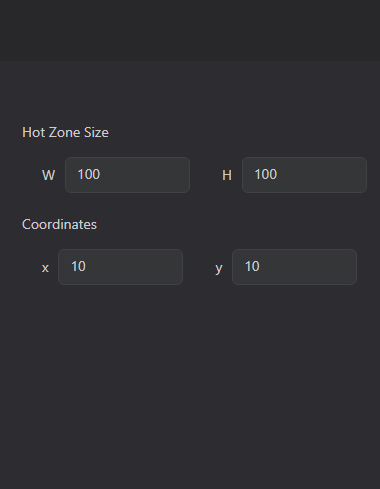
Te adjunto una imagen donde verás las opciones de la barra derecha de "Go to hot zone" del modelo Bip U, en las primeras opciones debes indicar el tamaño que tendrá la zona caliente, ancho y alto, en la segunda opción debes indicar las coordenadas donde quieres que esté la zona caliente.
Para que la zona caliente aparezca en la pantalla del reloj es obligatorio que pongas también la opción "Data", es decir, los diez dígitos para los números del elemento que estés integrando en la Watch Face, en el caso de que no quieras que este elemento sea visible en tu Watch Face crea diez PNG transparentes de cinco por cinco píxeles por ejemplo y los colocas en la opción "Data" como si fueran los dígitos, coordenadas cero de acho y cero de alto, de esta manera este elemento no será vivible pero la opción de zona caliente sí.
No se es la forma correcta de hacerlo pero es la única que me ha resuelto el problema a mi.
Who is online
Users browsing this forum: No registered users and 1 guest