• Administrador
  •  
    Support Ukraine
    If you experience any problems with the forum (it is not visible, there is no way to post messages, or some functionality does not work), please let us know. If you have problems with registration or you did not receive confirmation letter, let us know and we will activate your account manually.
    If you get an "The submitted form was invalid. Try submitting again" error, delete cookies, then try again.
     

How to install watchfaces (Bip, Verge Lite, GTR, GTS, T-Rex, Cor, Mi Band 4)

This forum contains step by step guides, complete manuals and instructions.

Moderadores: asoo, Internal error

Avatar de Usuario
GIK-Team
root
Mensajes: 1015
Registrado: 22 Mar 2018, 10:00
Ubicación: Ukraine
Has thanked: 1120 times
Been thanked: 267 times
Contactar:

How to install watchfaces (Bip, Verge Lite, GTR, GTS, T-Rex, Cor, Mi Band 4)

Mensaje por GIK-Team »

Detailed instructions for installing custom watch faces on Amazfit GTR, GTS, T-Rex, Verge Lite, Amazfit Bip smartwatches, and Cor and Mi Band 4 smart bracelets.

Note! At the moment, the instruction is relevant only for Zepp (Amazfit)

For a successful installation, you need to connect your gadget to a smartphone on Android or IOS with the Amazfit (Zepp) app installed. You also need to have installed file manager and pre-download the watch face that you would like to set on your watch.

Installation for Android
  1. First, you need to install one of the stock watch faces available in Zepp (Amazfit)/Mifit (if you have already installed one, you may skip this step).
  2. Open the folder with the downloaded watch face in the file manager with the path:
    • Zepp (Amazfit) /Android/data/com.huami.watch.hmwatchmanager/files/watch_skin_local/
    • Mi Fit /Android/data/com.xiaomi.hm.health/files/watch_skin_local/
    There you will find folders with downloaded stock watch faces.
  3. Go to any of these folders and find the .bin file. Copy the .bin file name.
    • Name example for bin: 4lIYUjzg3Vwqt8tJU9sYLeOSqUSAreJNzUxJhxgM.bin
    • Name example for zip: UQkNrGEQmaPvYbLmGseWkOkUCHDDkOBf.zip
  4. Go to the custom watch face and rename it using the name of the standard watch face.
  5. Copy the watch face file with the new name and transfer it to the folder from step 3 with a replacement.
  6. Open the Zepp (Amazfit)/Mifit app and install the stock watch face, which file you replaced.
This method does not work on android 11 and above!

Note! The preview image will not change.

Android apps
AmazFaces app
Gadgetbridge (Android)
Notify & Fitness for Amazfit (Android)
Amazfit Replacer (Android)


Installation for iOS
You may also use our application or other, such as AmazTools (iOS), to install watch faces


This manual is current at the time of writing.
If you notice any inaccuracies or mistakes, please, let us know.
"sometimes it's scary but it's still just you and me” — Leaving Laurel
samonefit
Mensajes: 2
Registrado: 28 Mar 2022, 13:17
Ubicación: Roma

Mensaje por samonefit »

Dear All,
i've an issue when i try to open a project. During importing appears this disclaimer:
"Unable to open image:0001.png. You do not have permission to read the file, or the image is damaged."
This is repeating for all the images of the watchface.

Thanks so much.
Fearless-Week
WF maker
Mensajes: 12
Registrado: 27 Mar 2020, 13:35
Ubicación: Amsterdam
Contactar:

Mensaje por Fearless-Week »

these intructions for Android using Zepp is not working anymore. Im on Zepp version 7.1.6 and seems like they changed the way to install the skins. Seems like they dont store anymore the skins to then upload it to the watch, they directly download the watchface and up that file directly to the watch.
Tinopon
Mensajes: 0
Registrado: 03 Nov 2022, 17:48
Ubicación: Galicia
Contactar:

Mensaje por Tinopon »

Selects escribió: 06 Oct 2020, 08:50
Does not work for GTS 2
Acabo de instalar 3 watchfaces en Android 12 sin problema alguno:
1. Phone Xiaomi 11 con Android 12
2. Reloj: Amazfit GTR 4, (recién salido)
3. Aplicación usada: Amazfaces

Proceso:
1. Instalar Amazfaces
2. Abrir Zepp en el phone y conectarlo con el GTR4
3. Abrir la app Amazfaces
4. Elegir la esfera
5. Descargar. En un comento comienza la descarga al GTR4 y pone por defecto el watchface elegido.

P.D. no tengo permisos para abrir nuevos temas.
Salu2
Muzkur
Mensajes: 0
Registrado: 10 Ene 2020, 15:37
Ubicación: Brazil
Has thanked: 1 time
Contactar:

Mensaje por Muzkur »

How can I delete the installed WFs in GTR4?
Avatar de Usuario
GIK-Team
root
Mensajes: 1015
Registrado: 22 Mar 2018, 10:00
Ubicación: Ukraine
Has thanked: 1120 times
Been thanked: 267 times
Contactar:

Mensaje por GIK-Team »

Muzkur escribió: 08 Nov 2022, 18:09
How can I delete the installed WFs in GTR4?
  1. Long press the watch face to enter the watch face selection screen (on your watch).
  2. Swipe up on the watch face you want to delete.
  3. Tap the Delete button to delete the watch face.
Note: Some of the build-in watch faces cannot be deleted.
"sometimes it's scary but it's still just you and me” — Leaving Laurel
camdavis2003
Mensajes: 0
Registrado: 29 Nov 2022, 15:35
Ubicación: Stuttgart, Germany
Contactar:

Mensaje por camdavis2003 »

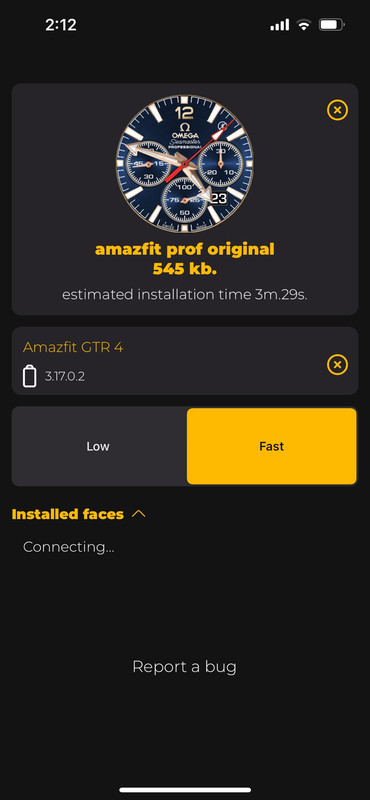
I have recently purchased the Amazfit GTR 4. It is connected to the Zepp (iPhone) app and syncs regularly. I have added watch faces from the Zepp app without issue. The Amazefaces app shows that it is connected with my Zepp app but when I try to download a new Amazfaces watch face, it just says "connecting". I have tried everything I can find in this and other internet sources but have still failed to download a watch face. Has anyone else had the same problems and are there any solutions?
Spoiler
Imagen
Avatar de Usuario
GIK-Team
root
Mensajes: 1015
Registrado: 22 Mar 2018, 10:00
Ubicación: Ukraine
Has thanked: 1120 times
Been thanked: 267 times
Contactar:

Mensaje por GIK-Team »

camdavis2003 escribió: 12 Dic 2022, 13:14
Has anyone else had the same problems and are there any solutions?
viewtopic.php?p=14491#p14491
"sometimes it's scary but it's still just you and me” — Leaving Laurel
kevs42
Mensajes: 5
Registrado: 20 Dic 2022, 00:14
Ubicación: Conroe, Texas
Been thanked: 2 times
Contactar:

Mensaje por kevs42 »

I'm new to Amazfit with a GTR 4. Where are the instructions for installing a custom watchface for iOS? The link to the instructions is not there although the title is. Also when I launch Amaztools it appears to be trying to connect to my watch, but never does. I am wondering if this is still possible & the info here is obsolete. Please advise me on where to find the procedure for installing watchfaces from Amazefitwatchfaces to my GRT 4 watch. Thanks, Kev
grytndgn
Mensajes: 1
Registrado: 27 Nov 2022, 18:21
Ubicación: Turkey
Has thanked: 2 times
Contactar:

Mensaje por grytndgn »

Hello. I am using Amazfit gts3. Can we upload watch faces used for gts or gts2 to gts3? There isn't as much variety as gts and gts2 watch faces in gts3.
Avatar de Usuario
GIK-Team
root
Mensajes: 1015
Registrado: 22 Mar 2018, 10:00
Ubicación: Ukraine
Has thanked: 1120 times
Been thanked: 267 times
Contactar:

Mensaje por GIK-Team »

grytndgn escribió: 10 Ene 2023, 09:14
Hello. I am using Amazfit gts3. Can we upload watch faces used for gts or gts2 to gts3? There isn't as much variety as gts and gts2 watch faces in gts3.
Hello. No. These dials are different and not compatible with each other.
"sometimes it's scary but it's still just you and me” — Leaving Laurel
grytndgn
Mensajes: 1
Registrado: 27 Nov 2022, 18:21
Ubicación: Turkey
Has thanked: 2 times
Contactar:

Mensaje por grytndgn »

GIK-Team escribió: 10 Ene 2023, 10:41
grytndgn escribió: 10 Ene 2023, 09:14
Hello. I am using Amazfit gts3. Can we upload watch faces used for gts or gts2 to gts3? There isn't as much variety as gts and gts2 watch faces in gts3.
Hello. No. These dials are different and not compatible with each other.
So, how can I adapt the watch faces I like in gts to gts3? The gts is 1.65 inches and the gts3 is 1.75 inches. Both are square screens.
Avatar de Usuario
GIK-Team
root
Mensajes: 1015
Registrado: 22 Mar 2018, 10:00
Ubicación: Ukraine
Has thanked: 1120 times
Been thanked: 267 times
Contactar:

Mensaje por GIK-Team »

grytndgn escribió: 10 Ene 2023, 11:41
GIK-Team escribió: 10 Ene 2023, 10:41
grytndgn escribió: 10 Ene 2023, 09:14
Hello. I am using Amazfit gts3. Can we upload watch faces used for gts or gts2 to gts3? There isn't as much variety as gts and gts2 watch faces in gts3.
Hello. No. These dials are different and not compatible with each other.
So, how can I adapt the watch faces I like in gts to gts3? The gts is 1.65 inches and the gts3 is 1.75 inches. Both are square screens.
They run on different operating systems.
"sometimes it's scary but it's still just you and me” — Leaving Laurel
moyomo
Mensajes: 0
Registrado: 11 Feb 2023, 09:38
Ubicación: Poland
Contactar:

Mensaje por moyomo »

Hi everyone, could someone please tell me how to upload a .bin file to the GTS 2e as the method given in this topic doesn't work anymore.
There's no "/watch_skin_local/" directory, even on android 8.
I want to check my edited watchface before uploading it to the website...
Superpuckz
Mensajes: 0
Registrado: 26 Feb 2023, 15:10
Ubicación: Jakarta
Contactar:

Mensaje por Superpuckz »

Hi everyone,
Bern using gts4, manage to install wathface with smooth second on amazwatch (ios). But the second dial keeps at 12 oclock, no movement at all, any suggestion?
Thanks
jcrist1027
Mensajes: 3
Registrado: 20 Oct 2020, 16:44
Ubicación: NW USA
Contactar:

Mensaje por jcrist1027 »

Nevermind. I got the app to work with my GTS3 again.
dAnnRioja
WF maker
Mensajes: 3
Registrado: 25 Sep 2019, 23:41
Ubicación: España
Contactar:

Mensaje por dAnnRioja »

In ANDROID 11 we can't reach this file.

Someone knows how to do? Ty
go_t_david
Mensajes: 0
Registrado: 04 Jul 2023, 19:58
Ubicación: Madrid
Contactar:

Mensaje por go_t_david »

Dear friend,

I'm trying to install some wacht faces in my T-Rex 2. The problem is when I access to mi Phone folders (Android) to this route: Zepp (Amazfit) /Android/data/com.huami.watch.hmwatchmanager/files/watch_skin_local/

In this route, on "files" folder, only appear the folder "MiPushLog", dont appear the "watch_skin_local" folder.

I delete the Zepp APP and reinstall, and after that I install one of the watch faces from Zepp APP, but dont appear this folder, and I dont know why.

Please, can you help me?

Thanks in advance and regards
taw_bip
WF maker
Mensajes: 130
Registrado: 12 Abr 2018, 16:29
Has thanked: 127 times
Been thanked: 19 times
Contactar:

Mensaje por taw_bip »

go_t_david escribió: 04 Jul 2023, 20:08
Dear friend,

I'm trying to install some wacht faces in my T-Rex 2. The problem is when I access to mi Phone folders (Android) to this route: Zepp (Amazfit) /Android/data/com.huami.watch.hmwatchmanager/files/watch_skin_local/

In this route, on "files" folder, only appear the folder "MiPushLog", dont appear the "watch_skin_local" folder.

I delete the Zepp APP and reinstall, and after that I install one of the watch faces from Zepp APP, but dont appear this folder, and I dont know why.

Please, can you help me?

Thanks in advance and regards
I don't have access to those folders on my phone. Maybe you need root.

I just download the watchface and change the extension from "zip" to "bin" and have the Amazfitwatchfaces app set to open those files by default. Then it will perform the installation.
Anmonju
Mensajes: 0
Registrado: 17 Jul 2023, 07:40
Ubicación: Deutschland
Contactar:

Mensaje por Anmonju »

Do I understand correctly that an installation via an Android phone with Android 13 is not possible?
(because the first post says: "This method does not work on android 11 and above!")
Thanks in advance and regards
Ailuvan
Mensajes: 0
Registrado: 07 Ago 2023, 00:41
Ubicación: Raleigh, NC
Contactar:

Mensaje por Ailuvan »

Seconding the above question. Now that faces are appearing for the Bip 5, nothing here seems to be working to import them.

The comment 2 up about renaming the .zip file as .bin at least gave me an option to have Zepp open the file, but doing that gives an error "Failed to import the track. Please try again or replace the track file."

As of right now, there doesn't seem to be any way to get faces from AmazFaces into current Zepp apps on current Android versions.
Avatar de Usuario
GIK-Team
root
Mensajes: 1015
Registrado: 22 Mar 2018, 10:00
Ubicación: Ukraine
Has thanked: 1120 times
Been thanked: 267 times
Contactar:

Mensaje por GIK-Team »

Ailuvan escribió: 15 Ago 2023, 16:50
Seconding the above question. Now that faces are appearing for the Bip 5, nothing here seems to be working to import them.

The comment 2 up about renaming the .zip file as .bin at least gave me an option to have Zepp open the file, but doing that gives an error "Failed to import the track. Please try again or replace the track file."

As of right now, there doesn't seem to be any way to get faces from AmazFaces into current Zepp apps on current Android versions.
Hello,

Currently, the direct installation from our website to Zepp app can face some challenges due to various reasons, but we are actively looking for solutions. In the meantime, consider using our dedicated app (if you haven't already) which might offer a smoother experience for some devices.
"sometimes it's scary but it's still just you and me” — Leaving Laurel
nile_etland
Mensajes: 0
Registrado: 07 Sep 2023, 13:35
Ubicación: United States
Contactar:

Mensaje por nile_etland »

Hi, I have a GTS 4 mini and an iPhone. I have downloaded the AmazFit app, but I can't install any watch faces.

1. Open AmazFaces.
2. Select device model. Click apply.
2. Open watch face.
3. Click "Download".
4. Choose watch model/ language version.
5. Watch ads. Click "Reward granted"
6. Click "Install watch face"
7. Select device.
8. Click "Install watch face"
9. Click Installation version.
10. There is a progress bar which goes to "Loading"
11. It reverts to "Install watch face."

There are no new faces in the Zepp app. There are no new files downloaded to my phone.

I have ensured that the app is set to download to my phone.
I have tried re-pairing the device
Turning bluetooth off and on before re-downloading the file

I'm not sure what the problem is.
Avatar de Usuario
Stas
Mensajes: 184
Registrado: 22 Ene 2019, 21:18
Ubicación: Ukraine
Has thanked: 4 times
Been thanked: 34 times
Contactar:

Mensaje por Stas »

Hello,

We understand that you're having some difficulties with the setup and connection of your smartwatch. Don't worry; you're not alone! Below are some troubleshooting steps that may resolve your issues.

Option 1: Check Bluetooth Devices on Your Phone
Navigate to the Bluetooth settings on your phone.
Make sure there is no duplicate connected device; if there is, remove all instances.
Reconnect your smartwatch from scratch.

Option 2: Synchronize Data Using the Zepp App
Open the Zepp App on your mobile device.
Swipe down several times to refresh the connection and synchronize data between your smartwatch and the Zepp App.

Option 3: Restart Bluetooth Module
Turn off the Bluetooth on your phone for 10 seconds and then turn it back on.
Try synchronizing your smartwatch with the Zepp App again.
Additional Notes:
If the settings reset spontaneously, don't worry. It happens occasionally.
There's no need to rebind your smartwatch in the Zepp App.

For Amazfaces settings, it might be best to reset all configurations to default and start anew.
Please try these solutions one at a time and check to see if the issue has been resolved. If you continue to experience problems, don't hesitate to reach out for further assistance.

nile_etland escribió: 07 Sep 2023, 14:38
Hi, I have a GTS 4 mini and an iPhone. I have downloaded the AmazFit app, but I can't install any watch faces.
Frank_MB
Mensajes: 0
Registrado: 01 Ene 2024, 13:55
Ubicación: New Jersey
Contactar:

Mensaje por Frank_MB »

I hope you can help. I have the GTR4 and have tried all the options you mentioned above. All I get is a yellow bar going across saying Loading and it has been doing this for at least 5 minute. I am using an Android phone and it OS 12 I believe.
Avatar de Usuario
GIK-Team
root
Mensajes: 1015
Registrado: 22 Mar 2018, 10:00
Ubicación: Ukraine
Has thanked: 1120 times
Been thanked: 267 times
Contactar:

Mensaje por GIK-Team »

Frank_MB escribió: 12 Ene 2024, 23:09
I hope you can help. I have the GTR4 and have tried all the options you mentioned above. All I get is a yellow bar going across saying Loading and it has been doing this for at least 5 minute. I am using an Android phone and it OS 12 I believe.
To address the loading problem, I recommend installing the watch face using the Zepp app along with a QR code from our website. Here's a step-by-step guide:

1. Visit our website and select the watchface you wish to install.
2. Find the QR code for the watchface on the download page.
3. On your phone, open the Zepp app.
4. Before scanning the QR code, activate the developer mode in the Zepp app: Go to "Profile" => "Settings" => "About" and click the Zepp icon 7 times in a row until a pop-up window appears confirming that developer mode is activated.
5. Now use the Zepp app to scan the QR code. This should initiate the direct download and installation process for your GTR4.

Please make sure your phone and the Zepp app are updated to their latest versions before trying these steps.
"sometimes it's scary but it's still just you and me” — Leaving Laurel
Responder

Volver a “Manuals and instructions”

¿Quién está conectado?

Usuarios navegando por este Foro: No hay usuarios registrados visitando el Foro y 1 invitado