If you experience any problems with the forum (it is not visible, there is no way to post messages, or some functionality does not work), please let us know.
If you have problems with registration or you did not receive confirmation letter, let us know and we will activate your account manually.
If you get an "The submitted form was invalid. Try submitting again" error, delete cookies, then try again.
If you have problems with registration or you did not receive confirmation letter, let us know and we will activate your account manually.
If you get an "The submitted form was invalid. Try submitting again" error, delete cookies, then try again.
Search options?
Moderators: Internal error, Watchmens
-
TrevorLahey
- Posts: 3
- Joined: 12 Nov 2018, 03:15
- Location: unknown
- Contact:
Search options?
I'm very surprised to not see more search options on a website like this so one can filter results for more than language. Like 12hr vs 24 hr faces or ones the display seconds or not. Would there be any plans to do so? I feel like many would appreciate.
-
GIK-Team

- root
- Posts: 1033
- Joined: 22 Mar 2018, 10:00
- Location: Ukraine
- Has thanked: 1181 times
- Been thanked: 281 times
- Contact:
We are working on the search and maybe update it soon. Thank you for your opinion. We will consider your wishes.TrevorLahey wrote: 12 Nov 2018, 03:38I'm very surprised to not see more search options on a website like this so one can filter results for more than language. Like 12hr vs 24 hr faces or ones the display seconds or not. Would there be any plans to do so? I feel like many would appreciate.
"sometimes it's scary but it's still just you and me” — Leaving Laurel
-
GIK-Team
- root
- Posts: 1033
- Joined: 22 Mar 2018, 10:00
- Location: Ukraine
- Has thanked: 1181 times
- Been thanked: 281 times
- Contact:
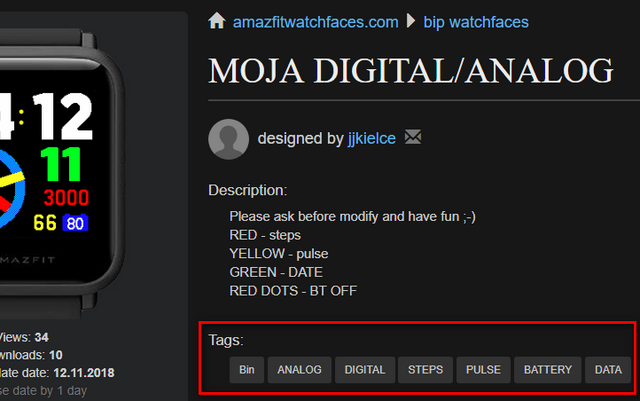
Currently you can search by tags:
"sometimes it's scary but it's still just you and me” — Leaving Laurel
-
TrevorLahey
- Posts: 3
- Joined: 12 Nov 2018, 03:15
- Location: unknown
- Contact:
I do understand and see that, but I think maybe part of the problem is that because of the purely user generated/submitted content, a lot of faces are either incorrectly tagged or not at all. Searches are restricted to very specific terms such as "analog" or "12 hr", but when "analog 12hr" is searched, a "Nothing found on your request" is returned. Another example would be that searches for English faces have sometimes returned faces that are clearly in other languages, but were tagged as Eng. "Analog" searches will sometimes return faces that are clearly just digital.
Perhaps what I mean to say is that it would be cool to be able to set multiple filters for results?
Like going to the most popular section and then removing all 24hr faces.
And thank you for responses!
Perhaps what I mean to say is that it would be cool to be able to set multiple filters for results?
Like going to the most popular section and then removing all 24hr faces.
And thank you for responses!
-
GIK-Team
- root
- Posts: 1033
- Joined: 22 Mar 2018, 10:00
- Location: Ukraine
- Has thanked: 1181 times
- Been thanked: 281 times
- Contact:
We understand you.TrevorLahey wrote: 13 Nov 2018, 04:25I do understand and see that, but I think maybe part of the problem is that because of the purely user generated/submitted content, a lot of faces are either incorrectly tagged or not at all. Searches are restricted to very specific terms such as "analog" or "12 hr", but when "analog 12hr" is searched, a "Nothing found on your request" is returned. Another example would be that searches for English faces have sometimes returned faces that are clearly in other languages, but were tagged as Eng. "Analog" searches will sometimes return faces that are clearly just digital.
Perhaps what I mean to say is that it would be cool to be able to set multiple filters for results?
Like going to the most popular section and then removing all 24hr faces.
And thank you for responses!
 And we will try to implement filtering by multiple tags.
"sometimes it's scary but it's still just you and me” — Leaving Laurel
-
GIK-Team
- root
- Posts: 1033
- Joined: 22 Mar 2018, 10:00
- Location: Ukraine
- Has thanked: 1181 times
- Been thanked: 281 times
- Contact:
[mention]TrevorLahey[/mention], [mention]tigerija[/mention], done!
https://amazfitwatchfaces.com/bip/searc ... nds,analog
https://amazfitwatchfaces.com/bip/searc ... nds,analog
"sometimes it's scary but it's still just you and me” — Leaving Laurel
-
TrevorLahey
- Posts: 3
- Joined: 12 Nov 2018, 03:15
- Location: unknown
- Contact:

-
GIK-Team
- root
- Posts: 1033
- Joined: 22 Mar 2018, 10:00
- Location: Ukraine
- Has thanked: 1181 times
- Been thanked: 281 times
- Contact:
[mention]tigerija[/mention], [mention]TrevorLahey[/mention], thanks!
"sometimes it's scary but it's still just you and me” — Leaving Laurel
-
novw
You have a different website as me? I can "filter" on language. No more than that.
-
GIK-Team
- root
- Posts: 1033
- Joined: 22 Mar 2018, 10:00
- Location: Ukraine
- Has thanked: 1181 times
- Been thanked: 281 times
- Contact:
This feature available on Top: https://amazfitwatchfaces.com/bip/topnovw wrote: 22 Dec 2018, 14:29You have a different website as me? I can "filter" on language. No more than that.
or filter by tag e.g.: https://amazfitwatchfaces.com/search/bi ... nds,analog
"sometimes it's scary but it's still just you and me” — Leaving Laurel
-
mikebounds
- WF maker
- Posts: 12
- Joined: 07 Jan 2019, 11:25
- Contact:
There is a particular problem with searching for watch faces in different languages:
When creating a watch with multiple languages you can select option "Multilingual" or choose one of the languages, so suppose I create a watchface that has EN and ES.
If I choose option Multilingual, then if a user seaches for lang EN or ES, then they will not find the watch
If I choose option EN, then if a user seaches for lang Multilingual (or ES), then they will not find the watch
If I choose option ES, then if a user seaches for lang Multilingual (or EN), then they will not find the watch
Possible resolutions for this are:
1. Allow user to create a watch with Multiple languages, so that they add each language, rather than only be able to add 1
2. Interpret tags, EN, ES as languages in a language seach, so that if you create tags of EN and ES (with watch face lang Multilingual), then searches using lang EN, ES or Multilingual will all find the watch face
When creating a watch with multiple languages you can select option "Multilingual" or choose one of the languages, so suppose I create a watchface that has EN and ES.
If I choose option Multilingual, then if a user seaches for lang EN or ES, then they will not find the watch
If I choose option EN, then if a user seaches for lang Multilingual (or ES), then they will not find the watch
If I choose option ES, then if a user seaches for lang Multilingual (or EN), then they will not find the watch
Possible resolutions for this are:
1. Allow user to create a watch with Multiple languages, so that they add each language, rather than only be able to add 1
2. Interpret tags, EN, ES as languages in a language seach, so that if you create tags of EN and ES (with watch face lang Multilingual), then searches using lang EN, ES or Multilingual will all find the watch face
-
GIK-Team
- root
- Posts: 1033
- Joined: 22 Mar 2018, 10:00
- Location: Ukraine
- Has thanked: 1181 times
- Been thanked: 281 times
- Contact:
We initially had a problem with this issue. When uploading watchfaces to the website, users were not quite correctly understanding this field and were using it differently that was intended by us. The "Multilingual" option implies the absence of language dependence, i.e. there is no text on the watchface. And all the other watchfaces were supposed to be added one for each language. Soon we will try to resolve this issue, explaining to our users how to use it, directly in the process of downloading the file. Or we change the whole system.mikebounds wrote: 19 Mar 2019, 11:10There is a particular problem with searching for watch faces in different languages:
When creating a watch with multiple languages you can select option "Multilingual" or choose one of the languages, so suppose I create a watchface that has EN and ES.
If I choose option Multilingual, then if a user seaches for lang EN or ES, then they will not find the watch
If I choose option EN, then if a user seaches for lang Multilingual (or ES), then they will not find the watch
If I choose option ES, then if a user seaches for lang Multilingual (or EN), then they will not find the watch
Possible resolutions for this are:
1. Allow user to create a watch with Multiple languages, so that they add each language, rather than only be able to add 1
2. Interpret tags, EN, ES as languages in a language seach, so that if you create tags of EN and ES (with watch face lang Multilingual), then searches using lang EN, ES or Multilingual will all find the watch face
"sometimes it's scary but it's still just you and me” — Leaving Laurel
-
mikebounds
- WF maker
- Posts: 12
- Joined: 07 Jan 2019, 11:25
- Contact:
I think you should use the term "Language neutral" as "Multilingual" means many languages.
Are you saying if I have a watch face with multiple languages which have identical layout and only the language is different, then I should create a unique page for each watchface, rather than loading multiple watchfaces into one page like top of the week watchface https://amazfitwatchfaces.com/bip/view/8159
Mike
Are you saying if I have a watch face with multiple languages which have identical layout and only the language is different, then I should create a unique page for each watchface, rather than loading multiple watchfaces into one page like top of the week watchface https://amazfitwatchfaces.com/bip/view/8159
Mike
-
GIK-Team
- root
- Posts: 1033
- Joined: 22 Mar 2018, 10:00
- Location: Ukraine
- Has thanked: 1181 times
- Been thanked: 281 times
- Contact:
You are right. After we will deal with the application, we will begin to solve the issue with languages. Thank you!mikebounds wrote: 19 Mar 2019, 16:41I think you should use the term "Language neutral" as "Multilingual" means many languages.
Are you saying if I have a watch face with multiple languages which have identical layout and only the language is different, then I should create a unique page for each watchface, rather than loading multiple watchfaces into one page like top of the week watchface https://amazfitwatchfaces.com/bip/view/8159
Mike
"sometimes it's scary but it's still just you and me” — Leaving Laurel
-
mikebounds
- WF maker
- Posts: 12
- Joined: 07 Jan 2019, 11:25
- Contact:
I don't think this is a good idea to create multiple pages for the same watch face in different languages. I have created a watch face which so far has 6 languages and I plan to add more which are currently under 1 page. If I had these on separate pages then if I created a version 2 (to improve or fix an issue), then I would then have to change 6 pages, which would be extra effort on my part, but I think a bigger issue is it would mean 6 watch faces would then appear in "Updated New" which would be identical apart from an abbreviated 2 letter day of the week, so making it harder to search for watchfaces if there are lots of duplicates.
I think if a watch face has multiple version which differ in language 12/24hr, colour or font, but the layout is the same, then it is better to put them all under one page as it is easier to create and manage by the creator and better for users who WANT to find the watch face and users who do NOT want the watch face as with multiple page it floods the watch face listings.
I think if a watch face has multiple version which differ in language 12/24hr, colour or font, but the layout is the same, then it is better to put them all under one page as it is easier to create and manage by the creator and better for users who WANT to find the watch face and users who do NOT want the watch face as with multiple page it floods the watch face listings.
-
GIK-Team
- root
- Posts: 1033
- Joined: 22 Mar 2018, 10:00
- Location: Ukraine
- Has thanked: 1181 times
- Been thanked: 281 times
- Contact:
Can you describe exactly how you see this option?mikebounds wrote: 19 Mar 2019, 22:29I don't think this is a good idea to create multiple pages for the same watch face in different languages. I have created a watch face which so far has 6 languages and I plan to add more which are currently under 1 page. If I had these on separate pages then if I created a version 2 (to improve or fix an issue), then I would then have to change 6 pages, which would be extra effort on my part, but I think a bigger issue is it would mean 6 watch faces would then appear in "Updated New" which would be identical apart from an abbreviated 2 letter day of the week, so making it harder to search for watchfaces if there are lots of duplicates.
I think if a watch face has multiple version which differ in language 12/24hr, colour or font, but the layout is the same, then it is better to put them all under one page as it is easier to create and manage by the creator and better for users who WANT to find the watch face and users who do NOT want the watch face as with multiple page it floods the watch face listings.
"sometimes it's scary but it's still just you and me” — Leaving Laurel
-
mikebounds
- WF maker
- Posts: 12
- Joined: 07 Jan 2019, 11:25
- Contact:
Create one watch face page with versions including multiple languages and then either:
1. In the option "Watchface language" when you create watchface, allow addition of multiple language, rather than only be able to add 1
2. Interpret tags that are country codes such as EN, ES as languages in a language search, so that if you a watchface has tags of EN and ES, then searches using lang EN, ES will both find the watch face.
Option 2 would seem to be easier to implement as you only have to change the language search code and also some users (including myself) already add country codes as tags so they wouldn't need to edit their watchfaces.
Also if you go for option 2, you could possibly do without the language search all together and just use a better implementation of tags, but this is a much bigger job and probably an option for the future:
The issue with search and tags is that:
1. There are not pre-defined tags for all options - like DND, bluetooth
2. Much bigger issue is you cannot search on pre-defined tags (i.e you have to type in a tag - you can't choose from a list of pre-defined tags)
3. Tag option does not appear when you initially search and so for example at https://amazfitwatchfaces.com/bip/ you have to first do a search and THEN you get the option to search by tag.
4. Search searches username, so for example if I search for "dog", then the first page of 16 matches, are users with the string "dog" in their username, not watchfaces with "dog" in the title or as a tag
To give an example of issue 2, if a user, wants a watch that shows heartrate, then they may search for pulse, bpm, heartbeat, heartrate and even if a user starts typing the correct tag (the predefined "heartrate"), then after typing "he", the first 2 options are heart and heartbeat and "heartrate" is the 5th option, so how do they know which one to choose?
For me the default search should search title and tags and then there should be another option (on main page) for "search by tag" or "advanced search") which brings up option for all features on watch - something like:
Language:
Analog/Digital:
12hr / 24hr:
Weather: Icons Current Temp, Day (max) temp Night (min) temp
Status: Alarm Bluetooth DND Lock
Activity: STEPS, STEPS GOAL, STEPS PROGRESS, STEPS GOAL ICON, PULSE, CALORIES, DISTANCE
etc
+ Free text search:
So user can simply click on the features they want on watch (not type them in) and then you can do a search on exact matches and near matches
And all course all these tags should be listed when you create a watchface, so that watchface creators can just easily add the features that are on their watchfaces (or even possibly do this automatically if web server opens bin file and detects features used, or allow creator to upload a "json" file and extract features from this as I guess the web server is probably Linux and the bin extract tool only works on Windows and also extracting bin adds extra complexity and resource usage)
Mike
1. In the option "Watchface language" when you create watchface, allow addition of multiple language, rather than only be able to add 1
2. Interpret tags that are country codes such as EN, ES as languages in a language search, so that if you a watchface has tags of EN and ES, then searches using lang EN, ES will both find the watch face.
Option 2 would seem to be easier to implement as you only have to change the language search code and also some users (including myself) already add country codes as tags so they wouldn't need to edit their watchfaces.
Also if you go for option 2, you could possibly do without the language search all together and just use a better implementation of tags, but this is a much bigger job and probably an option for the future:
The issue with search and tags is that:
1. There are not pre-defined tags for all options - like DND, bluetooth
2. Much bigger issue is you cannot search on pre-defined tags (i.e you have to type in a tag - you can't choose from a list of pre-defined tags)
3. Tag option does not appear when you initially search and so for example at https://amazfitwatchfaces.com/bip/ you have to first do a search and THEN you get the option to search by tag.
4. Search searches username, so for example if I search for "dog", then the first page of 16 matches, are users with the string "dog" in their username, not watchfaces with "dog" in the title or as a tag
To give an example of issue 2, if a user, wants a watch that shows heartrate, then they may search for pulse, bpm, heartbeat, heartrate and even if a user starts typing the correct tag (the predefined "heartrate"), then after typing "he", the first 2 options are heart and heartbeat and "heartrate" is the 5th option, so how do they know which one to choose?
For me the default search should search title and tags and then there should be another option (on main page) for "search by tag" or "advanced search") which brings up option for all features on watch - something like:
Language:
Analog/Digital:
12hr / 24hr:
Weather: Icons Current Temp, Day (max) temp Night (min) temp
Status: Alarm Bluetooth DND Lock
Activity: STEPS, STEPS GOAL, STEPS PROGRESS, STEPS GOAL ICON, PULSE, CALORIES, DISTANCE
etc
+ Free text search:
So user can simply click on the features they want on watch (not type them in) and then you can do a search on exact matches and near matches
And all course all these tags should be listed when you create a watchface, so that watchface creators can just easily add the features that are on their watchfaces (or even possibly do this automatically if web server opens bin file and detects features used, or allow creator to upload a "json" file and extract features from this as I guess the web server is probably Linux and the bin extract tool only works on Windows and also extracting bin adds extra complexity and resource usage)
Mike
Who is online
Users browsing this forum: No registered users and 1 guest