Color Overload

Bip 6 en
Зверніть увагу, що всі циферблати, доступні на цьому сайті, є творчими роботами наших користувачів і не пов'язані з офіційними брендами або торговими марками. Вони створюються шанувальниками для шанувальників, надихаються популярними культурними феноменами, іграми, фільмами, або серіалами.
Наша мета - надати платформу для творчості та обміну, але ми також прагнемо поважати інтелектуальні права. Якщо ви володієте авторськими правами на будь-який контент, який, на вашу думку, порушує ваші права на цьому сайті, будь ласка, зв'яжіться з нами для вжиття відповідних заходів.

Опис
Ported directly from the Active 2 Square version: /active/view/2589
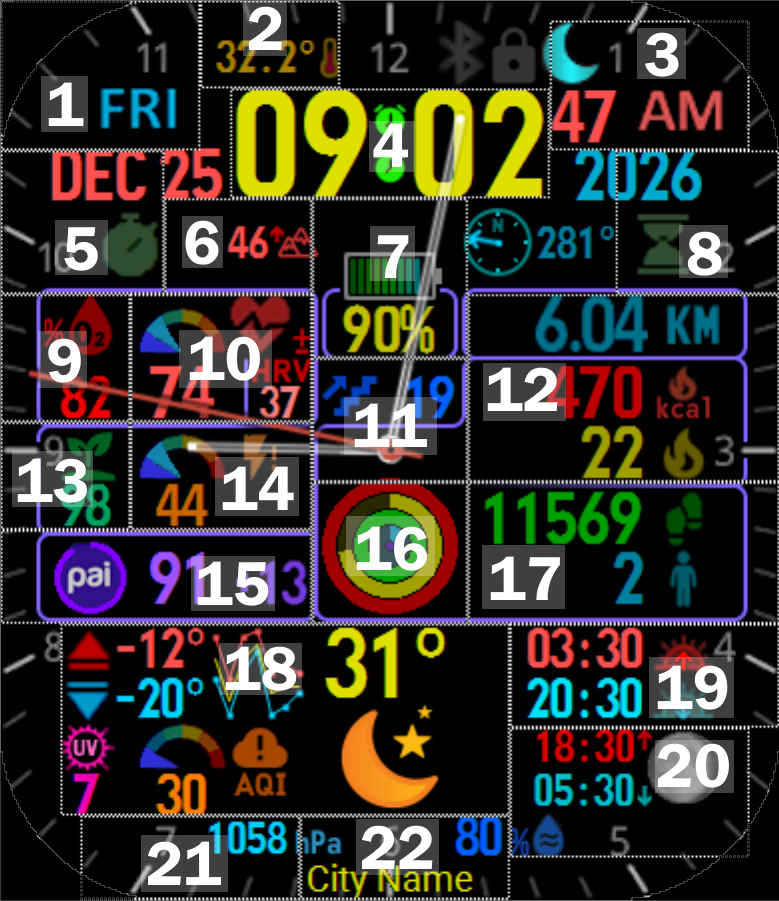
I do not own or have access to a Bip 6 watch, so I cannot test this and will not update it regularly, but please do let me know if something doesn't work properly. I currently have no plans to respond to requests for supporting additional features, languages, or watch models. You're welcome to make changes yourself and upload your own version, I only request that you let me know and link back to this page.This is my attempt to fit as much information onto a watch face as possible. There are a lot of elements and buttons, so here's a guide, with an annotated image below:
# | Element(s) | Tap action | Hold action
- | Day of week | Sleep | --
- | Temperature | Temperature details | --
- | Seconds, AM/PM | Training Load | To Do List
- | Digital time | Alarm settings | World clock
- | Month, Stopwatch icon | Stopwatch | Calendar (month view)
- | Altitude | Altitude | --
- | Battery icon, % | Battery stats | Battery saver option
- | Hourglass icon, Year | Countdown (timer) | Pomodoro (focus timer)
- | % O2 | % O2 | --
- | Heart rate + gauge, HRV | Heart rate details | HRV details
- | Floors climbed, center of analog hands | Change analog hands* | Choose watch face
- | Distance, Active kcal, Active minutes | Activity details | --
- | BioCharge / HybridCharge | BioCharge / HybridCharge details | Morning greeting
- | Stress + gauge | Stress stats | One-touch measurement
- | PAI progress circle, total, daily increase | PAI stats | --
- | Activity progress circles | Weekly goals | Workout history
- | Steps, Standing | Step stats | Start new workout
- | Weather** | Weather details | Weather Service app (if installed)
- | Sunrise/sunset times | Sun details | --
- | Moonrise/moonset times, Moon phase | Moon details | --
- | Barometric pressure | App list | Barometer / Altitude
- | City name | App icons | Map
** The Weather area shows high temp (red), low temp (light blue), 7-day forecast graph, current temp (yellow), UV index (pink), air quality index (orange), and current conditions (icon).
*** The Compass starts out inactive, but if you move the watch in a figure-8 motion it should show your current direction. Tapping to start the Compass app didn't work when I tried it, but if I get it to work I'll add another button.
In the past I've been asked about accepting donations for my work. I'm not doing this for money, I've built this for my personal use and decided to share in case others find it helpful. If you want to donate somewhere, consider supporting SashaCX75, the author of the Watch Face Editor that I used to create this, or support amazfitwatchfaces.com directly via their ads or app upgrade options. Alternatively, you can donate to some of my preferred charities: World Central Kitchen, Donors Choose, and MATHCOUNTS Foundation.
Теги
Поділиться цим циферблатом
Коментарі
Вам необхідно увійти, щоб залишати коментарі або відповідати на них.
Недавні обговорення в спільноті
Request for Kingdom Come Deliverance 2 WatchFace convert [Bip 6]
Hi Everyone Can anyone help me to convert this watchface into Amazfit BIP 6 please? https://amazfitwatchfaces.com/t-rex/view/16282 Thank you so much! [...
Request for Pokemon WatchFace convert [Bip 6]
Thank you for the file, but how to install the zip file into my watch? I'm new here How to : https://amazfitwatchfaces.com/forum/viewtopic.php?p=17161#p1716...
Request to adapt or convert a Bip 5 watch face to Bip Max
..Woooooww!!!!!..wooooohaaaaa!!!!!..Thank you, thank you, thank you asoo!!!!!!...I was able to install the watch face on the Bip Max without any issues, and so far it’s working perfectly; I’ll let you know if any problems arise. Thanks ...
watchface for fitness [Bip 6]
Creating a watch face that displays a heart rate widget in Always-On Display (AOD) mode isn't difficult. However, I am unsure whether the display will strictly adhere to your custom settings—for instance, if you have configured the device...
Bip 6 custom watchface question
And if you need to create any images, just use a program to create them. Images must be saved in PNG-24. https://www.photopea.com/...
Amazfit watch sync sometimes losing data
I use the Zepp App on an Android phone with 10 Amazfit BIP 3 Pro watches to track offroad Motorcycle racers. It usually works well syncing the data, but about every other time I...
Requesting creation of watch face [Bip Max]
hello! thank you for replying this! i just tried with that tutorial on your link. but.. its too complicated for me........





Немає коментарів. Залиште перший коментар.