MOD ( HWGridexPro )
Bip Max en
Зверніть увагу, що всі циферблати, доступні на цьому сайті, є творчими роботами наших користувачів і не пов'язані з офіційними брендами або торговими марками. Вони створюються шанувальниками для шанувальників, надихаються популярними культурними феноменами, іграми, фільмами, або серіалами.
Наша мета - надати платформу для творчості та обміну, але ми також прагнемо поважати інтелектуальні права. Якщо ви володієте авторськими правами на будь-який контент, який, на вашу думку, порушує ваші права на цьому сайті, будь ласка, зв'яжіться з нами для вжиття відповідних заходів.

Опис
Note:
Thank SashaCX75 so much for Editor Version 18.1 BetaIf without a good editor like this, It would be difficult to make this watchface. , so who want to donate please donate to sashacx75
https://www.buymeacoffee.com/sashacx75
or.
(Paypal: [email protected])
----------------------------------------------------------------------
This watchface design by HWGridexPro
Convert and modify layout from HWGridexPro
----------------------------------------------------------------------
- This watchface i do it for use by myself
- Please do not request any modify.
- This watch face, I will not accept any requests
- I won't make any request edits in here, because this space is for sharing work I like
- If you wish to make a request, please use the relevant forum. /forum/
- The comment section is not suitable for requests.
- If have request in the comment i will not answer
- who is interest to modify, you can download and edit it by yourself.- Please comment respectfully and avoid rude or disrespectful behavior.
- Only tested on Amazfit BipMax
- If the owner requests it to be removed Admin can delete immediately.
Thank you.
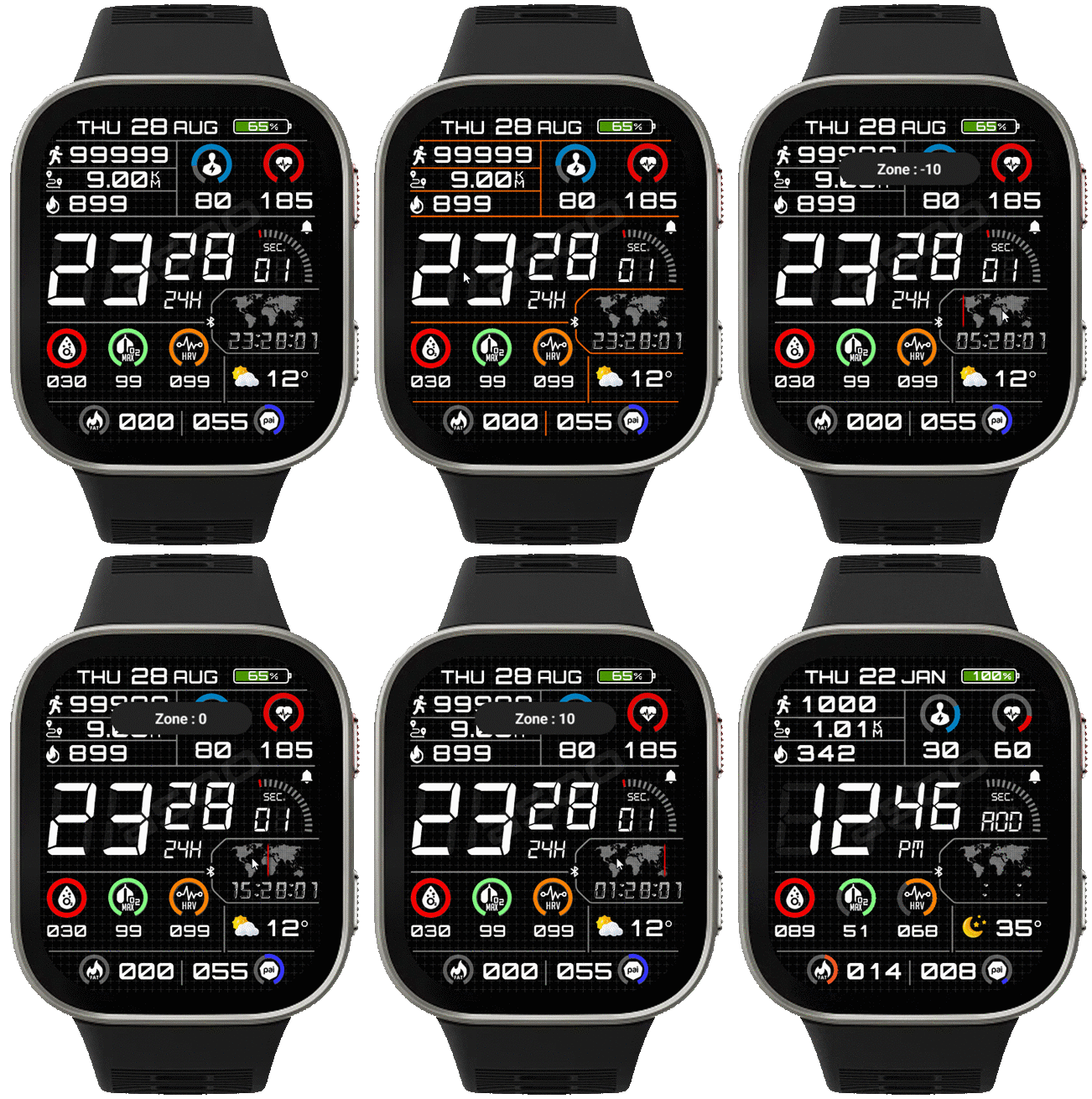
---------------------------------------------------------------------------------------- AOD Full ( only gray , no any widget seconds , no Widget Time Zone )
- Shortcut open calendar ( click on Day area)
- Open power manage by click on power area
- Change BG line color by click on Center Digital ( HOUR )
- Change time zone ( line) by click on world map
- Can use Shortcut on widget
- In the real watch face will not have a watermark ( The watermark is only to inform you that the sample image is created by me. )
------------------------------------------------------------------------------------------
Image showing shortcuts area
11-07-2026
- AOD Full ( only gray , no any widget seconds , no Widget Time Zone )
- Shortcut open calendar ( click on Day area)
- Open power manage by click on power area
- Change BG line color by click on Center Digital ( HOUR )
- Change time zone ( line) by click on world map
- Can use Shortcut on widget
Time on timezone will be show only 24h format.
If you change the country zone on your phone, you must reset the watch first to reset the zone settings on the watch so that the select zone function on the watch can work properly.
The time zone selection function only allows selection in hours.
- In the real watch face will not have a watermark ( The watermark is only to inform you that the sample image is created by me. )
------------------------------------------------------------------------------
it works in 24h format.
for the 12 h format to work. must be enabled in phone settings. (settings-system-date and time-disable 24-hour format.)
------------------------------------------------------------------------------
Теги
Поділиться цим циферблатом
Коментарі
Вам необхідно увійти, щоб залишати коментарі або відповідати на них.
Недавні обговорення в спільноті
Request for Pokemon WatchFace convert [Bip 6]
I already did the steps but it didnt work, but still thank you for your response brother. Here's a manual method that I used to use: I install watchfaces from my Android ...
Request for Kingdom Come Deliverance 2 WatchFace convert [Bip 6]
Hi Everyone Can anyone help me to convert this watchface into Amazfit BIP 6 please? https://amazfitwatchfaces.com/t-rex/view/16282 Thank you so much! [...
Request to adapt or convert a Bip 5 watch face to Bip Max
..Woooooww!!!!!..wooooohaaaaa!!!!!..Thank you, thank you, thank you asoo!!!!!!...I was able to install the watch face on the Bip Max without any issues, and so far it’s working perfectly; I’ll let you know if any problems arise. Thanks ...
watchface for fitness [Bip 6]
Creating a watch face that displays a heart rate widget in Always-On Display (AOD) mode isn't difficult. However, I am unsure whether the display will strictly adhere to your custom settings—for instance, if you have configured the device...
Bip 6 custom watchface question
And if you need to create any images, just use a program to create them. Images must be saved in PNG-24. https://www.photopea.com/...
Amazfit watch sync sometimes losing data
I use the Zepp App on an Android phone with 10 Amazfit BIP 3 Pro watches to track offroad Motorcycle racers. It usually works well syncing the data, but about every other time I...
Requesting creation of watch face [Bip Max]
hello! thank you for replying this! i just tried with that tutorial on your link. but.. its too complicated for me........





Немає коментарів. Залиште перший коментар.