Refined Chart (Bip6 )
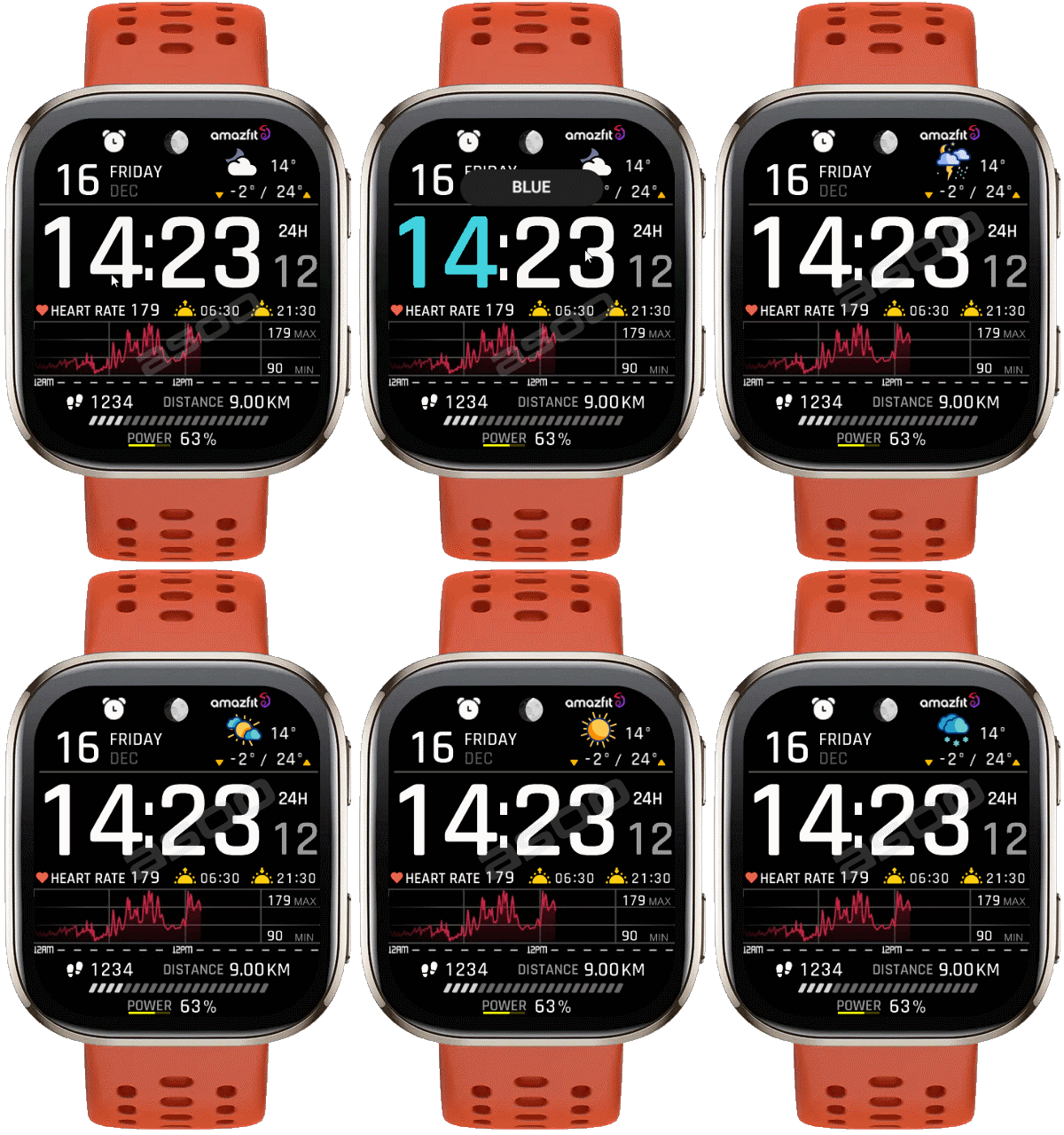
Bip 6 en
Si prega di notare che tutti i quadranti orologio disponibili su questo sito sono opere creative dei nostri utenti e non sono affiliati con marchi ufficiali o marchi registrati. Sono creati da fan per fan, ispirati da fenomeni culturali popolari, giochi, film o serie.
Il nostro obiettivo è fornire una piattaforma per la creatività e lo scambio, ma ci impegniamo anche a rispettare i diritti intellettuali. Se detiene i diritti d'autore su qualsiasi contenuto che ritiene infranga i suoi diritti su questo sito, contattaci per un'azione appropriata.

Descrizione
Note:
Thank SashaCX75 so much for Editor Version 15.3 betaIf without a good editor like this, It would be difficult to make this watchface. , so who want to donate please donate to sashacx75
https://www.buymeacoffee.com/sashacx75
or.
(Paypal: [email protected])
--------------------------------------------------------------------
This watch face made by refer to Refined_Chart Zepp Official Built-in
----------------------------------------------------------------------
I didn't design it , do not give credit to me.
----------------------------------------------------------------------- This watchface i do it for use by myself
- Please do not request any modify.
- This watch face, I will not accept any requests
- If have request in the comment i will not answer
- who is interest to modify, you can download and edit it by yourself.- Only tested on Amazfit BIP6
- If the owner requests it to be removed Admin can delete immediately.
Thank you.
---------------------------------------------------------------------------------------- AOD ( only Digital time )
- Shortcut open calendar ( click on day area )
- Open power save by click on center "Battery progress"
- Add ( Alarm , Bluetooth ) icon
- Change color Hour / Minute by click on center it.
---------------------------------------------------------------------------------------
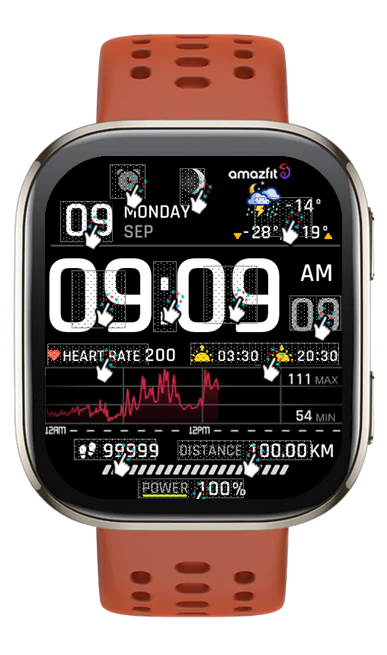
- Shortcuts
(1. Alarm , 2. sunrise/sunset , 3. temperature, 4. countdown ,
------------------------------------------------------------------------------------------
Image showing shortcuts area
https://i.postimg.cc/pT8rkYqL/All-Shortscut.png
https://files.catbox.moe/kgk982.png
04-12-2025 (1) (2) (3) (4)
- Upload Version Fixed some issue about preview selection screen on Version Animation Weather (4)
This is non-important issues, if you don't see the issue on your device then no need to re-download. (4)
- Upload Version Fixed a little issue about refresh Weather animation. (3)
Please Download again (3)
- Upload Version Weather animation (2)
- AOD ( only Digital time )
- Shortcut open calendar ( click on day area )
- Open power save by click on center "Battery progress"
- Add ( Alarm , Bluetooth ) icon
- Change color Hour / Minute by click on center it.
------------------------------------------------------------------------------
it works in 24h format.
for the 12 h format to work. must be enabled in phone settings. (settings-system-date and time-disable 24-hour format.)
------------------------------------------------------------------------------
Tag
Condividi questo quadrante
Commenti
Per rispondere ai commenti devi essere loggato .
Discussioni recenti della comunità
Request for Pokemon WatchFace convert [Bip 6]
I already did the steps but it didnt work, but still thank you for your response brother. Here's a manual method that I used to use: I install watchfaces from my Android ...
Request for Kingdom Come Deliverance 2 WatchFace convert [Bip 6]
Hi Everyone Can anyone help me to convert this watchface into Amazfit BIP 6 please? https://amazfitwatchfaces.com/t-rex/view/16282 Thank you so much! [...
Request to adapt or convert a Bip 5 watch face to Bip Max
..Woooooww!!!!!..wooooohaaaaa!!!!!..Thank you, thank you, thank you asoo!!!!!!...I was able to install the watch face on the Bip Max without any issues, and so far it’s working perfectly; I’ll let you know if any problems arise. Thanks ...
watchface for fitness [Bip 6]
Creating a watch face that displays a heart rate widget in Always-On Display (AOD) mode isn't difficult. However, I am unsure whether the display will strictly adhere to your custom settings—for instance, if you have configured the device...
Bip 6 custom watchface question
And if you need to create any images, just use a program to create them. Images must be saved in PNG-24. https://www.photopea.com/...
Amazfit watch sync sometimes losing data
I use the Zepp App on an Android phone with 10 Amazfit BIP 3 Pro watches to track offroad Motorcycle racers. It usually works well syncing the data, but about every other time I...
Requesting creation of watch face [Bip Max]
hello! thank you for replying this! i just tried with that tutorial on your link. but.. its too complicated for me........





Nessun commento. Commenta per primo.