Sector13+ ( Bip6 )
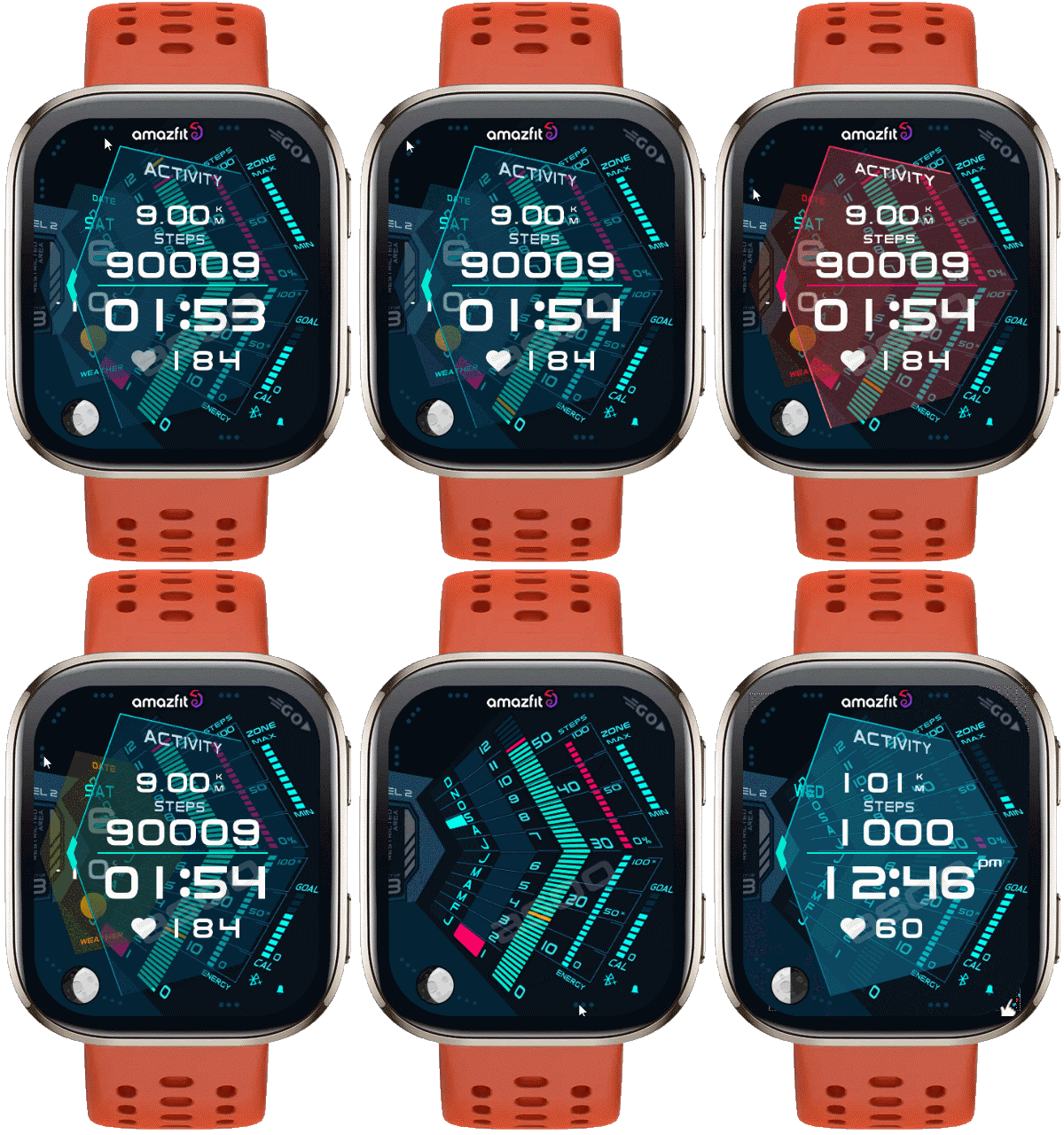
Bip 6 en
请注意,本网站上所有可用的手表面都是我们用户的创作作品,并且与任何官方品牌或商标无关。这些作品是由粉丝为粉丝创作的,灵感来源于流行文化现象、游戏、电影或电视剧。
我们的目标是提供一个创意交流的平台,同时我们也致力于尊重知识产权。如果您拥有本网站上任何内容的版权,并认为该内容侵犯了您的权利,请与我们联系以采取适当措施。

描述
Note:
Thank SashaCX75 so much for Editor Version 15If without a good editor like this, It would be difficult to make this watchface. , so who want to donate please donate to sashacx75
https://www.buymeacoffee.com/sashacx75
or.
(Paypal: [email protected])
Thank wax so much for code change background by click on screen
/gtr/view/27840
--------------------------------------------------------------------
This watchface is inspired by the design of many watchfaces.
Every image used to create it, I created the main image from scratch based on those design ideas and re-arranged it to my liking.
----------------------------------------------------------------------
Design besed on Sector13+
----------------------------------------------------------------------- This watchface i do it for use by myself
- Please do not request any modify.
- This watch face, I will not accept any requests
- If have request in the comment i will not answer
- who is interest to modify, you can download and edit it by yourself.- Only tested on Amazfit Bip6
- If the owner requests it to be removed Admin can delete immediately.
Thank you.
---------------------------------------------------------------------------------------- AOD ( Only Activity Windows)
- hidden and show Activity Windows by click on 3dots below
- hidden and show weather Windows by click on 9 o'clock area
- change color style by click on 3dots at the left logo ( Amazfit )
- change color Activity windows by click on 3dots at top left corner
- change color Weather Windows by click on 3dots at the top left
- Add ( Alarm , Bluetooth ) icon
- In the real watch face will not have a watermark ( The watermark is only to inform you that the sample image is created by me. )
---------------------------------------------------------------------------------------
- Shortcuts
(1. Alarm , 2. sunrise/sunset , 3. temperature, 4. countdown , 5.PAI , 6. Steps , 7. Pulse , 8. SP02 , 9.Stopwatch , 10.calendar , Power Save
------------------------------------------------------------------------------------------
Image showing shortcuts area
06-09-2025
- AOD ( Only Activity Windows)
- hidden and show Activity Windows by click on 3dots below
- hidden and show weather Windows by click on 9 o'clock area
- change color style by click on 3dots at the left logo ( Amazfit )
- change color Activity windows by click on 3dots at top left corner
- change color Weather Windows by click on 3dots at the top left
- Add ( Alarm , Bluetooth ) icon
This watchface uses the layout of "Sector13+" to create. Some layout changes have been made to add elements. Therefore, this watchface will have a different layout from the original, including different functionality and font and logo changes.
If the dial is complained about in any case, please delete it immediately by the admin.
- In the real watch face will not have a watermark ( The watermark is only to inform you that the sample image is created by me. )
If who cares about the power consumption of the watch, I do not recommend using this watchface I made because this watchface consumes more power than usual about 1%-2% per day.
------------------------------------------------------------------------------it works in 24h format.
for the 12 h format to work. must be enabled in phone settings. (settings-system-date and time-disable 24-hour format.)
------------------------------------------------------------------------------
标签
分享此表盘
评论
您需要登录才能发布或回复评论。
近期 社区论坛 讨论贴
Request for Pokemon WatchFace convert [Bip 6]
I already did the steps but it didnt work, but still thank you for your response brother. Here's a manual method that I used to use: I install watchfaces from my Android ...
Request for Kingdom Come Deliverance 2 WatchFace convert [Bip 6]
Hi Everyone Can anyone help me to convert this watchface into Amazfit BIP 6 please? https://amazfitwatchfaces.com/t-rex/view/16282 Thank you so much! [...
Request to adapt or convert a Bip 5 watch face to Bip Max
..Woooooww!!!!!..wooooohaaaaa!!!!!..Thank you, thank you, thank you asoo!!!!!!...I was able to install the watch face on the Bip Max without any issues, and so far it’s working perfectly; I’ll let you know if any problems arise. Thanks ...
watchface for fitness [Bip 6]
Creating a watch face that displays a heart rate widget in Always-On Display (AOD) mode isn't difficult. However, I am unsure whether the display will strictly adhere to your custom settings—for instance, if you have configured the device...
Bip 6 custom watchface question
And if you need to create any images, just use a program to create them. Images must be saved in PNG-24. https://www.photopea.com/...
Amazfit watch sync sometimes losing data
I use the Zepp App on an Android phone with 10 Amazfit BIP 3 Pro watches to track offroad Motorcycle racers. It usually works well syncing the data, but about every other time I...
Requesting creation of watch face [Bip Max]
hello! thank you for replying this! i just tried with that tutorial on your link. but.. its too complicated for me........





没有评论。欢迎对此第一个发表评论。