TR-163 ( Bip 6)
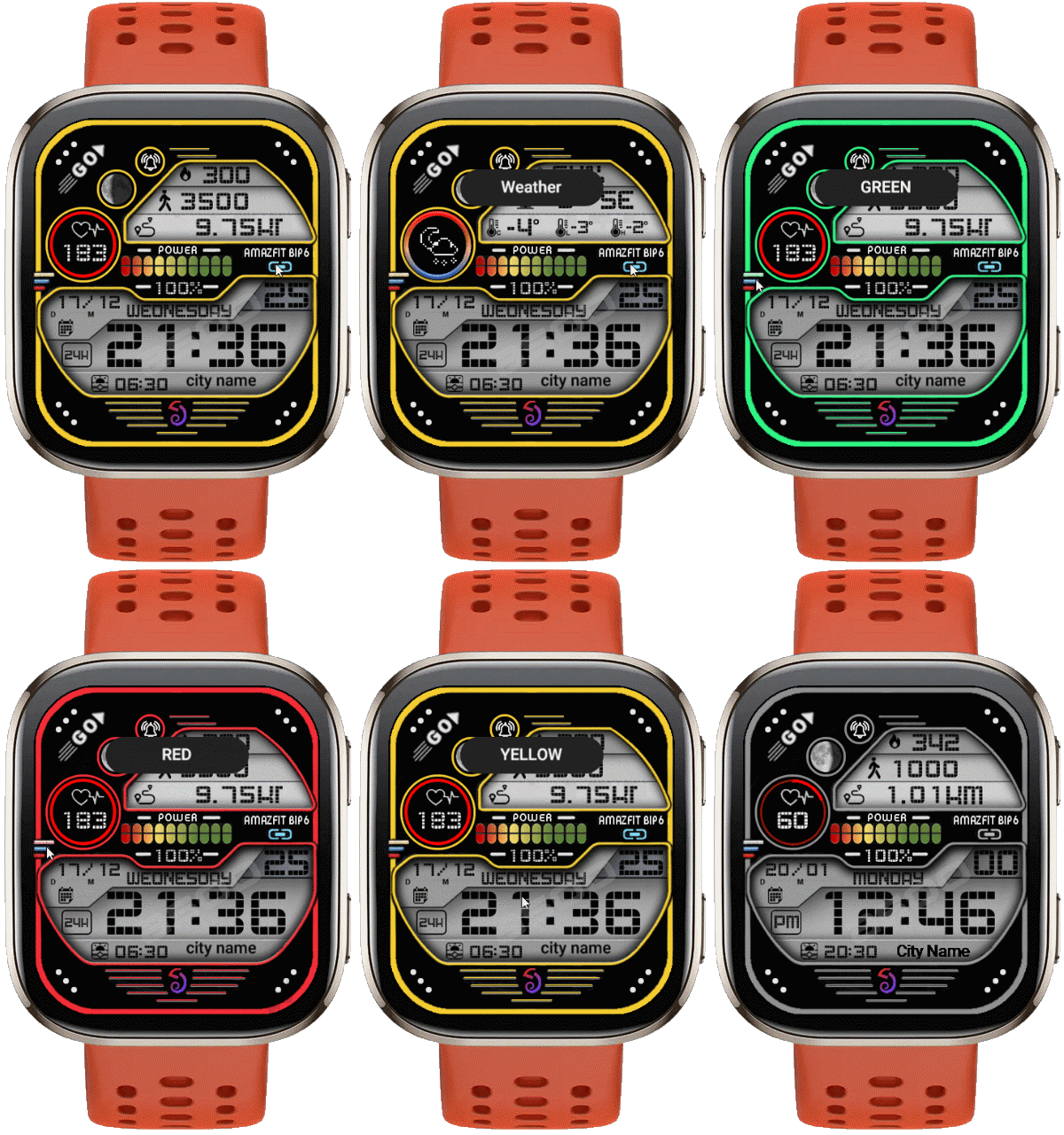
Bip 6 en
Зверніть увагу, що всі циферблати, доступні на цьому сайті, є творчими роботами наших користувачів і не пов'язані з офіційними брендами або торговими марками. Вони створюються шанувальниками для шанувальників, надихаються популярними культурними феноменами, іграми, фільмами, або серіалами.
Наша мета - надати платформу для творчості та обміну, але ми також прагнемо поважати інтелектуальні права. Якщо ви володієте авторськими правами на будь-який контент, який, на вашу думку, порушує ваші права на цьому сайті, будь ласка, зв'яжіться з нами для вжиття відповідних заходів.

Опис
Note:
Thank SashaCX75 so much for Editor Version 14.1.1If without a good editor like this, It would be difficult to make this watchface. , so who want to donate please donate to sashacx75
https://www.buymeacoffee.com/sashacx75
or.
(Paypal: [email protected])
Thank wax so much for code change background by click on screen
/gtr/view/27840
--------------------------------------------------------------------
This watchface is inspired by the design of many watchfaces.
Every image used to create it, I created the main image from scratch based on those design ideas and re-arranged it to my liking.
----------------------------------------------------------------------
Design besed on zk_tr163
----------------------------------------------------------------------- This watchface i do it for use by myself
- Please do not request any modify.
- This watch face, I will not accept any requests
- If have request in the comment i will not answer
- who is interest to modify, you can download and edit it by yourself.- Only tested on Amazfit Bip6
- If the owner requests it to be removed Admin can delete immediately.
Thank you.
---------------------------------------------------------------------------------------- AOD ( No seconds )
- Shortcut open calendar ( click on icon calendar)
- Open power save by click on Power Progress
- Add ( Alarm , Bluetooth ) icon
- Click icon below amazfit bip 6 for switch Weather and Activity
- Click on 3 lines at the left for change color
- In the real watch face will not have a watermark ( The watermark is only to inform you that the sample image is created by me. )
---------------------------------------------------------------------------------------
- Shortcuts
(1. Alarm , 2. sunrise/sunset , 3. temperature, 4. countdown , 5.PAI , 6. Steps , 7. Pulse , 8. SP02 , 9.Stopwatch , 10.calendar , Power Save
------------------------------------------------------------------------------------------
Image showing shortcuts area
21-07-2025
- AOD ( No seconds )
- Shortcut open calendar ( click on icon calendar )
- Open power save by click on Power Progress
- Add ( Alarm , Bluetooth ) icon
- Click icon below amazfit bip 6 for switch Weather and Activity
- Click on 3 lines at the left for change color
This watchface uses the layout of "zk_tr163" to create. Some layout changes have been made to add elements. Therefore, this watchface will have a different layout from the original, including different functionality and font and logo changes.
If the dial is complained about in any case, please delete it immediately by the admin.
Due to the latest FW of Bip6 there is a change in the weather icon display, it will not be able to display the weather night icon, so I have implemented leXxiR's weather icon switching script to fix this issue, and I would like to thank leXxiR for this useful scirpt deck.
- In the real watch face will not have a watermark ( The watermark is only to inform you that the sample image is created by me. )
------------------------------------------------------------------------------
it works in 24h format.
for the 12 h format to work. must be enabled in phone settings. (settings-system-date and time-disable 24-hour format.)
------------------------------------------------------------------------------
Теги
Поділиться цим циферблатом
Коментарі
Вам необхідно увійти, щоб залишати коментарі або відповідати на них.
Недавні обговорення в спільноті
Request for Pokemon WatchFace convert [Bip 6]
I already did the steps but it didnt work, but still thank you for your response brother. Here's a manual method that I used to use: I install watchfaces from my Android ...
Request for Kingdom Come Deliverance 2 WatchFace convert [Bip 6]
Hi Everyone Can anyone help me to convert this watchface into Amazfit BIP 6 please? https://amazfitwatchfaces.com/t-rex/view/16282 Thank you so much! [...
Request to adapt or convert a Bip 5 watch face to Bip Max
..Woooooww!!!!!..wooooohaaaaa!!!!!..Thank you, thank you, thank you asoo!!!!!!...I was able to install the watch face on the Bip Max without any issues, and so far it’s working perfectly; I’ll let you know if any problems arise. Thanks ...
watchface for fitness [Bip 6]
Creating a watch face that displays a heart rate widget in Always-On Display (AOD) mode isn't difficult. However, I am unsure whether the display will strictly adhere to your custom settings—for instance, if you have configured the device...
Bip 6 custom watchface question
And if you need to create any images, just use a program to create them. Images must be saved in PNG-24. https://www.photopea.com/...
Amazfit watch sync sometimes losing data
I use the Zepp App on an Android phone with 10 Amazfit BIP 3 Pro watches to track offroad Motorcycle racers. It usually works well syncing the data, but about every other time I...
Requesting creation of watch face [Bip Max]
hello! thank you for replying this! i just tried with that tutorial on your link. but.. its too complicated for me........





Thank for you tested on Active2 Square 15.08.2025 06:54:01 Скарга
I am not sure why it's not work on your Bip6 I test install with QR it's can installed normally
I you can not install Please try to refresh page and try again.
This is image from my tested :