GVX1 ( Bip6)
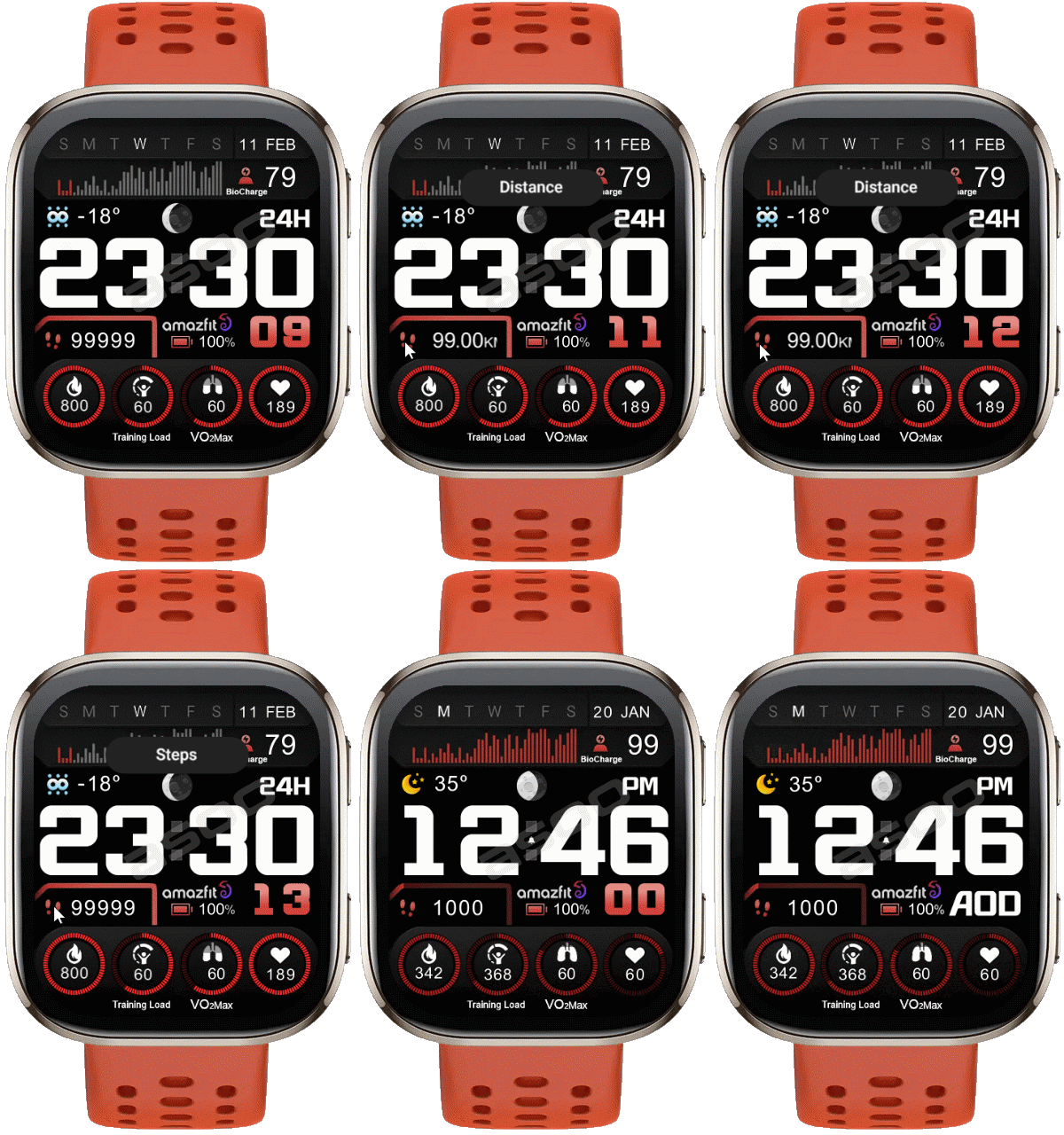
Bip 6 en
Please note that all watch faces available on this site are creative works by our users and are not affiliated with official brands or trademarks. They are created by fans for fans, inspired by popular cultural phenomena, games, movies, or series.
Our goal is to provide a platform for creativity and exchange, but we also strive to respect intellectual rights. If you hold copyright to any content that you believe infringes your rights on this site, please contact us for appropriate action.

Description
Note:
Thank SashaCX75 so much for Editor Version 14.1.1If without a good editor like this, It would be difficult to make this watchface. , so who want to donate please donate to sashacx75
https://www.buymeacoffee.com/sashacx75
or.
(Paypal: [email protected])
Thank wax so much for code change background by click on screen
/gtr/view/27840
--------------------------------------------------------------------
This watchface is inspired by the design of many watchfaces.
Every image used to create it, I created the main image from scratch based on those design ideas and re-arranged it to my liking.
----------------------------------------------------------------------
Design besed on V e n u_X1
----------------------------------------------------------------------- This watchface i do it for use by myself
- Please do not request any modify.
- This watch face, I will not accept any requests
- If have request in the comment i will not answer
- who is interest to modify, you can download and edit it by yourself.- Only tested on Amazfit Bip6
- If the owner requests it to be removed Admin can delete immediately.
Thank you.
---------------------------------------------------------------------------------------- AOD ( No seconds )
- Shortcut open calendar ( click on Day)
- Open power save by click on Power Progress
- Add ( Alarm , Bluetooth ) icon
- Click steps icon for switch Steps and Distance
- In the real watch face will not have a watermark ( The watermark is only to inform you that the sample image is created by me. )
---------------------------------------------------------------------------------------
- Shortcuts
(1. Alarm , 2. sunrise/sunset , 3. temperature, 4. countdown , 5.PAI , 6. Steps , 7. Pulse , 8. SP02 , 9.Stopwatch , 10.calendar , Power Save
------------------------------------------------------------------------------------------
Image showing shortcuts area
11-02-2026
- Upload Version Biocharge 3.01 ( Fixed Vo2Max's "image Progress" )
09-02-2026
- No any update Only upload old version 2.01 Because have some user report his Bip6 do not have Biocharge so if how do not have biocharge please use Version 2.01
But Who after Update FW to 3.10.0.1 and have Biocharge in you watch Please User Versinv 3.0 ( Biocharge )
08-02-2026 (1) (2)
- Upload Version Change logo to Amazfit (2)
- Upload Version BioCharge
Because the new firmware ( V. 3.10.0.1 ) for the Bip6 changed "readiness" to "BioCharge," the watch face has been modified in that section.
- Delete old version
- remove script the weather night icon because new FW fixed this issue
https://i.postimg.cc/jj3bRrR8/1770538498-559c7ab958.gif
16-07-2025 (1) (2)
- upload version 2.01 ( add shortcut readiness ) (2)
- AOD ( No seconds )
- Shortcut open calendar ( click on Day)
- Open power save by click on Power Progress
- Add ( Alarm , Bluetooth ) icon
- Click steps icon for switch Steps and Distance
This watchface I make for test function "Readiness" , "Training Load" , "VO2Max"
- if you want to use Readiness you must to set open Readiness on you watch or App Zepp
- VO2max : Must select an exercise that has a VO2max measurement set.
When you finish the exercise and the program concludes that you used Vo2max, it will show the value on the watch face. For example, running (but you must run according to the criteria that use Vo2max).
This watchface uses the layout of "V e n u_X1" to create. Some layout changes have been made to add elements. Therefore, this watchface will have a different layout from the original, including different functionality and font and logo changes.
If the dial is complained about in any case, please delete it immediately by the admin.
.:. In BioC version had remove this script, because FW fixed this issue already
- In the real watch face will not have a watermark ( The watermark is only to inform you that the sample image is created by me. )
------------------------------------------------------------------------------
it works in 24h format.
for the 12 h format to work. must be enabled in phone settings. (settings-system-date and time-disable 24-hour format.)
------------------------------------------------------------------------------
Tags
Share this face
Comments
You need to be logged in to post or reply to comments.
Recent community discussions
Request for Pokemon WatchFace convert [Bip 6]
I already did the steps but it didnt work, but still thank you for your response brother. Here's a manual method that I used to use: I install watchfaces from my Android ...
Request for Kingdom Come Deliverance 2 WatchFace convert [Bip 6]
Hi Everyone Can anyone help me to convert this watchface into Amazfit BIP 6 please? https://amazfitwatchfaces.com/t-rex/view/16282 Thank you so much! [...
Request to adapt or convert a Bip 5 watch face to Bip Max
..Woooooww!!!!!..wooooohaaaaa!!!!!..Thank you, thank you, thank you asoo!!!!!!...I was able to install the watch face on the Bip Max without any issues, and so far it’s working perfectly; I’ll let you know if any problems arise. Thanks ...
watchface for fitness [Bip 6]
Creating a watch face that displays a heart rate widget in Always-On Display (AOD) mode isn't difficult. However, I am unsure whether the display will strictly adhere to your custom settings—for instance, if you have configured the device...
Bip 6 custom watchface question
And if you need to create any images, just use a program to create them. Images must be saved in PNG-24. https://www.photopea.com/...
Amazfit watch sync sometimes losing data
I use the Zepp App on an Android phone with 10 Amazfit BIP 3 Pro watches to track offroad Motorcycle racers. It usually works well syncing the data, but about every other time I...
Requesting creation of watch face [Bip Max]
hello! thank you for replying this! i just tried with that tutorial on your link. but.. its too complicated for me........





This is the best watch face. Thank you so much for making this. 16.07.2025 07:27:48 Complaint
I got it 16.07.2025 11:27:45 Complaint
You must select an exercise that has a VO2max measurement set.
When you finish the exercise and the program concludes that you used Vo2max, it will show the value on the watch face.
For example, running (but you must run according to the criteria that use Vo2max). 16.07.2025 11:45:41 Complaint
You can do it by yourself by use program "Watch face editor for Amazfit watch on ZeppOS"
/forum/viewtopic.php?p=20823#p20823 18.07.2025 04:02:44 Complaint
I don't know how to do that :/
Could you help me? 18.07.2025 04:41:56 Complaint
If you want to request to modify, please use the related forum 18.07.2025 08:30:02 Complaint
If it is not related to the request, you can ask on comment or if it is convenient, I recommend that you post a question in the related forum. 23.07.2025 12:23:39 Complaint
Yes, this watchface is Bip6's watchface 05.09.2025 03:55:07 Complaint
I'm not sure if BioCharge is compatible with the Bip6.
As far as I know, it's unlikely to be available on the Bip6, so I can't comment on that. And I haven't used it either. 07.02.2026 14:18:32 Complaint
Today I received a new firmware update, and
the readiness has been changed to BioCharge. I'll test it out to see what it can do.
If there are any changes, I will update the download. 08.02.2026 08:56:54 Complaint
Thank for you report , I forgot to change it
But now you can download Version change logo to Amazfit on Download list 08.02.2026 18:10:05 Complaint
I'm not sure which FW version you're using,
but on my Bip6 after the latest FW update, 3.10.0.1,
it has changed its readiness to BioCharge.
You can see it in my Bip6 screenshot.
It definitely has BioCharge.
If you haven't received the update yet, you may have to wait until the update reaches your region.
Or, if your region's firmware hasn't been switched to BioCharge, you'll have to revert to version 2.x. I'll upload a new version later. 09.02.2026 06:22:45 Complaint
Firmware 3.10.0.1 ( 8-02-2026 )
Welcome to Amazfit Bip 6, The features of this upgrade are:
1. Upgraded the "Readiness" feature to BioCharge.
2. Updated workout voice prompts.
3. Automatically return to the Watch Face after clearing all notifications.
4. Improved Weather data source and refresh logic.
5. Optimized the Sleep Score algorithm.
6. Optimized the display of the brightness adjustment icon in the Control Center.
7. Fixed other known issues and improved system stability. 09.02.2026 06:40:29 Complaint
Thank you so much for the update, without a doubt this is one of the most beautiful watch faces for the Bip6, however with the BioCharge update I had lost the readlines function. I like watch faces that have the heart rate graph on the screen. Thanks again for the update. 09.02.2026 17:15:56 Complaint
I'm not sure what you mean by "readlines".
Do you mean Readiness? If so, it's been replaced by BioCharge.
That's part of the firmware; I can't do anything about it.
As far as I understand, regarding the features | **Readiness** | **BioCharge** |
They both represent physical readiness, but they differ as follows:
Readiness = “How ready am I to start today?”
BioCharge = “How much energy do I have right now?”
Regarding the heart rate graph, as far as I remember, this watch face was never in this section, and I probably wouldn't do it because there's no layout to place it in.
And the heart rate graph can be viewed via a shortcut, which shows more accurate values than the graph displayed on the watch face. 09.02.2026 18:37:10 Complaint
As far as I know, you don't need to install an app. When you update the firmware, it will be on the watch immediately, and a Biocharge menu will be added to the zapp app on your phone.
Therefore, if you have not updated your firmware to version 3.10.0.1, you will not be able to use Biocharge.
If you do not have firmware 3.10.0.1, it means the system has not yet sent you the update.
You will have to wait until the system sends you the update to install this new firmware.
Have you met the Biocharge requirements?
- You must check your heart rate at least every 5 minutes.
- Stress measurement must be enabled.
- Sleep monitoring assistant must be enabled.
If you are unsure, press the Biocharge icon. If you haven't met the requirements,
it will guide you through the steps. You must follow those steps first.
Once you have met these requirements, if it still doesn't appear, press the Biocharge shortcut again
to refresh, or wait for the Biocharge value to change. From that page, the Biocharge value will be displayed on the watch face.
Or in some cases, if the overall data is insufficient to estimate the biocharge value, it may not be displayed on the watchface. You may need to wear the watch continuously for at least 24 hours to obtain enough data for biocharge assessment (you must wear it while sleeping for accurate results).
Therefore, regarding this part, I don't think it's related to this watch face at all, because the picture I sent confirms that it works on my Bip6 with the firmware updated.
So, if you want to ask about the usage or requirements of Biocharge, I recommend using the relevant forum to ask your question.
So, I will not answer any more questions in this topic regarding about biocharge in this watch face. 10.02.2026 02:26:43 Complaint
I am so sorry. 10.02.2026 17:40:31 Complaint
Congratulations, that you can now use Biocharge. 11.02.2026 18:04:23 Complaint