Basic Digital Animation motion ( Bip 6 )
Bip 6 en
Tenga en cuenta que todos los diseños de relojes disponibles en este sitio son obras creativas de nuestros usuarios y no están afiliados con marcas o marcas registradas oficiales. Son creados por y para fans, inspirados en fenómenos culturales populares, juegos, películas o series.
Nuestro objetivo es proporcionar una plataforma para la creatividad e intercambio, pero también nos esforzamos por respetar los derechos intelectuales. Si posee derechos de autor sobre cualquier contenido que cree infringe sus derechos en este sitio, contáctenos para tomar medidas apropiadas.

Descripción
Note:
Thank SashaCX75 so much for Editor 13.2If without a good editor like this, It would be difficult to make this watchface. , so who want to donate please donate to sashacx75
https://www.buymeacoffee.com/sashacx75
or.
(Paypal: [email protected])
-----------------------------------------------------------------------------------------------------
Thank SashaCX75 so much for help fixed
custom script about Switch 24 , 12
-----------------------------------------------------------------------------------------------------
Thank wax so much for code change background by click on screen
/gtr/view/27840
--------------------------------------------------------------------
This watch face I design and made by myself
----------------------------------------------------------------------
- This watchface i do it for use by myself
- Please do not request any modify.
- This watch face, I will not accept any requests
- If have request in the comment i will not answer
- who is interest to modify, you can download and edit it by yourself.- Only tested on Bip 6
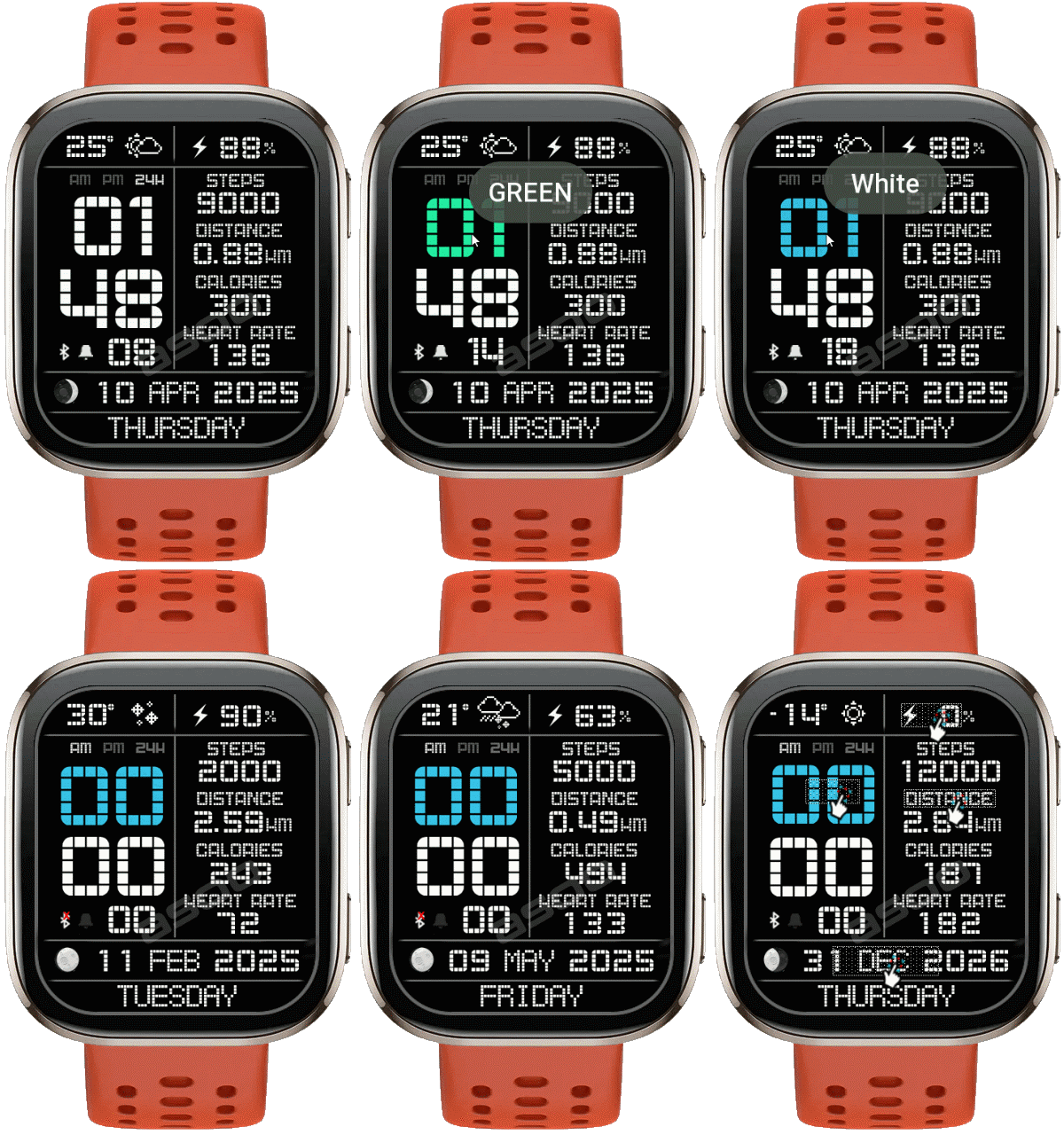
---------------------------------------------------------------------------------------- Change Color Digital Hour by Click on center digital hour
- AOD ( Animation Digital Second (save battery) , Screen show only white stye )
- Open calendar by click on month area
- Open sports list by click on distance text
- Open power save click on Battery icon
---------------------------------------------------------------------------------------
- Shortcuts
(1. Alarm , 2. sunrise/sunset , 3. temperature, 4. countdown , 5.PAI , 6. Steps , 7. Pulse , 8. SP02 , 9.Stopwatch , 10.calendar , Sports list , Power Save
--------------------------------------------------------------------------------------------------------------------
Image showing shortcuts area
05-12-2025
- Upload version No animation
05-12-2025
- Upload version Digital not move
09-04-2025
- Ported
- Change Color Digital Hour by Click on center digital hour
- AOD ( Animation Digital Second (save battery) , Screen show only white stye )
- Open calendar by click on month area
- Open sports list by click on distance text
- Open power save click on Battery icon
- This watchface I make for test my script Animation motion on "digital time " on Bip 6
-
This watchface uses more power than usual.
If anyone is serious about batteries, it is not recommended to use this.
When the screen turns off, time updates give to the "animation function" will stop for Save energy When the screen turn on, it will update again in no more than 1 second.
Test zeus create Bip6
------------------------------------------------------------------------------
it works in 24h format.
for the 12 h format to work. must be enabled in phone settings. (settings-system-date and time-disable 24-hour format.)
------------------------------------------------------------------------------
Etiquetas
Comparte este watchface
Comentarios
You need to be logged in to post or reply to comments.
Discusiones recientes de la comunidad
Request for Pokemon WatchFace convert [Bip 6]
I already did the steps but it didnt work, but still thank you for your response brother. Here's a manual method that I used to use: I install watchfaces from my Android ...
Request for Kingdom Come Deliverance 2 WatchFace convert [Bip 6]
Hi Everyone Can anyone help me to convert this watchface into Amazfit BIP 6 please? https://amazfitwatchfaces.com/t-rex/view/16282 Thank you so much! [...
Request to adapt or convert a Bip 5 watch face to Bip Max
..Woooooww!!!!!..wooooohaaaaa!!!!!..Thank you, thank you, thank you asoo!!!!!!...I was able to install the watch face on the Bip Max without any issues, and so far it’s working perfectly; I’ll let you know if any problems arise. Thanks ...
watchface for fitness [Bip 6]
Creating a watch face that displays a heart rate widget in Always-On Display (AOD) mode isn't difficult. However, I am unsure whether the display will strictly adhere to your custom settings—for instance, if you have configured the device...
Bip 6 custom watchface question
And if you need to create any images, just use a program to create them. Images must be saved in PNG-24. https://www.photopea.com/...
Amazfit watch sync sometimes losing data
I use the Zepp App on an Android phone with 10 Amazfit BIP 3 Pro watches to track offroad Motorcycle racers. It usually works well syncing the data, but about every other time I...
Requesting creation of watch face [Bip Max]
hello! thank you for replying this! i just tried with that tutorial on your link. but.. its too complicated for me........





Upload Version non-moving , Now you can see it in the list Download 05.12.2025 17:01:57 Queja
Version no animation The Digital time will not moving 05.12.2025 18:04:17 Queja
Glad you like it. 07.12.2025 17:54:53 Queja
your welcome 07.12.2025 17:54:18 Queja
You can modify that you want , by using the editing program:
"Watch face editor for Amazfit watch on ZeppOS"
/forum/viewtopic.php?p=11643#p11643
Or if you want to request modify, please use the relevant forum.
The comment section is not convenient for handling requests.
PS. Please read the description as well. 11.12.2025 06:49:05 Queja
The BIP6 watch face is in .zip format, not zwf.
If you need the .zip file, go to download and click on the file name you want, and the .zip file will be downloaded to your computer. 11.12.2025 14:07:27 Queja
It's difficult to explain this in the comments section due to several posting restrictions.
So , next time, if you need to ask a question unrelated to this watchface, please use the forum.
/forum/viewforum.php?f=6 11.12.2025 14:13:17 Queja