Black Grid

Balance 2 el, en
Please note that all watch faces available on this site are creative works by our users and are not affiliated with official brands or trademarks. They are created by fans for fans, inspired by popular cultural phenomena, games, movies, or series.
Our goal is to provide a platform for creativity and exchange, but we also strive to respect intellectual rights. If you hold copyright to any content that you believe infringes your rights on this site, please contact us for appropriate action.

Description
The eight columns in the heart rate chart represent the 24-hour period. Each column represents 3 hours. it is the average heart rate over the three-hour period. The heart icon also change colour based pulse. Along the perimeter is the 24-hour scale, indicated by the yellow colour. The perimeter turns yellow as the day progresses, completing its cycle at the 12, which also marks the end of the day. Tap in the middle of time to show or hide analog seconds. There are shortcuts. English and Greek language.
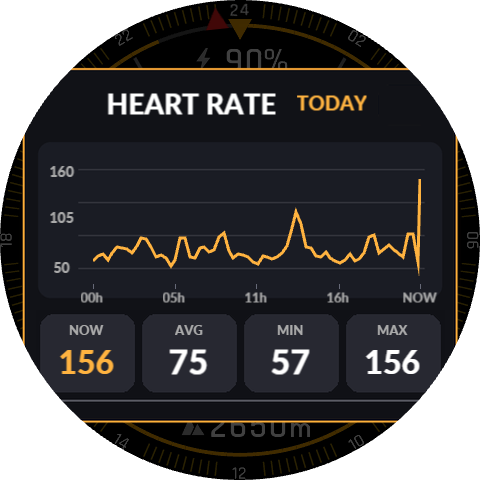
Update: Colors have been added to the hour, the minutes, and the outer ring. To change the color of the outer ring, tap the arrow located above and below the number 24. To change the color of the hour and the minutes, tap on the hour or the minutes, respectively. A new heart rate graph has been created, featuring the color for each zone, similar to the Zepp app.
A separate page has been added, displaying the heart rate graph and the average heart rate. To access the graph page, tap on the heart rate chart area. Tapping on the heart rate reading will take you to the heart rate section within the Zepp app.
Keep in mind that because it’s a large and heavy project, it takes a little while to load onto the watch, but it’s working very well so far. If you spot any errors, let me know in the comments below.
The new file is the black_grid_pai_final_v23_ring_colors
Tags
Share this face
Comments


You need to be logged in to post or reply to comments.
Recent community discussions
Petal_V39_Darker_Palette_Weather
@taw_bip This isn’t quite relevant to the topic of this discussion. But here are a few suggestions regarding your dial. The colour of the text changes, but the icons remain w...
Change target steps internally (Balance 2) using JS?
Great news, it works!! Thank you very much. I've been able to adapt it to my needs. You're even better than my friend GPT (didn't help at all). I have tons of watch faces that I want to adapt....
Flex Dashboard Balance 2
I sent it to you to take a look, simply because you’re experienced and know how to read script code. I don’t have the knowledge to do it myself. I don't have the any doub...
GlucoseX Clarity Round balance 2
I'll chip in with my contribution to this thread as well, but I have no way to test if the hourly chart works. So, if anyone is interested in testing it and tweaking it if necessary, here is your chance. Fixed pulse graf 0...
Watch Face for Active Max conversion possible?
Thank you, I will give it a try....
Racing Chronograph Watch Face Request [Active Max]
Hello asoo, Thank you so much for all the work you've put into creating this watch face, and I'm really sorry I didn't see your message earlier. Unfortunately, I haven't b...
request for Balance 2, Garmin clone
This is my vision for it, though I am not 100% certain that it will be functional. https://i.postimg.cc/qMcQjCMt/standalone-Balamin.gif Down: https://amazfitwatchface...


