MechDash

Balance 2 Click here for details.
multilingual, de, en, es, fr, it, ja, pl, pt, th, zh
Please note that all watch faces available on this site are creative works by our users and are not affiliated with official brands or trademarks. They are created by fans for fans, inspired by popular cultural phenomena, games, movies, or series.
Our goal is to provide a platform for creativity and exchange, but we also strive to respect intellectual rights. If you hold copyright to any content that you believe infringes your rights on this site, please contact us for appropriate action.

Description
MechDash | Dashboard Layout & Ultimate Customization
Welcome to the MechDash watchface! Experience a sleek dashboard layout, pure solid aesthetics, deep personalization, and extreme battery efficiency. Enjoy testing the core features completely for FREE during your 24-hour trial!
Visit My Website: watch.homecmf.com
Highlights & Smart Features
• 12 Auto-Languages: Automatically adapts to your watch's system language without any manual setup!
• Pure Aesthetics: We've removed all messy gradients and background lines for a clean, highly readable dashboard look. Choose from 3 premium solid background styles (configurable in the AOD menu).
• Dashboard Data Grid: Freely configure your layout with 5 mutually exclusive custom data blocks and 1 Top ARC progress indicator, alongside a large vertical time display on the left.
• Gestures & Shortcuts: Short press any data indicator to open its app, or double-tap the Air Pressure metric to switch display units. Long-press any custom block or the Top ARC to quickly cycle through metrics. Long-press the bottom-right "Month" area to toggle the Lunar calendar (Chinese UI only).
• Minimalist Mode & Power Saving: Retains a functional outer compass. On the main screen, long-press the bottom-left "Seconds" area to quickly hide the seconds and compass—instantly pausing sensors for extreme battery saving!
• On-Watch Profiles: Save and load up to 3 of your favorite layout combinations directly on the watch with a single tap in the Settings Management menu.
• Smart AOD & Toggles: Features a pure Always-On Display mode that transitions seamlessly back to live seconds upon waking up. A dedicated "Shortcut Settings" menu is also built-in to easily manage your quick toggles.
Deep Customization & 27 Full Metrics
• 27 Full Data Metrics: Track everything you need! Choose from a massive library of 27 metrics for the 5 custom blocks (including Heart Rate, Battery, Steps, Weather, SpO2, Sleep, Stress, Altitude, Air Pressure, BioCharge, VO2 Max, Recovery Time, Fat Burn, Floors, Wind, AQI, UV, Next Sun, and much more). The Top ARC supports 10 core progress metrics.
• Deep On-Watch Settings: Long-press the bottom edge to open the Main Menu. Customize your dashboard by choosing from 3 Time colors (White, Sand Gold, Red) and 2 Data Metric colors (White, Sand Gold). You can even independently adjust the background color block behind the Date!
Trial Rules (24-Hour Free Trial)
• During Trial: Enjoy layout access and explore the watchface capabilities for 24 hours.
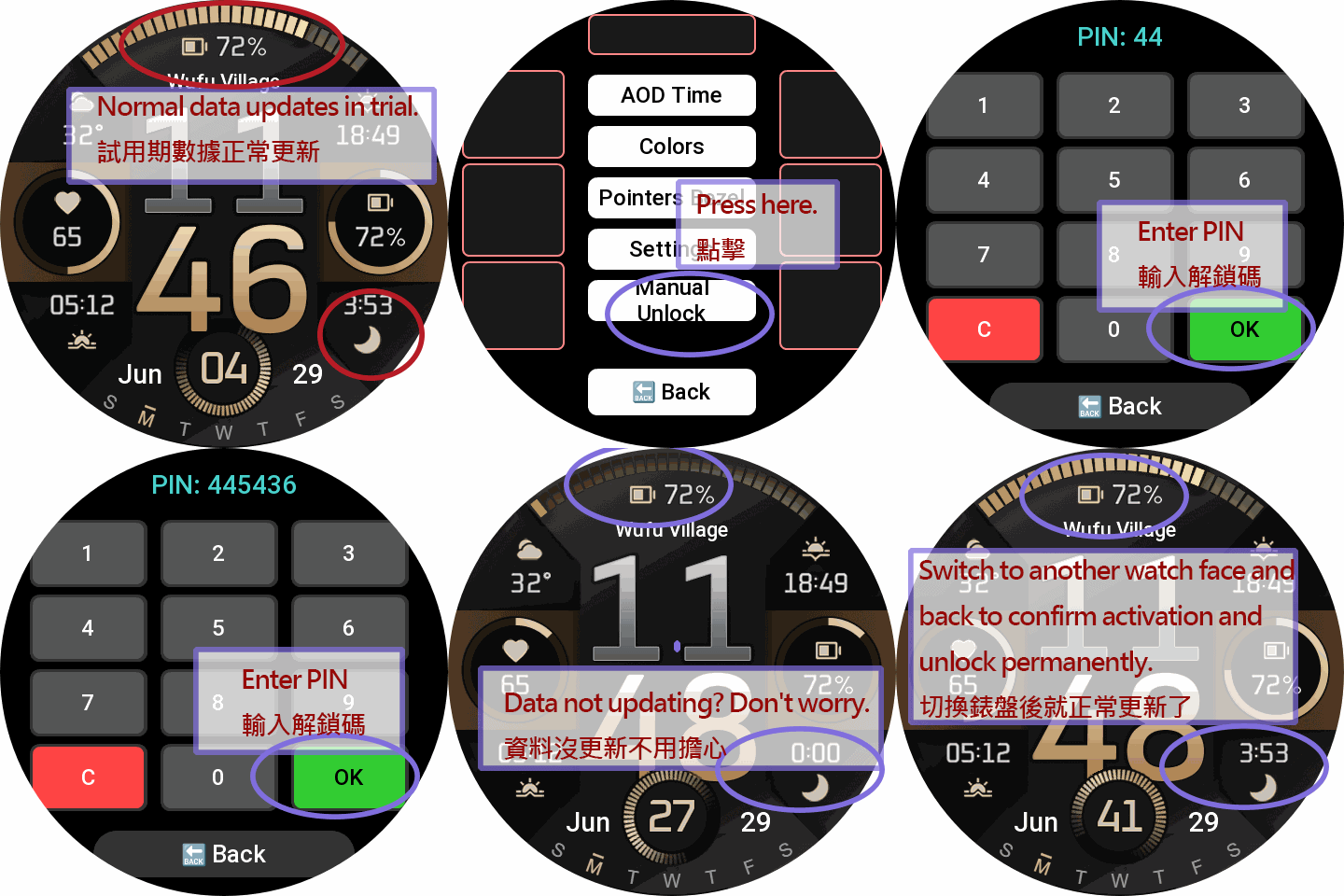
• Post-Trial Lock: After 24 hours, touch controls and sensors will be completely frozen to save power. The watchface locks to display only basic Time, Date, and essential items. Tapping anywhere will prompt the unlock screen.
PRO Unlock (Permanent Full Access)
Sponsoring permanently unlocks the ultimate modular experience:
• All 27 Metrics Unlocked: Gain full access to all 27 advanced PRO metrics.
• Full Area Swapping: Unrestricted metric swapping is permanently unlocked for ALL 5 custom dynamic blocks and the Top ARC!
• Complete Settings Access: Permanently unlock all color layouts, solid backgrounds, and save profiles.
How to Unlock Permanently:
1. Visit watch.homecmf.com (or scan the QR Code in the watch settings menu).
2. Make a small coffee donation to support watchface development.
3. Check your email! Follow the instructions provided to retrieve your unique 6-digit Unlock PIN.
4. Enter the PIN on your watch to permanently unlock all features!
Tags
Share this face
Comments
You need to be logged in to post or reply to comments.
Recent community discussions
Flex Dashboard Balance 2
Thank you both taw_bip and asoo for your help. The watch face created by taw_bip is very good, but could someone ple...
GlucoseX Clarity Round balance 2
I'll chip in with my contribution to this thread as well, but I have no way to test if the hourly chart works. So, if anyone is interested in testing it and tweaking it if necessary, here is your chance. Fixed pulse graf 0...
Watch Face for Active Max conversion possible?
Thank you, I will give it a try....
Racing Chronograph Watch Face Request [Active Max]
Hello asoo, Thank you so much for all the work you've put into creating this watch face, and I'm really sorry I didn't see your message earlier. Unfortunately, I haven't b...
request for Balance 2, Garmin clone
This is my vision for it, though I am not 100% certain that it will be functional. https://i.postimg.cc/qMcQjCMt/standalone-Balamin.gif Down: https://amazfitwatchface...
Request for Active 3 premium
Fair enough. Have a very nice day. Thank you again for your kindest efforts. Regards....
Request to make a watchface tor Active 3 Premium
I confirm in editor don't show weather font but in zepp player and real watch show weather font. I don't edit custom script but i don't find until now something don't fit. [...





No comments. Be the first to comment.