OSW-852H ( Amazfit Balance )
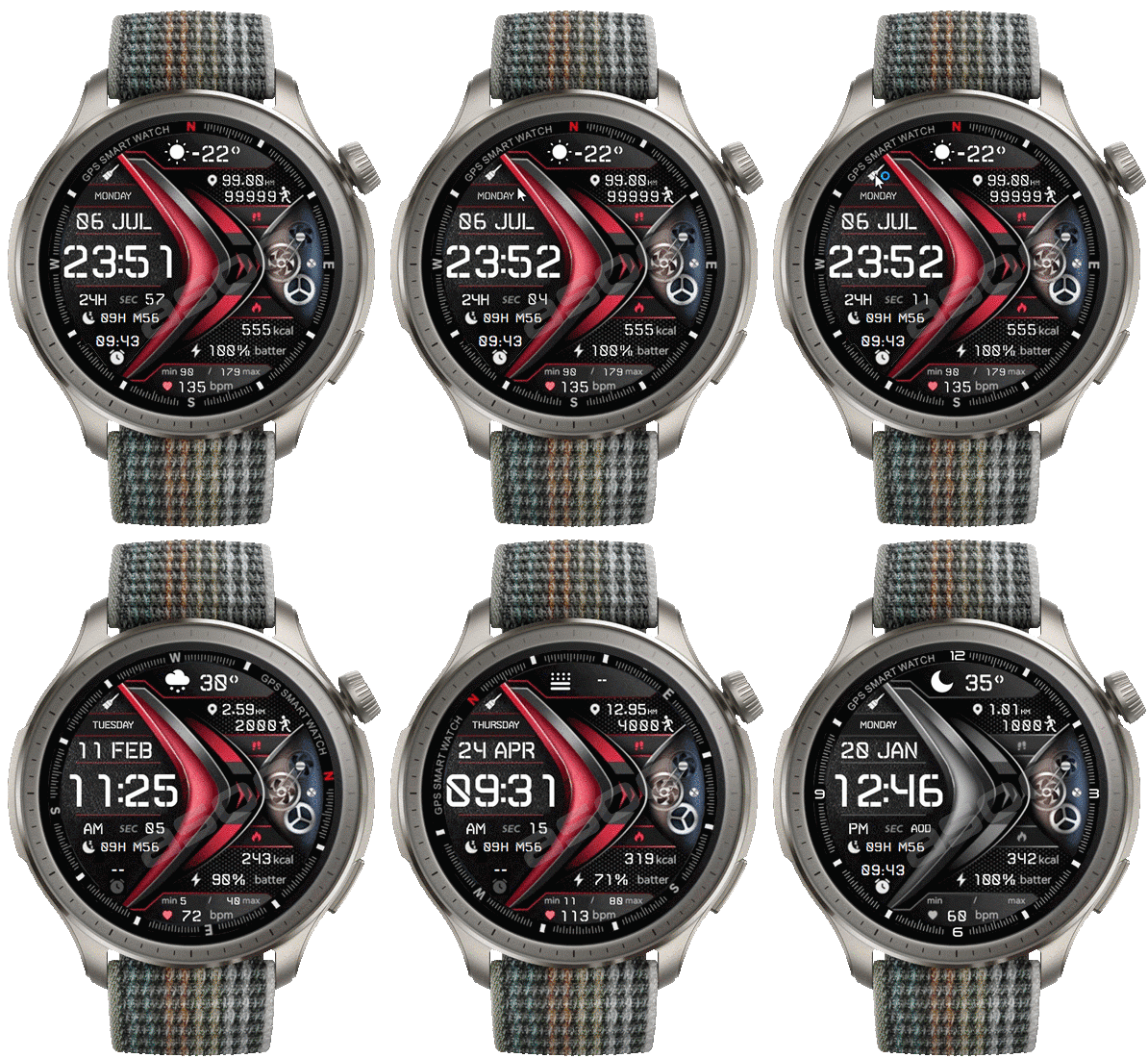
Balance en
请注意,本网站上所有可用的手表面都是我们用户的创作作品,并且与任何官方品牌或商标无关。这些作品是由粉丝为粉丝创作的,灵感来源于流行文化现象、游戏、电影或电视剧。
我们的目标是提供一个创意交流的平台,同时我们也致力于尊重知识产权。如果您拥有本网站上任何内容的版权,并认为该内容侵犯了您的权利,请与我们联系以采取适当措施。

描述
Note:
Thank SashaCX75 so much for Editor Version 18.1 BetaIf without a good editor like this, It would be difficult to make this watchface. , so who want to donate please donate to sashacx75
https://www.buymeacoffee.com/sashacx75
or.
(Paypal: [email protected])
----------------------------------------------------------------------
This watchface design by OSW-852H
----------------------------------------------------------------------
- This watchface i do it for use by myself
- Please do not request any modify.
- This watch face, I will not accept any requests
- I won't make any request edits in here, because this space is for sharing work I like
- If you wish to make a request, please use the relevant forum. /forum/
- The comment section is not suitable for requests.
- If have request in the comment i will not answer
- who is interest to modify, you can download and edit it by yourself.- Please comment respectfully and avoid rude or disrespectful behavior.
- Only tested on Amazfit Balance
- If the owner requests it to be removed Admin can delete immediately.
Thank you.
---------------------------------------------------------------------------------------- AOD Full ( No Second, No Animation , No compass , only gray )
- Shortcut open calendar ( click on Date area)
- Open power manage by click on power area
- Modify BG image
- Change color screen by click on brush icon
- ON / OFF Compass by click on front animation area ( switch compass / analog sceconds )
- In the real watch face will not have a watermark ( The watermark is only to inform you that the sample image is created by me. )
------------------------------------------------------------------------------------------
Image showing shortcuts area
07-07-2026 (1) (2)
- ADD Version click on / off animation ( by click on animation area ) (2)
- AOD Full ( No Second, No Animation , No compass , only gray )
- Shortcut open calendar ( click on Date area)
- Open power manage by click on power area
- Modify BG image
- Change color screen by click on brush icon
- ON / OFF Compass by click on front animation area ( switch compass / analog sceconds )
- In the real watch face will not have a watermark ( The watermark is only to inform you that the sample image is created by me. )
If the compass doesn't work , Please shake the watch three or four times to calibrate the compass.
------------------------------------------------------------------------------it works in 24h format.
for the 12 h format to work. must be enabled in phone settings. (settings-system-date and time-disable 24-hour format.)
------------------------------------------------------------------------------
标签
分享此表盘
评论
您需要登录才能发布或回复评论。
近期 社区论坛 讨论贴
Request for Active 3 premium
Fair enough. Have a very nice day. Thank you again for your kindest efforts. Regards....
Request to make a watchface tor Active 3 Premium
I confirm in editor don't show weather font but in zepp player and real watch show weather font. I don't edit custom script but i don't find until now something don't fit. [...
Request for creating a watchface for Active 3 premium
I see. Thank you for your response....
Racing Chronograph Watch Face Request [Active Max]
Hi, I’m looking for a custom watch face for the Amazfit Active Max (480 × 480). I really like the design of the S4U RC ONE / RC ONE Racing watch faces available for Wea...
Realtime Pulse Graph balance 2
Thank you, it's perfect!...
Data master watchface balance 2
Thank you, asoo. Everything is ok now except one t...
Request for Active 3 Premium
Hello, Classic example of what age does to one. I didn't notice it. I'm sorry and feel ashamed. I'm extremely sorry. I will not bother you again with any request. Sorry again. But you're work is great. You're truly an artist. Bye...





Thank for you comment .
But , the animation will be stop when the screen is turned off anyway.
And in AOD , the animation stops as well.
Therefore, I don't see the need for a stop animation button.
But if you really want it, and if I'm free, I'll try to arrange it for you. 07.07.2026 03:05:49 投诉
Now the version can "NO/OFF Animation" is on dowload list 07.07.2026 03:42:23 投诉
"You don't need to worry about the 'with high power' notification at all. It's just a standard message that appears for any animated watch face, regardless of the animation size. Believe it or not, some animations are even more energy-efficient than the continuous seconds displayed on regular digital and analog faces." 07.07.2026 11:15:01 投诉