ProData

Balance Натисніть тут, щоб дізнатися більше.
multilingual, de, en, es, fr, it, ja, pl, pt, ru, th, zh
Зверніть увагу, що всі циферблати, доступні на цьому сайті, є творчими роботами наших користувачів і не пов'язані з офіційними брендами або торговими марками. Вони створюються шанувальниками для шанувальників, надихаються популярними культурними феноменами, іграми, фільмами, або серіалами.
Наша мета - надати платформу для творчості та обміну, але ми також прагнемо поважати інтелектуальні права. Якщо ви володієте авторськими правами на будь-який контент, який, на вашу думку, порушує ваші права на цьому сайті, будь ласка, зв'яжіться з нами для вжиття відповідних заходів.

Опис
ProData | Ultimate Customization & Rich Metrics
Welcome to the ProData watchface! Experience a highly customizable, feature-rich design. Enjoy 80% of the core features completely for FREE during your trial! Visit My Website: watch.homecmf.com
Highlights & Smart Features
• 12 Auto-Languages: Automatically syncs with your system language without any manual setup!
• Dual Time Zone: Keep track of a secondary time zone directly on your watch face. Double-tap the watch face to open the selection menu and set your preferred timezone.
• Massive Data: 6 dynamic blocks supporting up to 28 metrics.
• Gestures & Shortcuts: Tap the top/bottom screen or time digits for quick app access, double-tap the Air Pressure metric to switch display units (hPa/mmHg), and long-press to swap metrics instantly or toggle Lunar/Solar calendars (Chinese UI only).
• Sensor Control & Moon Phase: Hide the seconds hand or pointers to pause sensors and display the moon phase instead.
• On-Watch Profiles: Save and load up to 3 of your favorite layout combinations directly on the watch.
• Smart Toggles & Status: Features 3 distinct AOD styles (Classic, BlackBG, Time) featuring the moon phase, Quiet Mode (screen flash instead of vibration), and a manual City Name toggle.
Deep Customization & 28 Full Metrics
• 28 Full Data Metrics: Track everything you need! Choose from a massive library of 28 metrics including Heart Rate, Battery, Steps, Weather, SpO2, Sleep, Altitude, Air Pressure, BioCharge, VO2 Max, Recovery Time, Floors, Wind, Next Sun, Dual Time Zone, and much more.
• Deep On-Watch Settings: Long-press the 6 o'clock edge to open the main menu. Customize 2 global text colors, 3 time colors, 6 gradient backgrounds, 6 background lines, 12 date backgrounds, 11 progress bar colors, 6 pointer styles, and 3 bezel styles. Includes unique toggles for a contour line background texture, High/Low Temperature display, and an enlarged City Name font. Want a cleaner look? Tap an active style again to completely hide elements like progress bars, lines, or bezels.
Trial Rules (1-Day Free Trial)
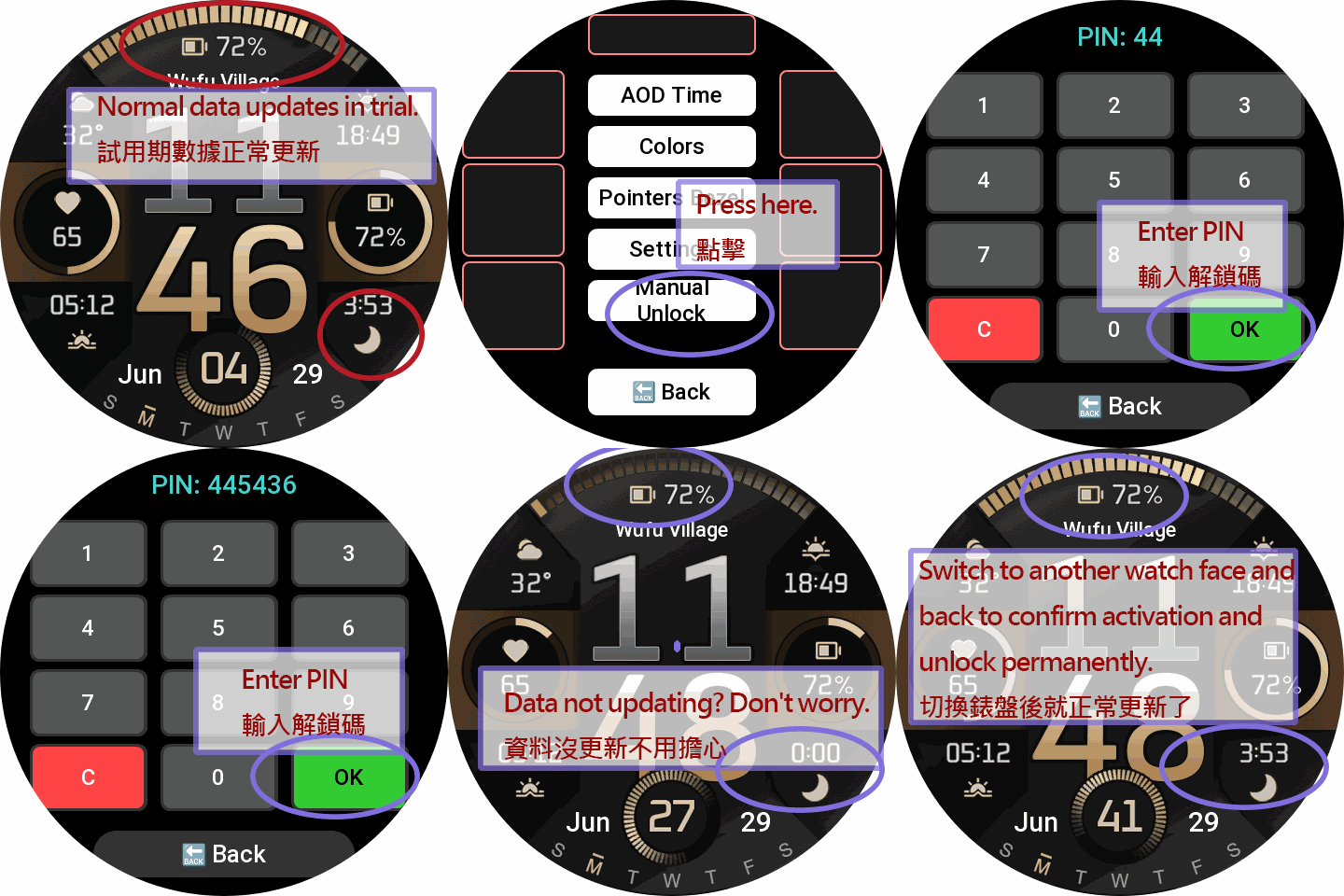
• During Trial: The settings menu is fully accessible for 24 hours. Blocks can swap between 10 base metrics.
• Post-Trial Lock: After 24 hours, customization is disabled. The watchface locks to display only basic Time, Date, and essential items.
PRO Unlock (Permanent Full Access)
Sponsoring permanently unlocks the ultimate experience:
• All 28 Metrics Unlocked: Gain full access to the 10 base + 18 advanced PRO metrics.
• Full Area Swapping: Unrestricted 28-metric swapping is permanently unlocked for ALL dynamic blocks!
• Complete Settings Access: Permanently restore all trial features, layouts, and customizations.
How to Unlock Permanently:
1. Visit watch.homecmf.com (or scan the QR Code in the watch settings menu).
2. Make a small coffee donation to support the development.
3. Check your email! Follow the instructions provided to retrieve your unique 6-digit Unlock PIN.
4. Enter the PIN on your watch to permanently unlock all features!
Теги
Поділиться цим циферблатом
Коментарі
Вам необхідно увійти, щоб залишати коментарі або відповідати на них.
Недавні обговорення в спільноті
Request for Active 3 premium
Fair enough. Have a very nice day. Thank you again for your kindest efforts. Regards....
Request to make a watchface tor Active 3 Premium
I confirm in editor don't show weather font but in zepp player and real watch show weather font. I don't edit custom script but i don't find until now something don't fit. [...
Request for creating a watchface for Active 3 premium
I see. Thank you for your response....
Racing Chronograph Watch Face Request [Active Max]
Hi, I’m looking for a custom watch face for the Amazfit Active Max (480 × 480). I really like the design of the S4U RC ONE / RC ONE Racing watch faces available for Wea...
Realtime Pulse Graph balance 2
Thank you, it's perfect!...
Data master watchface balance 2
Thank you, asoo. Everything is ok now except one t...
Request for Active 3 Premium
Hello, Classic example of what age does to one. I didn't notice it. I'm sorry and feel ashamed. I'm extremely sorry. I will not bother you again with any request. Sorry again. But you're work is great. You're truly an artist. Bye...





Немає коментарів. Залиште перший коментар.