G 340 ( Balance )

Balance en
Si prega di notare che tutti i quadranti orologio disponibili su questo sito sono opere creative dei nostri utenti e non sono affiliati con marchi ufficiali o marchi registrati. Sono creati da fan per fan, ispirati da fenomeni culturali popolari, giochi, film o serie.
Il nostro obiettivo è fornire una piattaforma per la creatività e lo scambio, ma ci impegniamo anche a rispettare i diritti intellettuali. Se detiene i diritti d'autore su qualsiasi contenuto che ritiene infranga i suoi diritti su questo sito, contattaci per un'azione appropriata.

Descrizione
Note:
Thank SashaCX75 so much for Editor Version 16.0 FinalIf without a good editor like this, It would be difficult to make this watchface. , so who want to donate please donate to sashacx75
https://www.buymeacoffee.com/sashacx75
or.
(Paypal: [email protected])
Thank wax so much for code change background by click on screen
/gtr/view/27840
--------------------------------------------------------------------
I created the main image from scratch based on those original design and re-arranged it to my liking.
----------------------------------------------------------------------
design by M D
----------------------------------------------------------------------- This watchface i do it for use by myself
- Please do not request any modify.
- This watch face, I will not accept any requests
- If have request in the comment i will not answer
- who is interest to modify, you can download and edit it by yourself.- Only tested on Amazfit Balance
- If the owner requests it to be removed Admin can delete immediately.
Thank you.
---------------------------------------------------------------------------------------- AOD ( No seconds only BW)
- Shortcut open calendar ( click on month )
- Open power save by click on Power icon
- Add ( Alarm , Bluetooth ) icon
- Change color style click on amazfit logo ( below )
- Change color Hour by click on center Hour area
- Change color minute by click on center Minute area
- Change color Hour and minute click on center Time Dot
- Switch ( steps , distance , calories ) by click on ( steps , distance , calories ) Text.
Note :
Steps image progress use invert function with alpha images, So it will be start process after about 5% of goal ( When the steps image progress starts, you will see the goal flag light up. )
Battery image progress use invert function with alpha images, So it will be stop process after battery low more than 5% ( When the battery image progress stop, you will see full color on progress. )
- In the real watch face will not have a watermark ( The watermark is only to inform you that the sample image is created by me. )
---------------------------------------------------------------------------------------
- Shortcuts
(1. Alarm , 2. sunrise/sunset , 3. temperature, 4. countdown , 5.PAI , 6. Steps , 7. Pulse , 8. SP02 , 9.Stopwatch , 10.calendar , Power Save
------------------------------------------------------------------------------------------
Image showing shortcuts area
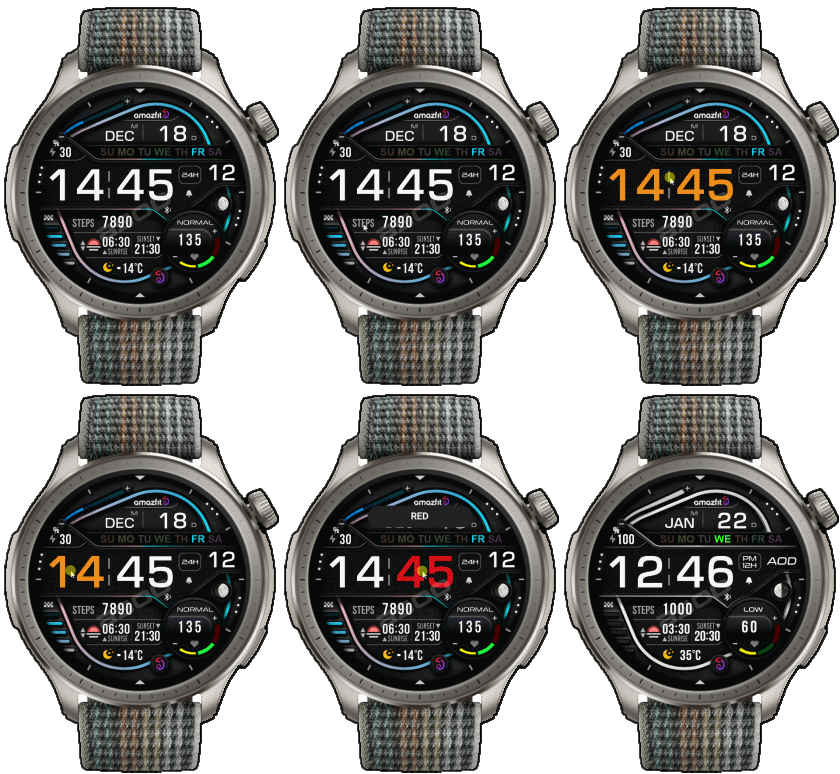
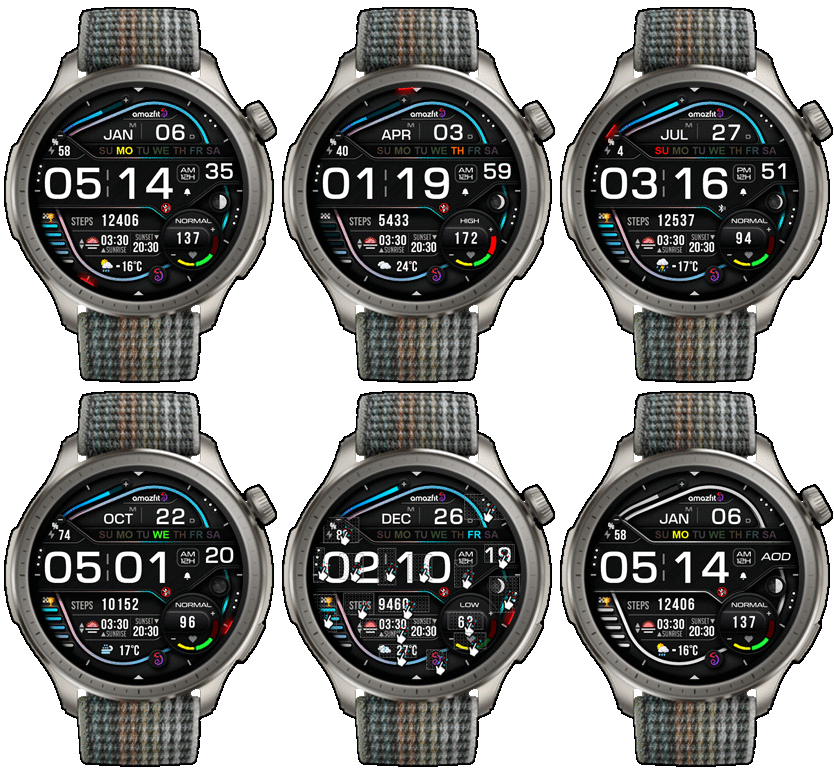
27-12-2025 (1) (2) (3) (4)
- Fixed about steps image progress (4)
- Only Fixed the name of file ( nothing for change in script ) (3)
- Upload Version 1.2 , add Seconds hand (2)
- AOD ( No seconds only BW)
- Shortcut open calendar ( click on month )
- Open power save by click on Power icon
- Add ( Alarm , Bluetooth ) icon
- Change color style click on amazfit logo ( below )
- Change color Hour by click on center Hour area
- Change color minute by click on center Minute area
- Change color Hour and minute click on center Time Dot
- Switch ( steps , distance , calories ) by click on ( steps , distance , calories ) Text.
Note :
Steps image progress use invert function with alpha images, So it will be start process after about 5% of goal ( When the steps image progress starts, you will see the goal flag light up. )
Battery image progress use invert function with alpha images, So it will be stop process after battery low more than 5% ( When the battery image progress stop, you will see full color on progress. )
- In the real watch face will not have a watermark ( The watermark is only to inform you that the sample image is created by me. )
------------------------------------------------------------------------------
it works in 24h format.
for the 12 h format to work. must be enabled in phone settings. (settings-system-date and time-disable 24-hour format.)
------------------------------------------------------------------------------
Tag
Condividi questo quadrante
Commenti
Per rispondere ai commenti devi essere loggato .
Discussioni recenti della comunità
request for Balance 2, Garmin clone
This is my vision for it, though I am not 100% certain that it will be functional. https://i.postimg.cc/qMcQjCMt/standalone-Balamin.gif Down: https://amazfitwatchface...
For Active 3 premium, conversion
Can anyone convert the following watchface for Active 3 premium: https://amazfitwatchfaces.com/balance/view/1255 When I try to do it, it says something regarding image limits and after conversion every editable assets appear at once and ru...
Request for Active 3 premium
Fair enough. Have a very nice day. Thank you again for your kindest efforts. Regards....
Request to make a watchface tor Active 3 Premium
I confirm in editor don't show weather font but in zepp player and real watch show weather font. I don't edit custom script but i don't find until now something don't fit. [...
Request for creating a watchface for Active 3 premium
I see. Thank you for your response....
Racing Chronograph Watch Face Request [Active Max]
Hi, I’m looking for a custom watch face for the Amazfit Active Max (480 × 480). I really like the design of the S4U RC ONE / RC ONE Racing watch faces available for Wea...
Realtime Pulse Graph balance 2
Thank you, it's perfect!...





I don't understand your question.
If you mean a watch face similar to this one, I'm not sure.
This watch face is the MD 227, which the creator recreated as the MD 340.
You can find details on the creator's IG:
https://www.instagram.com/mdwatchfaces/p/DSqmuy8iGVR/
I just thought it was pretty and ported it to my Amazfit Balance for my own use.
But if you mean a similar watch face that I've ported before,
I don't remember which one. You can try searching for my work on Balance using this link:
/search/balance/authorID/15485 28.12.2025 05:11:24 Segnala
You are one of my favorite watchface creators. I always look forward to your releases. 29.12.2025 00:22:21 Segnala
Thank for you comment and answer