DAX WFF S-33 ( Balance )

兼容于
Balance 支持的语言
en
en
新增: 21.12.2025 19:18
更新日期: 21.12.2025 19:21
21 个用户已加入 收藏
用户须知
请注意,本网站上所有可用的手表面都是我们用户的创作作品,并且与任何官方品牌或商标无关。这些作品是由粉丝为粉丝创作的,灵感来源于流行文化现象、游戏、电影或电视剧。
我们的目标是提供一个创意交流的平台,同时我们也致力于尊重知识产权。如果您拥有本网站上任何内容的版权,并认为该内容侵犯了您的权利,请与我们联系以采取适当措施。
请注意,本网站上所有可用的手表面都是我们用户的创作作品,并且与任何官方品牌或商标无关。这些作品是由粉丝为粉丝创作的,灵感来源于流行文化现象、游戏、电影或电视剧。
我们的目标是提供一个创意交流的平台,同时我们也致力于尊重知识产权。如果您拥有本网站上任何内容的版权,并认为该内容侵犯了您的权利,请与我们联系以采取适当措施。

描述
Note:
Thank SashaCX75 so much for Editor Version 15.3 betaIf without a good editor like this, It would be difficult to make this watchface. , so who want to donate please donate to sashacx75
https://www.buymeacoffee.com/sashacx75
or.
(Paypal: [email protected])
--------------------------------------------------------------------
This watch face made by refer to DAX WFF S-33
----------------------------------------------------------------------
I didn't design it , do not give credit to me.
----------------------------------------------------------------------- This watchface i do it for use by myself
- Please do not request any modify.
- This watch face, I will not accept any requests
- If have request in the comment i will not answer
- who is interest to modify, you can download and edit it by yourself.- Only tested on Amazfit Balance
- If the owner requests it to be removed Admin can delete immediately.
Thank you.
---------------------------------------------------------------------------------------- AOD ( no seconds , minute only White)
- Change color minute by click on center digital minute area
- Shortcut open calendar ( click on month area )
- Open power save by click on center "Battery progress"
- Add ( Alarm , Bluetooth ) icon
- Change some layout
---------------------------------------------------------------------------------------
- Shortcuts
(1. Alarm , 2. sunrise/sunset , 3. temperature, 4. countdown , 5.PAI , 6. Steps , 7. Pulse , 8. SP02 , 9.Stopwatch , 10.calendar , Power Save
------------------------------------------------------------------------------------------
Image showing shortcuts area
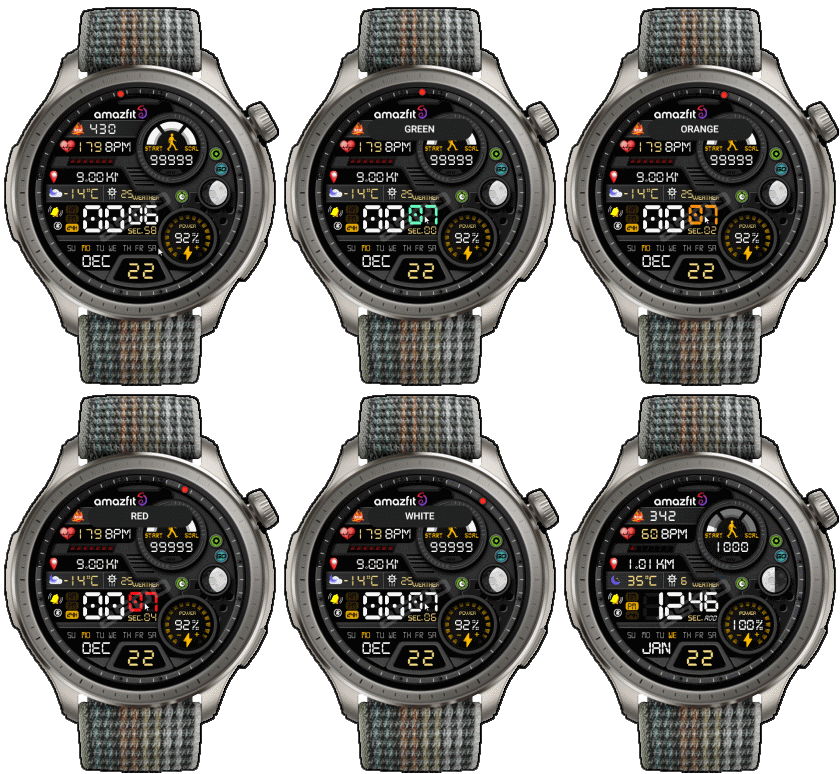
22-12-2025
- AOD ( no seconds , minute only White)
- Change color minute by click on center digital minute area
- Shortcut open calendar ( click on month area )
- Open power save by click on center "Battery progress"
- Add ( Alarm , Bluetooth ) icon
- Change some layout
------------------------------------------------------------------------------
it works in 24h format.
for the 12 h format to work. must be enabled in phone settings. (settings-system-date and time-disable 24-hour format.)
------------------------------------------------------------------------------
标签
分享此表盘
评论
您需要登录才能发布或回复评论。
近期 社区论坛 讨论贴
Orange‑Ray‑Gather and Radiant‑Solar Balance for balance 2
Awesome, thank you!...
Request for creating a watchface for Active 3 premium
Thank you very much mate :)...
Request for Kingdom Come Deliverance II WatchFace convert [Active 3 Premium]
Hi! I installed the watch face directly on my Active 3 Premium. It installs successfully, but there is a display bug: the hour and minute digits keep jumping vertically from bott...
Digital Technology ++ – minor edits for Amazfit Active 2
Thanks for the reply, Asoo! Really appreciate all your work on here....
Request for creating a watchface for Active 3 premium
Thank you very much mate :)...
request for Balance 2
Can this be replicated in English for Balance 2? https://i.postimg.cc/GtkjppWt/Watchface.jpg ...
Everything and LiveView for balance 2
Thank you, asoo!...





没有评论。欢迎对此第一个发表评论。