Saint Seiya ( Pegasus Seiya ) ( Balance)

Compatibile con
Balance Idiomas compatibles
en
en
Data aggiunta: 29.11.2025 16:53
9 utenti che hanno questo elemento nei preferiti
Informazioni Importanti per gli Utenti
Si prega di notare che tutti i quadranti orologio disponibili su questo sito sono opere creative dei nostri utenti e non sono affiliati con marchi ufficiali o marchi registrati. Sono creati da fan per fan, ispirati da fenomeni culturali popolari, giochi, film o serie.
Il nostro obiettivo è fornire una piattaforma per la creatività e lo scambio, ma ci impegniamo anche a rispettare i diritti intellettuali. Se detiene i diritti d'autore su qualsiasi contenuto che ritiene infranga i suoi diritti su questo sito, contattaci per un'azione appropriata.
Si prega di notare che tutti i quadranti orologio disponibili su questo sito sono opere creative dei nostri utenti e non sono affiliati con marchi ufficiali o marchi registrati. Sono creati da fan per fan, ispirati da fenomeni culturali popolari, giochi, film o serie.
Il nostro obiettivo è fornire una piattaforma per la creatività e lo scambio, ma ci impegniamo anche a rispettare i diritti intellettuali. Se detiene i diritti d'autore su qualsiasi contenuto che ritiene infranga i suoi diritti su questo sito, contattaci per un'azione appropriata.

Descrizione
Note:
Thank SashaCX75 so much for Editor Version 15.3 betaIf without a good editor like this, It would be difficult to make this watchface. , so who want to donate please donate to sashacx75
https://www.buymeacoffee.com/sashacx75
or.
(Paypal: [email protected])
--------------------------------------------------------------------
This watch face made by refer to Saint Seiya: Knights of the Zodiac
----------------------------------------------------------------------
I didn't design it , do not give credit to me.
----------------------------------------------------------------------- This watchface i do it for use by myself
- Please do not request any modify.
- This watch face, I will not accept any requests
- If have request in the comment i will not answer
- who is interest to modify, you can download and edit it by yourself.- Only tested on Amazfit Balance
- If the owner requests it to be removed Admin can delete immediately.
Thank you.
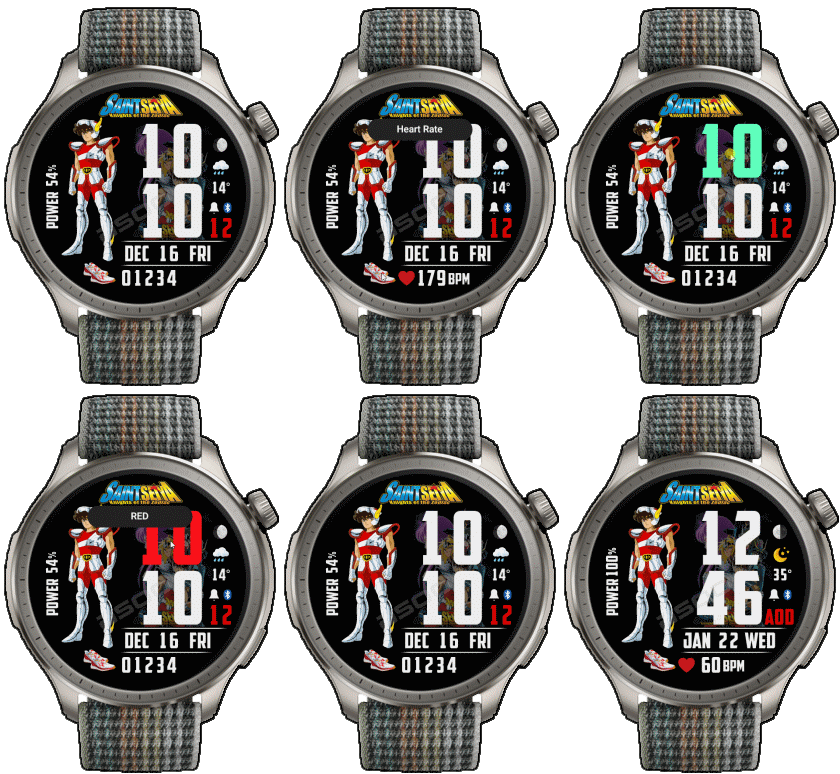
---------------------------------------------------------------------------------------- AOD ( no seconds and only heart rate )
- Shortcut open calendar ( click on date area )
- Open power save by click on center "Battery progress"
- Add ( Alarm , Bluetooth ) icon
- Switch widget steps , distance , calories, heart rate by click on icon shoes
- Change color Digital HOUR by click on center area on Digital Hour
- Pegasus Seiya images change according to "steps images progress"
---------------------------------------------------------------------------------------
- Shortcuts
(1. Alarm , 2. sunrise/sunset , 3. temperature, 4. countdown , 5.PAI , 6. Steps , 7. Pulse , 8. SP02 , 9.Stopwatch , 10.calendar , Power Save
------------------------------------------------------------------------------------------
Image showing shortcuts area
29-11-2025
- AOD ( no seconds and only heart rate )
- Shortcut open calendar ( click on date area )
- Open power save by click on center "Battery progress"
- Add ( Alarm , Bluetooth ) icon
- Switch widget steps , distance , calories, heart rate by click on icon shoes
- Change color Digital HOUR by click on center area on Digital Hour
- Pegasus Seiya images change according to "steps images progress"
------------------------------------------------------------------------------
it works in 24h format.
for the 12 h format to work. must be enabled in phone settings. (settings-system-date and time-disable 24-hour format.)
------------------------------------------------------------------------------
Tag
Condividi questo quadrante
Commenti
Per rispondere ai commenti devi essere loggato .
Discussioni recenti della comunità
Orange‑Ray‑Gather and Radiant‑Solar Balance for balance 2
Awesome, thank you!...
Request for creating a watchface for Active 3 premium
Thank you very much mate :)...
Request for Kingdom Come Deliverance II WatchFace convert [Active 3 Premium]
Hi! I installed the watch face directly on my Active 3 Premium. It installs successfully, but there is a display bug: the hour and minute digits keep jumping vertically from bott...
Digital Technology ++ – minor edits for Amazfit Active 2
Thanks for the reply, Asoo! Really appreciate all your work on here....
Request for creating a watchface for Active 3 premium
Thank you very much mate :)...
request for Balance 2
Can this be replicated in English for Balance 2? https://i.postimg.cc/GtkjppWt/Watchface.jpg ...
Everything and LiveView for balance 2
Thank you, asoo!...





Nessun commento. Commenta per primo.