Snoopy AVi_8 (Balance)

Balance en
Por favor, note que todos os mostradores de relógio disponíveis neste site são obras criativas dos nossos usuários e não estão afiliados com marcas oficiais ou marcas registradas. São criados por fãs para fãs, inspirados em fenômenos culturais populares, jogos, filmes ou séries.
Nosso objetivo é fornecer uma plataforma para criatividade e troca, mas também nos esforçamos para respeitar os direitos intelectuais. Se você detém direitos autorais sobre qualquer conteúdo que acredita infringir seus direitos neste site, por favor, entre em contato conosco para ações apropriadas.

Descrição
Note:
Thank SashaCX75 so much for Editor Version 15.1 FinalIf without a good editor like this, It would be difficult to make this watchface. , so who want to donate please donate to sashacx75
https://www.buymeacoffee.com/sashacx75
or.
(Paypal: [email protected])
Thank wax so much for code change background by click on screen
/gtr/view/27840
--------------------------------------------------------------------
I created the main image from scratch based on those original design and re-arranged it to my liking.
----------------------------------------------------------------------
design by AVI_8
----------------------------------------------------------------------- This watchface i do it for use by myself
- Please do not request any modify.
- This watch face, I will not accept any requests
- If have request in the comment i will not answer
- who is interest to modify, you can download and edit it by yourself.- Only tested on Amazfit Balance
- If the owner requests it to be removed Admin can delete immediately.
Thank you.
---------------------------------------------------------------------------------------- AOD ( No seconds , No GMT )
- Shortcut open calendar ( click on Day )
- Open power save by click on Power porgress
- Add ( Alarm , Bluetooth ) icon
- Set GMT By click on 7 and 5 O'clock
- In the real watch face will not have a watermark ( The watermark is only to inform you that the sample image is created by me. )
---------------------------------------------------------------------------------------
- Shortcuts
(1. Alarm , 2. sunrise/sunset , 3. temperature, 4. countdown , 5.PAI , 6. Steps , 7. Pulse , 8. SP02 , 9.Stopwatch , 10.calendar , Power Save
------------------------------------------------------------------------------------------
Image showing shortcuts area
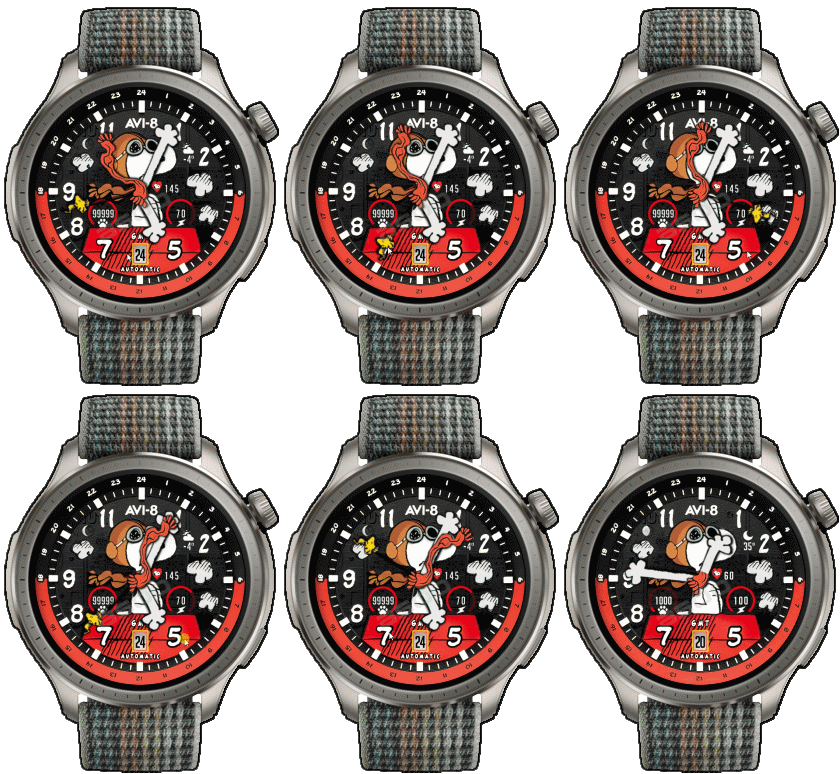
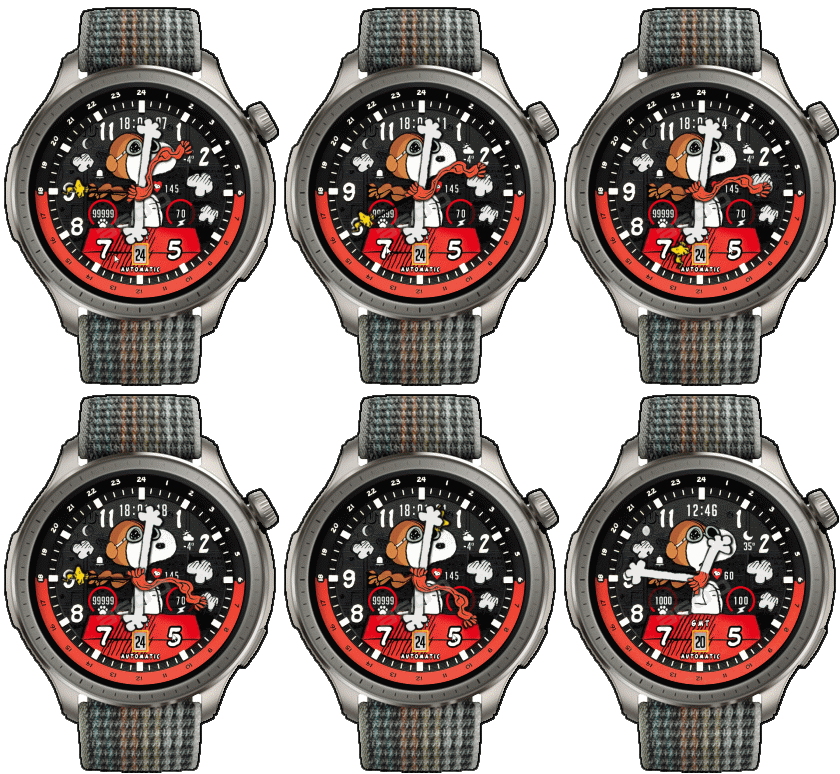
24-10-2025 (1) (2)
- Upload Version H ( Add Digital time replace on logo ) (2)
- AOD ( No seconds , No GMT )
- Shortcut open calendar ( click on Day )
- Open power save by click on Power porgress
- Add ( Alarm , Bluetooth ) icon
- Set GMT By click on 7 and 5 O'clock
How to Use the GMT Hand
Simply move the GMT hand to the hour of the second country you wish to track.
The GMT hand functions as the hour hand for that second time zone.
For example, if you travel to Japan and Japan time there is 21:xx,
just rotate the GMT hand to point at 21 the GMT Hands is the time of japan. Then now you use the GMT hand to see the Japan time.
Note:
If the main time is past 30 minutes (for example local time is 7:30),
when you move the GMT hand to 21 ( second country time ),
the GMT hand will not rest exactly on 21,
but will be positioned between 21 and 22 to indicate the half-hour.
After setting it, the GMT hand will continue to move in sync with the main hour hand.
Suppose the time in your home country is 7:30, while the time in Japan is 21:xx.
When you set the GMT hand to 21, it will remain between 21 and 22,
indicating that the time in Japan is approximately 21:30.
Note: The GMT hand on this watch face can be adjusted in one-hour increments only.
If you do not select a second country, the GMT hand will initially display the 24-hour format of your local time by default.For instance, if your local time is 9:00 PM,
the main hour hand will point to 9 on the 12-hour dial,
while the GMT hand will point to 21 on the 24-hour scale.
- In the real watch face will not have a watermark ( The watermark is only to inform you that the sample image is created by me. )
Tags
Compatilhar este watch face
Comentários
Você precisa estar logado para postar ou responder aos comentários.
Discussões recentes na comunidade
Request for editing a watchface for Active 3 premium
Sir, Thank you for your reply. I am learning and for master it would be a minor adjustment, but for a novice like me sadly it isn't. But hope one day I would be successful in doing so. Nonetheless thank you very much for your kind efforts :...
HGT 112 watchface conversion request [Cheetah Square]
Dear, I found this watchface HGT 112 that is really amazing and has been already ported to many other devices, but not...
Orange‑Ray‑Gather and Radiant‑Solar Balance for balance 2
Awesome, thank you!...
Request for creating a watchface for Active 3 premium
Thank you very much mate :)...
Request for Kingdom Come Deliverance II WatchFace convert [Active 3 Premium]
Hi! I installed the watch face directly on my Active 3 Premium. It installs successfully, but there is a display bug: the hour and minute digits keep jumping vertically from bott...
Digital Technology ++ – minor edits for Amazfit Active 2
Thanks for the reply, Asoo! Really appreciate all your work on here....
Request for creating a watchface for Active 3 premium
Thank you very much mate :)...





Quick question on GMT function. How it is intended to be used? 25.09.2025 13:04:42 Reclamar
How to Use the GMT Hand
Simply move the GMT hand to the hour of the second country you wish to track.
The GMT hand functions as the hour hand for that second time zone.
For example, if you travel to Japan and the local time there is 21:xx,
just rotate the GMT hand to point at 21 the GMT Hands is the time of japan. Then now you use the GMT hand to see the Japan time.
Note:
If the main time is past 30 minutes (for example local time is 7:30),
when you move the GMT hand to 21 ( second country time ),
the GMT hand will not rest exactly on 21,
but will be positioned between 21 and 22 to indicate the half-hour.
After setting it, the GMT hand will continue to move in sync with the main hour hand.
Suppose the time in your home country is 7:30, while the time in Japan is 21:xx.
When you set the GMT hand to 21, it will remain between 21 and 22,
indicating that the time in Japan is approximately 21:30.
์Note: The GMT hand on this watch face can be adjusted in one-hour increments only.
If you do not select a second country, the GMT hand will initially display
the 24-hour format of your local time by default.
For instance, if your local time is 9:00 PM,
the main hour hand will point to 9 on the 12-hour dial,
while the GMT hand will point to 21 on the 24-hour scale. 25.09.2025 16:38:18 Reclamar