BA | AX8300 ( Amazfit Balance )

兼容于
Balance 支持的语言
en
en
新增: 11.03.2025 20:17
更新日期: 12.03.2025 13:26
39 个用户已加入 收藏
用户须知
请注意,本网站上所有可用的手表面都是我们用户的创作作品,并且与任何官方品牌或商标无关。这些作品是由粉丝为粉丝创作的,灵感来源于流行文化现象、游戏、电影或电视剧。
我们的目标是提供一个创意交流的平台,同时我们也致力于尊重知识产权。如果您拥有本网站上任何内容的版权,并认为该内容侵犯了您的权利,请与我们联系以采取适当措施。
请注意,本网站上所有可用的手表面都是我们用户的创作作品,并且与任何官方品牌或商标无关。这些作品是由粉丝为粉丝创作的,灵感来源于流行文化现象、游戏、电影或电视剧。
我们的目标是提供一个创意交流的平台,同时我们也致力于尊重知识产权。如果您拥有本网站上任何内容的版权,并认为该内容侵犯了您的权利,请与我们联系以采取适当措施。

描述
Note:
Thank SashaCX75 so much for Editor Version 13.1 FinalIf without a good editor like this, It would be difficult to make this watchface. , so who want to donate please donate to sashacx75
https://www.buymeacoffee.com/sashacx75
or.
(Paypal: [email protected])
Thank wax so much for code change background by click on screen
/gtr/view/27840
--------------------------------------------------------------------
This watch face made by ported from image BA | AX8300
f a c e r . i o
----------------------------------------------------------------------
I didn't design it , do not give credit to me.
----------------------------------------------------------------------- This watchface i do it for use by myself
- Please do not request any modify.
- This watch face, I will not accept any requests
- If have request in the comment i will not answer
- who is interest to modify, you can download and edit it by yourself.- Only tested on Amazfit Balance
- If the owner requests it to be removed Admin can delete immediately.
Thank you.
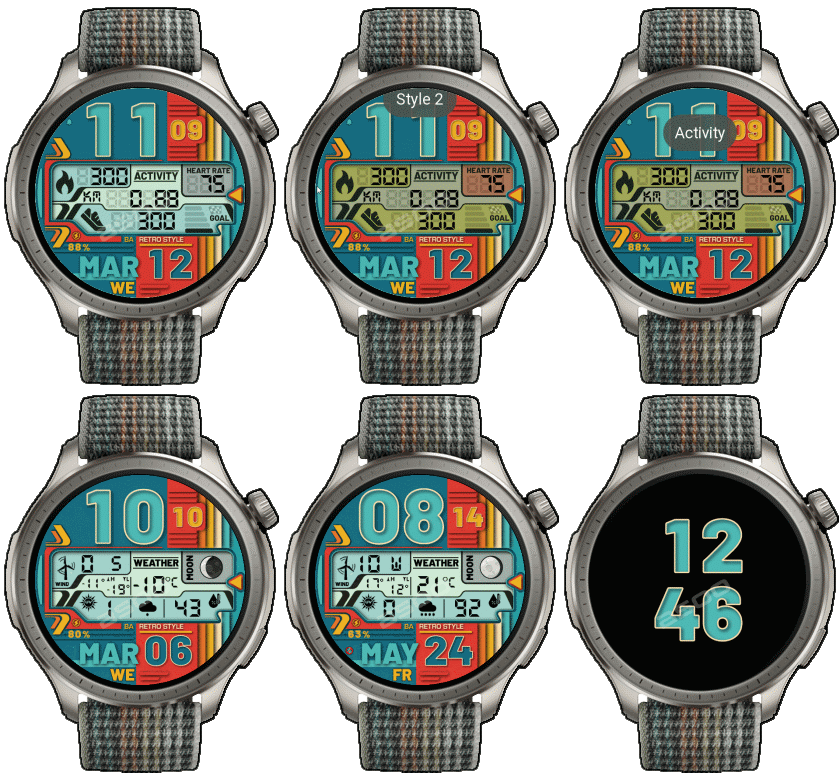
---------------------------------------------------------------------------------------- AOD ( only digital time )
- Shortcut open calendar ( click on Month )
- Open power save by click on power icon
- Add ( Alarm , Bluetooth ) icon
- switch window information by click on 3 o'clock
This watchface make for test new function on 13.1
- In the real watch face will not have a watermark ( The watermark is only to inform you that the sample image is created by me. )
---------------------------------------------------------------------------------------
- Shortcuts
(1. Alarm , 2. sunrise/sunset , 3. temperature, 4. countdown , 5.PAI , 6. Steps , 7. Pulse , 8. SP02 , 9.Stopwatch , 10.calendar , Power Save
------------------------------------------------------------------------------------------
Image showing shortcuts area
12-03-2025 (1) (2)
- upload version 1.01 add new color ( windows information )
- chnage windows info. color style by click on 9 o'clock
- AOD ( only digital time )
- Shortcut open calendar ( click on Month )
- Open power save by click on power icon
- Add ( Alarm , Bluetooth ) icon
- switch window information by click on 3 o'clock
- In the real watch face will not have a watermark ( The watermark is only to inform you that the sample image is created by me. )
------------------------------------------------------------------------------
it works in 24h format.
for the 12 h format to work. must be enabled in phone settings. (settings-system-date and time-disable 24-hour format.)
------------------------------------------------------------------------------
标签
分享此表盘
评论
您需要登录才能发布或回复评论。
近期 社区论坛 讨论贴
Request for editing a watchface for Active 3 premium
Sir, Thank you for your reply. I am learning and for master it would be a minor adjustment, but for a novice like me sadly it isn't. But hope one day I would be successful in doing so. Nonetheless thank you very much for your kind efforts :...
HGT 112 watchface conversion request [Cheetah Square]
Dear, I found this watchface HGT 112 that is really amazing and has been already ported to many other devices, but not...
Orange‑Ray‑Gather and Radiant‑Solar Balance for balance 2
Awesome, thank you!...
Request for creating a watchface for Active 3 premium
Thank you very much mate :)...
Request for Kingdom Come Deliverance II WatchFace convert [Active 3 Premium]
Hi! I installed the watch face directly on my Active 3 Premium. It installs successfully, but there is a display bug: the hour and minute digits keep jumping vertically from bott...
Digital Technology ++ – minor edits for Amazfit Active 2
Thanks for the reply, Asoo! Really appreciate all your work on here....
Request for creating a watchface for Active 3 premium
Thank you very much mate :)...





Thank you. Glad you like. 01.04.2025 09:25:40 投诉