OMG 342 ( Amazfit Balance )

Balance en
请注意,本网站上所有可用的手表面都是我们用户的创作作品,并且与任何官方品牌或商标无关。这些作品是由粉丝为粉丝创作的,灵感来源于流行文化现象、游戏、电影或电视剧。
我们的目标是提供一个创意交流的平台,同时我们也致力于尊重知识产权。如果您拥有本网站上任何内容的版权,并认为该内容侵犯了您的权利,请与我们联系以采取适当措施。

描述
Note:
Thank SashaCX75 so much for Editor Version 13.1 betaIf without a good editor like this, It would be difficult to make this watchface. , so who want to donate please donate to sashacx75
https://www.buymeacoffee.com/sashacx75
or.
(Paypal: [email protected])
Thank wax so much for code change background by click on screen
/gtr/view/27840
--------------------------------------------------------------------
This watch face made by ported from image OMG342
f a c e r . i o
----------------------------------------------------------------------
I didn't design it , do not give credit to me.
----------------------------------------------------------------------- This watchface i do it for use by myself
- Please do not request any modify.
- This watch face, I will not accept any requests
- If have request in the comment i will not answer
- who is interest to modify, you can download and edit it by yourself.- Only tested on Amazfit Balance
- If the owner requests it to be removed Admin can delete immediately.
Thank you.
---------------------------------------------------------------------------------------- AOD ( NO Analog , No seconds , in BW style )
- Shortcut open calendar ( click on day area )
- Open power save by click on power area
- Add ( Alarm , Bluetooth ) icon
- Change color style by click on 3dots icon
This watchface make for test new function on 13.1 beta
- Test new function on editable elementes
you can change shortcut on the icon by select new shortcut ( App. or training ) by click on icon blue pen in the watchface selection area.
This shortcut point will be a shortcut that you can customize to be a shortcut for any activity that you want.
When you are done selecting, press the crown button (Top right button) to exit the shortcut selection screen.
- In the real watch face will not have a watermark ( The watermark is only to inform you that the sample image is created by me. )
---------------------------------------------------------------------------------------
- Shortcuts
(1. Alarm , 2. sunrise/sunset , 3. temperature, 4. countdown , 5.PAI , 6. Steps , 7. Pulse , 8. SP02 , 9.Stopwatch , 10.calendar , Power Save
------------------------------------------------------------------------------------------
Image showing shortcuts area
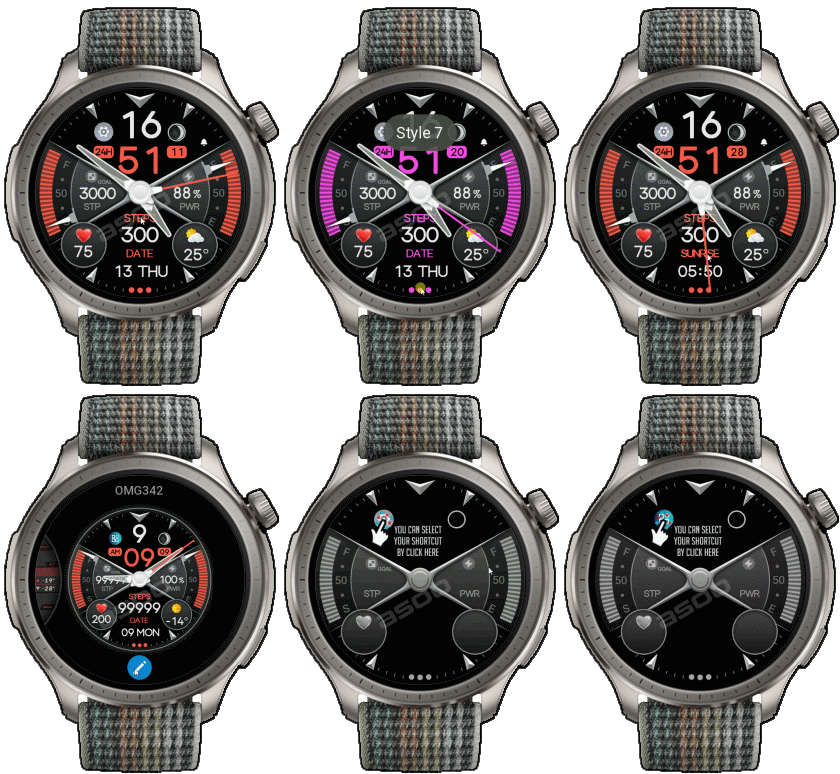
14-02-2025
- AOD ( NO Analog , No seconds , in BW style )
- Shortcut open calendar ( click on day area )
- Open power save by click on power area
- Add ( Alarm , Bluetooth ) icon
- Change color style by click on 3dots icon
This watchface make for test new function on 13.1 beta
- Test new function on editable elementes
you can change shortcut on the icon by select new shortcut ( App. or training ) by click on icon blue pen in the watchface selection area.
This shortcut point will be a shortcut that you can customize to be a shortcut for any activity that you want.
When you are done selecting, press the crown button to exit the shortcut selection screen.
- In the real watch face will not have a watermark ( The watermark is only to inform you that the sample image is created by me. )
------------------------------------------------------------------------------
it works in 24h format.
for the 12 h format to work. must be enabled in phone settings. (settings-system-date and time-disable 24-hour format.)
------------------------------------------------------------------------------
标签
分享此表盘
评论
您需要登录才能发布或回复评论。
近期 社区论坛 讨论贴
Racing Chronograph Watch Face Request [Active Max]
Hello asoo, Thank you so much for all the work you've put into creating this watch face, and I'm really sorry I didn't see your message earlier. Unfortunately, I haven't b...
request for Balance 2, Garmin clone
This is my vision for it, though I am not 100% certain that it will be functional. https://i.postimg.cc/qMcQjCMt/standalone-Balamin.gif Down: https://amazfitwatchface...
For Active 3 premium, conversion
Can anyone convert the following watchface for Active 3 premium: https://amazfitwatchfaces.com/balance/view/1255 When I try to do it, it says something regarding image limits and after conversion every editable assets appear at once and ru...
Request for Active 3 premium
Fair enough. Have a very nice day. Thank you again for your kindest efforts. Regards....
Request to make a watchface tor Active 3 Premium
I confirm in editor don't show weather font but in zepp player and real watch show weather font. I don't edit custom script but i don't find until now something don't fit. [...
Request for creating a watchface for Active 3 premium
I see. Thank you for your response....
Realtime Pulse Graph balance 2
Thank you, it's perfect!...





- Most of my work will be "FULL AOD". If you don't like it, you can enable watch's standard AOD. Once you enable watch standard AOD, full AOD of watchface will not be displayed. System will be use standard AOD from Watch 15.02.2025 04:15:10 投诉