SS Infometer VI ( Amazfit Balance )

Balance en
Si prega di notare che tutti i quadranti orologio disponibili su questo sito sono opere creative dei nostri utenti e non sono affiliati con marchi ufficiali o marchi registrati. Sono creati da fan per fan, ispirati da fenomeni culturali popolari, giochi, film o serie.
Il nostro obiettivo è fornire una piattaforma per la creatività e lo scambio, ma ci impegniamo anche a rispettare i diritti intellettuali. Se detiene i diritti d'autore su qualsiasi contenuto che ritiene infranga i suoi diritti su questo sito, contattaci per un'azione appropriata.

Descrizione
Note:
Thank SashaCX75 so much for Editor Version 13.1 betaIf without a good editor like this, It would be difficult to make this watchface. , so who want to donate please donate to sashacx75
https://www.buymeacoffee.com/sashacx75
or.
(Paypal: [email protected])
Thank wax so much for code change background by click on screen
/gtr/view/27840
--------------------------------------------------------------------
This watch face made by ported from image SS Infometer VI
f a c e r . i o
----------------------------------------------------------------------
I didn't design it , do not give credit to me.
----------------------------------------------------------------------- This watchface i do it for use by myself
- Please do not request any modify.
- This watch face, I will not accept any requests
- If have request in the comment i will not answer
- who is interest to modify, you can download and edit it by yourself.- Only tested on Amazfit Balance
- If the owner requests it to be removed Admin can delete immediately.
Thank you.
---------------------------------------------------------------------------------------- AOD ( NO Analog , No seconds , in BW style )
- Shortcut open calendar ( click on day area )
- Open power save by click on power area
- Add ( Alarm , Bluetooth ) icon
- Change color style by click on 3dots icon
This watchface make for test new function on 13.1 beta
- Test new function on editable elementes
you can change shortcut on the icon by select new shortcut ( App. or training ) by click on icon blue pen in the watchface selection area.
This shortcut point will be a shortcut that you can customize to be a shortcut for any activity that you want.
When you are done selecting, press the crown button (Top right button) to exit the shortcut selection screen.
- In the real watch face will not have a watermark ( The watermark is only to inform you that the sample image is created by me. )
---------------------------------------------------------------------------------------
- Shortcuts
(1. Alarm , 2. sunrise/sunset , 3. temperature, 4. countdown , 5.PAI , 6. Steps , 7. Pulse , 8. SP02 , 9.Stopwatch , 10.calendar , Power Save
------------------------------------------------------------------------------------------
Image showing shortcuts area
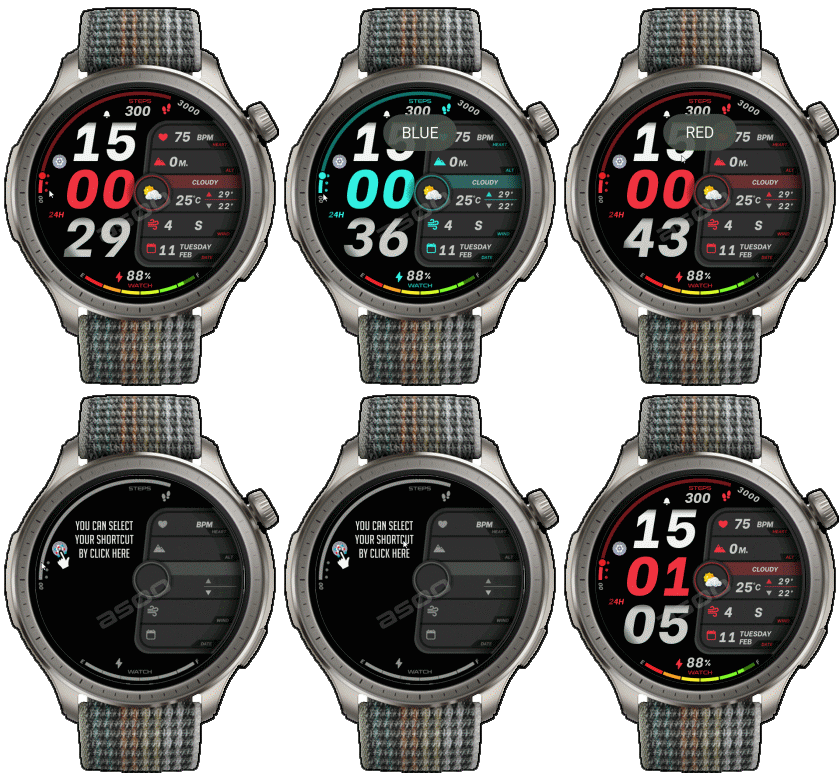
12-02-2025
- upload Version 1.01 Fixed a little script abot layout minute
11-02-2025
- AOD ( NO Analog , No seconds , in BW style )
- Shortcut open calendar ( click on day area )
- Open power save by click on power area
- Add ( Alarm , Bluetooth ) icon
- Change color style by click on 3dots icon
This watchface make for test new function on 13.1 beta
- Test new function on editable elementes
you can change shortcut on the icon by select new shortcut ( App. or training ) by click on icon blue pen in the watchface selection area.
This shortcut point will be a shortcut that you can customize to be a shortcut for any activity that you want.
When you are done selecting, press the crown button to exit the shortcut selection screen.
- In the real watch face will not have a watermark ( The watermark is only to inform you that the sample image is created by me. )
------------------------------------------------------------------------------
it works in 24h format.
for the 12 h format to work. must be enabled in phone settings. (settings-system-date and time-disable 24-hour format.)
------------------------------------------------------------------------------
Tag
Condividi questo quadrante
Commenti
Per rispondere ai commenti devi essere loggato .
Discussioni recenti della comunità
Digital Clock watchface for balance 2.
Hello to all. I found this watchface from zepp store for amazfit bip max and would be great if someone from the watchface creators making it for amazfit balance 2. Thank you ...
[Balance 2] Third-party watch faces fail to download with error 403
QR Installation Update We've finished analyzing the changes introduced in the latest Zepp versions and have updated our server accordingly. QR code installation should now work again for both: - amazfitwatchfaces.com ...
Modular and Active Rhythm for Balance 2
Thank you! It's amazing as always....
Azureblue luminous for amazfit active 2
Hi you all, could someone please fix the swapped watch hands on the "AzureBlue Luminous" watch face for the Amazfit Active 2? The long hand is showing the hours, while the sh...
Number of week Amazfit active 3 premium
Hi Do you know about some watchface with number of week ? For example wk36 Thanks You could check out Drakowed's watch faces: https://amazfitwatchfaces.com/search/g...
Electronic Style and Status Monitor for balance 2
Hello to all. Can someone help me and make these zepp watchfaces from zepp store for Bip max convert them for balance 2. Thank you. https://ze.mmk.pw/view/11206915/171619/1....
request Balance 2 iwc eternal
If i only had the background image.... This is the background image I used, and 30 layers of the moon. Hope it's still useful to you. Photo shop image : ...





Ottime anche le scorciatoie.
A mio parere AOD poco curato, meglio minimal. 12.02.2025 15:27:16 Segnala