SI INTERA ( Amazfit Blance )

Balance en
Зверніть увагу, що всі циферблати, доступні на цьому сайті, є творчими роботами наших користувачів і не пов'язані з офіційними брендами або торговими марками. Вони створюються шанувальниками для шанувальників, надихаються популярними культурними феноменами, іграми, фільмами, або серіалами.
Наша мета - надати платформу для творчості та обміну, але ми також прагнемо поважати інтелектуальні права. Якщо ви володієте авторськими правами на будь-який контент, який, на вашу думку, порушує ваші права на цьому сайті, будь ласка, зв'яжіться з нами для вжиття відповідних заходів.

Опис
Note:
Thank SashaCX75 so much for Editor Version 13.0If without a good editor like this, It would be difficult to make this watchface. , so who want to donate please donate to sashacx75
https://www.buymeacoffee.com/sashacx75
or.
(Paypal: [email protected])
----------------------------------------------------------------------------------------------------
Thank wax so much for code change background by click on screen
/gtr/view/27840
--------------------------------------------------------------------
This watch face made by ported from image SI INTERA
f a c e r . i o
----------------------------------------------------------------------
I didn't design it , do not give credit to me.
----------------------------------------------------------------------- This watchface i do it for use by myself
- Please do not request any modify.
- This watch face, I will not accept any requests
- If have request in the comment i will not answer
- who is interest to modify, you can download and edit it by yourself.- All my work will be "FULL AOD". If you don't like it, you can enable watch's standard AOD. Once you enable watch standard AOD, full AOD of watchface will not be displayed. System will be use standard AOD from Watch
- Only tested on Amazfit Balance
- If the owner requests it to be removed Admin can delete immediately.
Thank you.
---------------------------------------------------------------------------------------- AOD ( No analog and Seconds )
- Shortcut open calendar ( click on date area )
- Open power save by click on battery icon
- Add ( Alarm , Bluetooth ) icon
This watchface make for test new function on 13.0
- In the real watch face will not have a watermark ( The watermark is only to inform you that the sample image is created by me. )
---------------------------------------------------------------------------------------
- Shortcuts
(1. Alarm , 2. sunrise/sunset , 3. temperature, 4. countdown , 5.PAI , 6. Steps , 7. Pulse , 8. SP02 , 9.Stopwatch , 10.calendar , Power Save
------------------------------------------------------------------------------------------
Image showing shortcuts area
 .
.
04-01-2025
- Upload Version 2.01 ( Change icon clear night )
03-01-2025
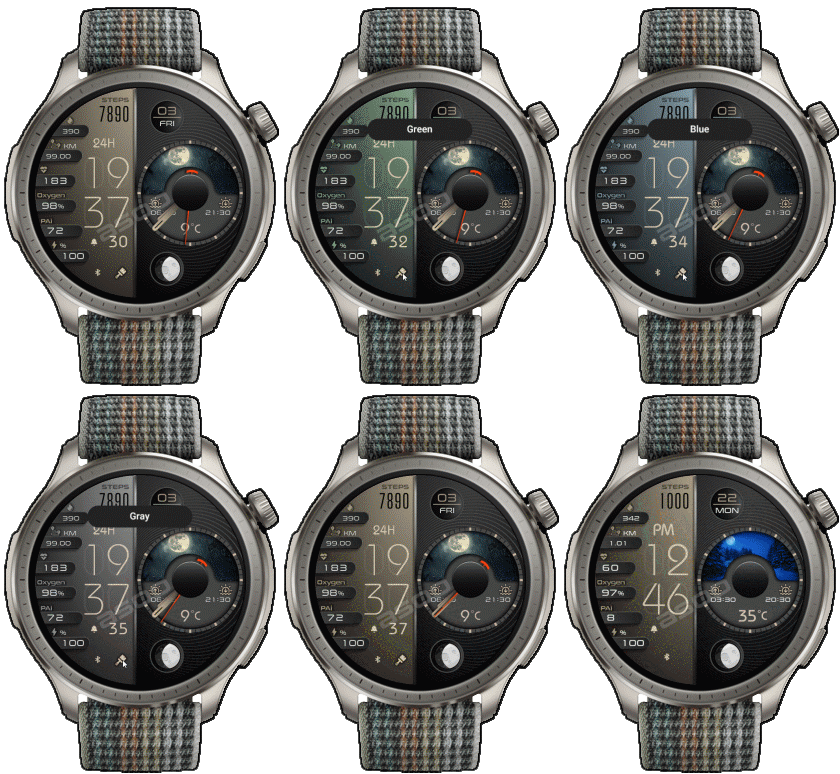
- Upload Version 2.0 ( can change 5 color on Digital BG )
- Click on brush icon
02-01-2025 (1) (2) (3)
- Upload Version 1.3 ( Fixed moon X Y , Modify a little AOD ) (3)
- Upload Version 1.2 ( Fixed about icon 24H ) (2)
- AOD ( No analog and Seconds )
- Shortcut open calendar ( click on date area )
- Open power save by click on battery icon
- Add ( Alarm , Bluetooth ) icon
This watchface make for test new function on 13.0
- In the real watch face will not have a watermark ( The watermark is only to inform you that the sample image is created by me. )
------------------------------------------------------------------------------
it works in 24h format.
for the 12 h format to work. must be enabled in phone settings. (settings-system-date and time-disable 24-hour format.)
------------------------------------------------------------------------------
Теги
Поділиться цим циферблатом
Коментарі
Вам необхідно увійти, щоб залишати коментарі або відповідати на них.
Недавні обговорення в спільноті
Racing Chronograph Watch Face Request [Active Max]
Hello asoo, Thank you so much for all the work you've put into creating this watch face, and I'm really sorry I didn't see your message earlier. Unfortunately, I haven't b...
request for Balance 2, Garmin clone
This is my vision for it, though I am not 100% certain that it will be functional. https://i.postimg.cc/qMcQjCMt/standalone-Balamin.gif Down: https://amazfitwatchface...
For Active 3 premium, conversion
Can anyone convert the following watchface for Active 3 premium: https://amazfitwatchfaces.com/balance/view/1255 When I try to do it, it says something regarding image limits and after conversion every editable assets appear at once and ru...
Request for Active 3 premium
Fair enough. Have a very nice day. Thank you again for your kindest efforts. Regards....
Request to make a watchface tor Active 3 Premium
I confirm in editor don't show weather font but in zepp player and real watch show weather font. I don't edit custom script but i don't find until now something don't fit. [...
Request for creating a watchface for Active 3 premium
I see. Thank you for your response....
Realtime Pulse Graph balance 2
Thank you, it's perfect!...





You're welcome
I hope you can create watchface by yourself soon. 02.01.2025 16:31:56 Скарга
1. I do not have tutorial. I recommend trying it little by little and understanding it.
2. I search the weather images by use Google.
3. I used Corel Photo Paint to edit the images.
However, the images in the zip file to be edited must be unpacked using Sasha's editor first.
You cannot edit images directly from the .zip because the .png in the zip is a PNG in ZeppOS's encoding format.
If you want to ask about the image of the dial creation, it is recommended to use the related forum. Because in the comment area, it is inconvenient to proceed with answering questions.
And you can find more information about creating a watch face and various tools for creating a watch face in the Forum Area. 02.01.2025 19:03:37 Скарга