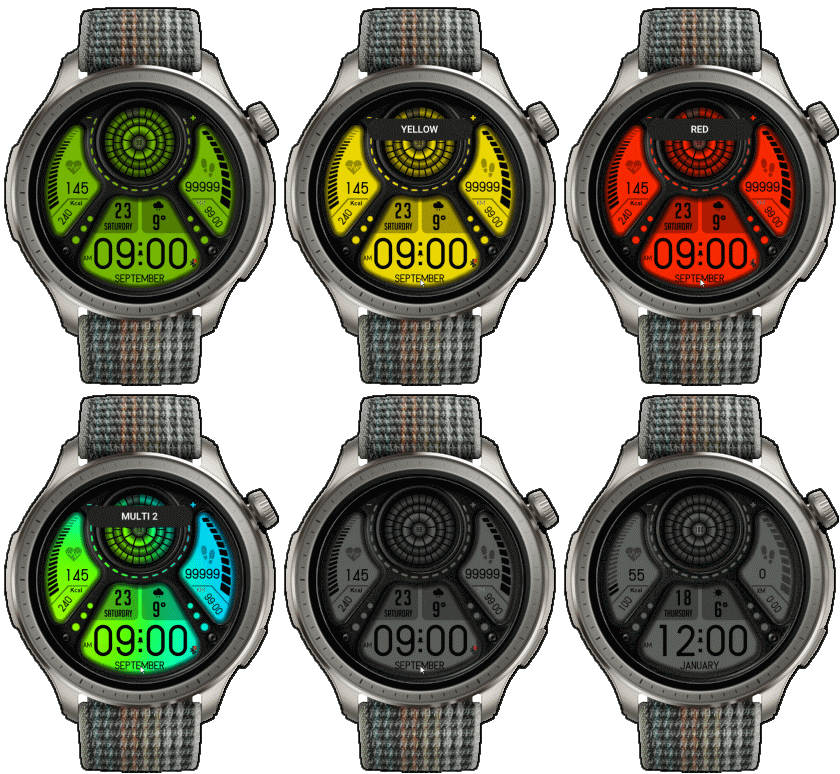
S4U_EYE2_Digital ( Amazfit Balance )

Balance en
Si prega di notare che tutti i quadranti orologio disponibili su questo sito sono opere creative dei nostri utenti e non sono affiliati con marchi ufficiali o marchi registrati. Sono creati da fan per fan, ispirati da fenomeni culturali popolari, giochi, film o serie.
Il nostro obiettivo è fornire una piattaforma per la creatività e lo scambio, ma ci impegniamo anche a rispettare i diritti intellettuali. Se detiene i diritti d'autore su qualsiasi contenuto che ritiene infranga i suoi diritti su questo sito, contattaci per un'azione appropriata.

Descrizione
Note:
Thank SashaCX75 so much for Editor 10.3 FinalIf without a good editor like this, It would be difficult to make this watchface. , so who want to donate please donate to sashacx75
https://www.buymeacoffee.com/sashacx75
or.
(Paypal: [email protected])
----------------------------------------------------------------------------------------------------
Thank wax so much for code change background by click on screen
/gtr/view/27840
--------------------------------------------------------------------
This watch face made by ported from image S4U EYE2Digital
----------------------------------------------------------------------
I didn't design it , do not give credit to me.
----------------------------------------------------------------------- This watchface i do it for use by myself
- Please do not request any modify.
- This watch face, I will not accept any requests
- If have request in the comment i will not answer
- who is interest to modify, you can download and edit it by yourself.- All my work will be "FULL AOD". If you don't like it, you can enable watch's standard AOD. Once you enable watch standard AOD, full AOD of watchface will not be displayed. System will be use standard AOD from Watch
- Only tested on Amazfit Balance
- If the owner requests it to be removed Admin can delete immediately.
Thank you.
---------------------------------------------------------------------------------------- Add Full AOD ( show only Gray style )
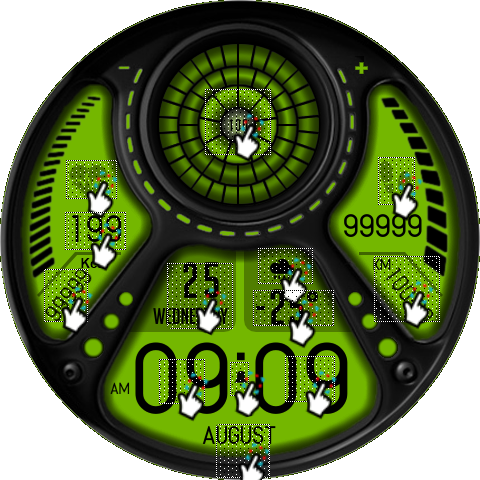
- Shortcut open calendar ( click on day / week area )
- Open power save by click on battery circle
- change color style click on 6 o'clock
- open sports list by click on Distance area
---------------------------------------------------------------------------------------
- Shortcuts
(1. Alarm , 2. sunrise/sunset , 3. temperature, 4. countdown , 5.PAI , 6. Steps , 7. Pulse , 8. SP02 , 9.Stopwatch , 10.calendar , Sports list , Power Save
------------------------------------------------------------------------------------------
Image showing shortcuts area
 .
.
14-02-2024
- Ported
- Change little layout and images
- Add weather, steps, distance, heart rate, battery, date, seconds, calendar, moon, oxygen blood, sports list,
- Add Full AOD ( show only Gray style )
- Shortcut open calendar ( click on day / week area )
- Open power save by click on battery circle
- change color style click on 6 o'clock
- open sports list by click on Distance area
------------------------------------------------------------------------------
it works in 24h format.
for the 12 h format to work. must be enabled in phone settings. (settings-system-date and time-disable 24-hour format.)
------------------------------------------------------------------------------
Tag
Condividi questo quadrante
Commenti
Per rispondere ai commenti devi essere loggato .
Discussioni recenti della comunità
Request to make a watchface tor Active 3 Premium
I confirm in editor don't show weather font but in zepp player and real watch show weather font. I don't edit custom script but i don't find until now something don't fit. [...
Request for creating a watchface for Active 3 premium
I see. Thank you for your response....
Racing Chronograph Watch Face Request [Active Max]
Hi, I’m looking for a custom watch face for the Amazfit Active Max (480 × 480). I really like the design of the S4U RC ONE / RC ONE Racing watch faces available for Wea...
Realtime Pulse Graph balance 2
Thank you, it's perfect!...
Data master watchface balance 2
Thank you, asoo. Everything is ok now except one t...
Request for Active 3 Premium
Hello, Classic example of what age does to one. I didn't notice it. I'm sorry and feel ashamed. I'm extremely sorry. I will not bother you again with any request. Sorry again. But you're work is great. You're truly an artist. Bye...
[Port Request] IWC Schaffhausen for Amazfit Active 2 (Round)
GTR 4 shares the exact screen resolution with Active 2 (Round). Both has 466*466 screen. You can safely sync that watchface in your watch via Zepp Developer mode....





As far as testing on "Amazfit Balance", the problem you reported was not found. You can see from the pictures that it shows testing on a real device.
If you use it on another device I can't verify it.
I expect the issue maybe is caused by the ZeppOS Version on the device you are using that has different image display requirements than the ZeppOS on the "Amazfit Balance" (ZeppOS V3).
If you want to fix the problem, you can try changing the E0.png file from a size of 1x1 pix. to 1x 12 pix may fix the problem. But I am not sure it can fix your issue or not. Because I don't have another device to test. 14.02.2024 05:19:44 Segnala
If I'm not mistaken, the ZeppOS 1.0 system sets the image boundaries from the first image that the element uses as the default boundary. And this value will be applied to every image in that element, so Dis_KM.png has a scope of ??x12, but the first image that this element activates is E0.png, which has a scope of 1x1, so you need to edit the image to have Boundary is set to 1x12 in order to display the full coverage of the Dis_KM.png boundary.
PS. Have you tried the fix I suggested earlier? If you try it first, it'll be great. Because I can't know if it can be fixed correctly or not because I don't have a device that uses ZeppOS 1.0 14.02.2024 11:59:04 Segnala
I am sorry In that case, I can't help you either. 23.02.2024 17:09:17 Segnala
Try fixing it by refreshing the page and download again. 23.02.2024 17:13:09 Segnala