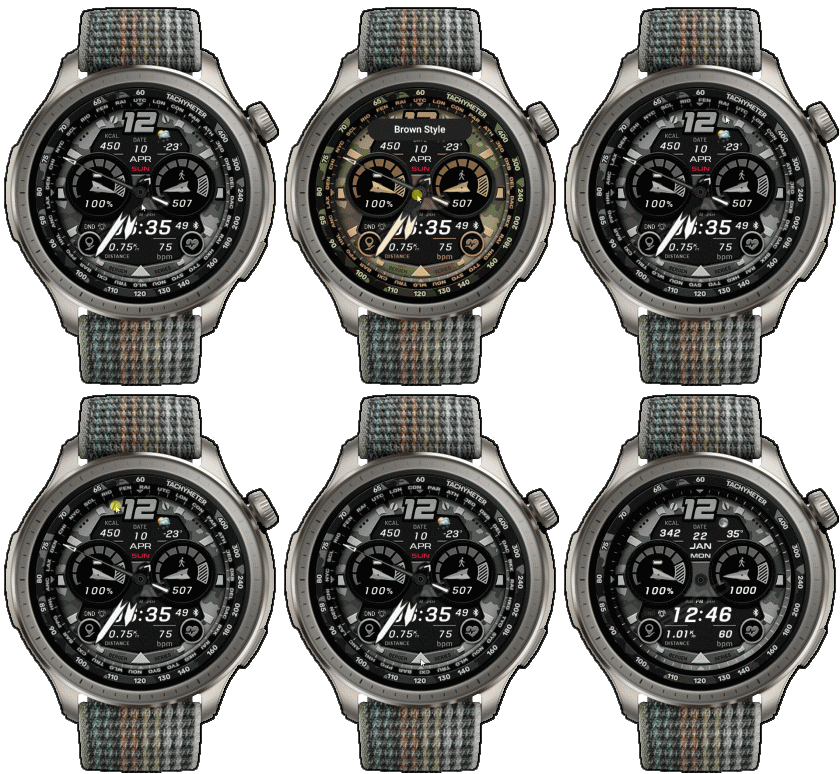
New BRG CAMO ( Amazfit Balance )

Balance en
Зверніть увагу, що всі циферблати, доступні на цьому сайті, є творчими роботами наших користувачів і не пов'язані з офіційними брендами або торговими марками. Вони створюються шанувальниками для шанувальників, надихаються популярними культурними феноменами, іграми, фільмами, або серіалами.
Наша мета - надати платформу для творчості та обміну, але ми також прагнемо поважати інтелектуальні права. Якщо ви володієте авторськими правами на будь-який контент, який, на вашу думку, порушує ваші права на цьому сайті, будь ласка, зв'яжіться з нами для вжиття відповідних заходів.

Опис
Note:
Thank SashaCX75 so much for Editor 11.2 betaIf without a good editor like this, It would be difficult to make this watchface. , so who want to donate please donate to sashacx75
https://www.buymeacoffee.com/sashacx75
or.
(Paypal: [email protected])
----------------------------------------------------------------------------------------------------
Thank wax so much for code change background by click on screen
/gtr/view/27840
--------------------------------------------------------------------
This watch face made by ported from image BRG Camo
f a c e r . i o
----------------------------------------------------------------------
I didn't design it , do not give credit to me.
----------------------------------------------------------------------- This watchface i do it for use by myself
- Please do not request any modify.
- This watch face, I will not accept any requests
- If have request in the comment i will not answer
- who is interest to modify, you can download and edit it by yourself.- All my work will be "FULL AOD". If you don't like it, you can enable watch's standard AOD. Once you enable watch standard AOD, full AOD of watchface will not be displayed. System will be use standard AOD from Watch
- Only tested on Amazfit Balance
- If the owner requests it to be removed Admin can delete immediately.
Thank you.
---------------------------------------------------------------------------------------- In AOD ( Gray no analog )
- Shortcut open calendar ( click on "Month Area" )
- Open power save by click on battery icon
- Open sportlist by click on "Distance icon "
- Change color style by click on center
- Rotate the city name bezel to the left by click on left 12 o'clock
- Rotate the city name bezel to the right by click on right 12 o'clock
- Reset the city name bezel by click on 6 o'clock
- In the real watch face will not have a watermark ( The watermark is only to inform you that the sample image is created by me. )
---------------------------------------------------------------------------------------
- Shortcuts
(1. Alarm , 2. sunrise/sunset , 3. temperature, 4. countdown , 5.PAI , 6. Steps , 7. Pulse , 8. SP02 , 9.Stopwatch , 10.calendar , Power Save , compass,
------------------------------------------------------------------------------------------
Image showing shortcuts area
27-09-2024
- upload Version 3 fixed issue smooth seconds , animation in firmware ( 3.22.15.7 )
19-08-2024
- Upload Version 1.01 ( Add button ON/OFF bezel of city name by click on 12 O'clock )
18-08-2024
- In AOD ( Gray no analog )
- Shortcut open calendar ( click on "Month Area" )
- Open power save by click on battery icon
- Open sportlist by click on "Distance icon "
- Change color style by click on center
- Rotate the city name bezel to the left by click on left 12 o'clock
- Rotate the city name bezel to the right by click on right 12 o'clock
- Reset the city name bezel by click on 6 o'clock
For watches with a World Time Bezel, which has the abbreviation of a city or country around the edge of the dial, you can follow these steps:
Set a home city: Rotate the city ring so that the name of the city you are in (e.g. London) matches the current time displayed on the main dial. For example, if the time is currently 22:00 in London, you would rotate the ring so that London is above the 22 on the 24-hour dial.
Read the time in other cities: After setting a home city, you can check the time in other cities around the world by looking at the number that corresponds to the name of the city you want to know the time. The number on the 24-hour dial will tell you what time it is in that city.
However, this original dial does not have a 24H bezel, so when you follow the usage steps, you must calculate the time of other countries by yourself by using the 24H bezel is standard.
- In the real watch face will not have a watermark ( The watermark is only to inform you that the sample image is created by me. )
------------------------------------------------------------------------------
it works in 24h format.
for the 12 h format to work. must be enabled in phone settings. (settings-system-date and time-disable 24-hour format.)
------------------------------------------------------------------------------
Теги
Поділиться цим циферблатом
Коментарі
Вам необхідно увійти, щоб залишати коментарі або відповідати на них.
Недавні обговорення в спільноті
request for Balance 2
Can this be replicated in English for Balance 2? https://i.postimg.cc/GtkjppWt/Watchface.jpg ...
Everything and LiveView for balance 2
Thank you, asoo!...
Digital Clock watchface for balance 2.
Hello to all. I found this watchface from zepp store for amazfit bip max and would be great if someone from the watchface creators making it for amazfit balance 2. Thank you ...
[Balance 2] Third-party watch faces fail to download with error 403
QR Installation Update We've finished analyzing the changes introduced in the latest Zepp versions and have updated our server accordingly. QR code installation should now work again for both: - amazfitwatchfaces.com ...
Modular and Active Rhythm for Balance 2
Thank you! It's amazing as always....
Azureblue luminous for amazfit active 2
Hi you all, could someone please fix the swapped watch hands on the "AzureBlue Luminous" watch face for the Amazfit Active 2? The long hand is showing the hours, while the sh...
Number of week Amazfit active 3 premium
Hi Do you know about some watchface with number of week ? For example wk36 Thanks You could check out Drakowed's watch faces: https://amazfitwatchfaces.com/search/g...





For watches with a World Time Bezel, which has the abbreviation of a city or country around the edge of the dial, you can follow these steps:
Set a home city: Rotate the city ring so that the name of the city you are in (e.g. London) matches the current time displayed on the main dial. For example, if the time is currently 22:00 in London, you would rotate the ring so that London is above the 22 on the 24-hour dial.
Read the time in other cities: After setting a home city, you can check the time in other cities around the world by looking at the number that corresponds to the name of the city you want to know the time. The number on the 24-hour dial will tell you what time it is in that city.
However, this original dial does not have a 24H bezel, so when you follow the usage steps, you must calculate the time of other countries by yourself by using the 24H bezel is standard. 18.08.2024 12:38:08 Скарга
I'm not really sure about your question.
Because circle of country only works when you choose to rotate it.
If you don't rotate it, it still disable mode
If you mean you don't want the ring of country, you can fix it yourself by deleting the image in the animation folder. The dial will be displayed as in AOD.
Or please wait, I have an idea to create a version that can turn off the display of the country ring. 19.08.2024 04:40:50 Скарга
Version 1.01
you can Show or Hidden bezel of city name by click on 12 o'clock 19.08.2024 07:29:51 Скарга