PICK(C)LOCK ( Amazfit Balance )

Balance en
Зверніть увагу, що всі циферблати, доступні на цьому сайті, є творчими роботами наших користувачів і не пов'язані з офіційними брендами або торговими марками. Вони створюються шанувальниками для шанувальників, надихаються популярними культурними феноменами, іграми, фільмами, або серіалами.
Наша мета - надати платформу для творчості та обміну, але ми також прагнемо поважати інтелектуальні права. Якщо ви володієте авторськими правами на будь-який контент, який, на вашу думку, порушує ваші права на цьому сайті, будь ласка, зв'яжіться з нами для вжиття відповідних заходів.

Опис
Note:
Thank SashaCX75 so much for Editor 11.1If without a good editor like this, It would be difficult to make this watchface. , so who want to donate please donate to sashacx75
https://www.buymeacoffee.com/sashacx75
or.
(Paypal: [email protected])
----------------------------------------------------------------------------------------------------
Thank wax so much for code change background by click on screen
/gtr/view/27840
--------------------------------------------------------------------
This watch face made by ported from PICK(C)LOCK
f a c e r . i o
----------------------------------------------------------------------
I didn't design it , do not give credit to me.
----------------------------------------------------------------------- This watchface i do it for use by myself
- Please do not request any modify.
- This watch face, I will not accept any requests
- If have request in the comment i will not answer
- who is interest to modify, you can download and edit it by yourself.- Only tested on Amazfit Balance
- If the owner requests it to be removed Admin can delete immediately.
Thank you.
---------------------------------------------------------------------------------------- Add AOD ( only digital )
- Shortcut open calendar ( click on day area )
- Open power save by click on power progress
- Switch Windows ( weather , Dis and Cal , Date , Heart rate ) by click on icon Gear
- Sport list click on steps progress line
- If the compass doesn't work, please calibrate the compass first.
By click on icon triangle, then refreshing the screen again. The compass should work normally.
- The real watch face will not have a watermark (the watermark is only to show that the sample image is mine).
---------------------------------------------------------------------------------------
- Shortcuts
(1. Alarm , 2. sunrise/sunset , 3. temperature, 4. countdown , 5.PAI , 6. Steps , 7. Pulse ,
9.Stopwatch , 10.calendar , Power Save , oxygen blood , sportlist
------------------------------------------------------------------------------------------
Image showing shortcuts area
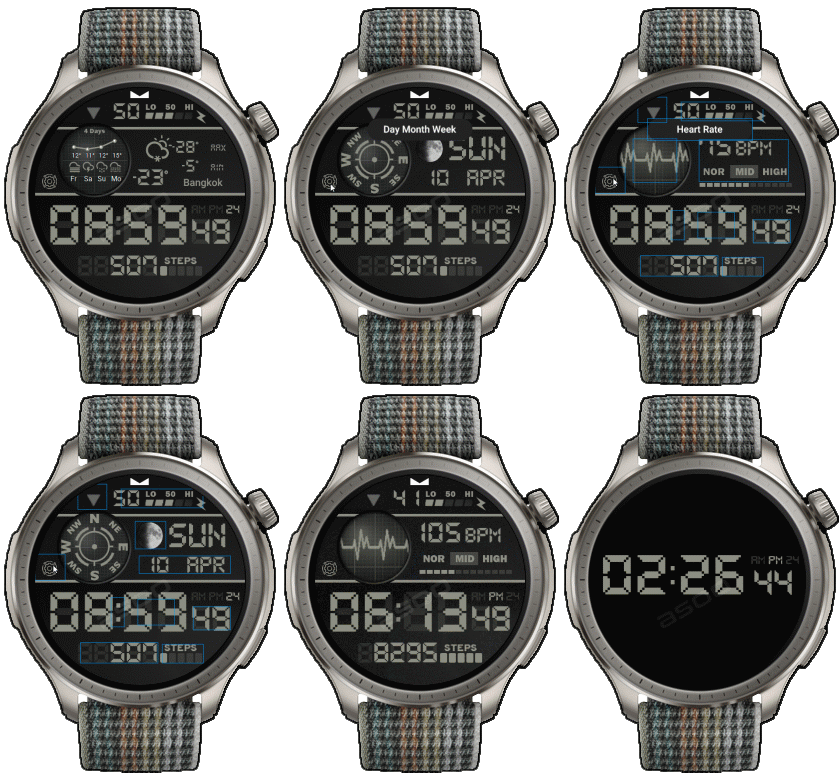
11-08-2024
- Add AOD ( only digital )
- Shortcut open calendar ( click on day area )
- Open power save by click on power progress
- Switch Windows ( weather , Dis and Cal , Date , Heart rate ) by click on icon Gear
- Sport list click on steps progress line
- If the compass doesn't work, please calibrate the compass first.
By click on icon triangle, then refreshing the screen again. The compass should work normally.
- In the real watch face will not have a watermark ( The watermark is only to inform you that the sample image is created by me. )
-----------------------------------------------------------------------------
Please note that some elements may not work on ZeppOS 1.0-2.x. So if you are using a device that uses ZeppOS 1.0-2.x and convert this watch face and find that some elements cannot be used, it is because ZeppOS 1.0-2.x does not support that function.
------------------------------------------------------------------------------It works in 24h format.
for the 12 h format to work. must be enabled in phone settings. (settings-system-date and time-disable 24-hour format.)
------------------------------------------------------------------------------
Теги
Поділиться цим циферблатом
Коментарі
Вам необхідно увійти, щоб залишати коментарі або відповідати на них.
Недавні обговорення в спільноті
Request to make a watchface tor Active 3 Premium
Hey y'all! I hope you are all having a nice day. So I have created this watchface design. Therefore, I would like to politely request to make it. Additionally, there are a few ...
Request for creating a watchface for Active 3 premium
I see. Thank you for your response....
Racing Chronograph Watch Face Request [Active Max]
Hi, I’m looking for a custom watch face for the Amazfit Active Max (480 × 480). I really like the design of the S4U RC ONE / RC ONE Racing watch faces available for Wea...
Realtime Pulse Graph balance 2
Thank you, it's perfect!...
Data master watchface balance 2
Thank you, asoo. Everything is ok now except one t...
Request for Active 3 Premium
Hello, Classic example of what age does to one. I didn't notice it. I'm sorry and feel ashamed. I'm extremely sorry. I will not bother you again with any request. Sorry again. But you're work is great. You're truly an artist. Bye...
[Port Request] IWC Schaffhausen for Amazfit Active 2 (Round)
GTR 4 shares the exact screen resolution with Active 2 (Round). Both has 466*466 screen. You can safely sync that watchface in your watch via Zepp Developer mode....





Немає коментарів. Залиште перший коментар.