PICK(C)LOCK ( Amazfit Balance )

Balance en
Please note that all watch faces available on this site are creative works by our users and are not affiliated with official brands or trademarks. They are created by fans for fans, inspired by popular cultural phenomena, games, movies, or series.
Our goal is to provide a platform for creativity and exchange, but we also strive to respect intellectual rights. If you hold copyright to any content that you believe infringes your rights on this site, please contact us for appropriate action.

Description
Note:
Thank SashaCX75 so much for Editor 11.1If without a good editor like this, It would be difficult to make this watchface. , so who want to donate please donate to sashacx75
https://www.buymeacoffee.com/sashacx75
or.
(Paypal: [email protected])
----------------------------------------------------------------------------------------------------
Thank wax so much for code change background by click on screen
/gtr/view/27840
--------------------------------------------------------------------
This watch face made by ported from PICK(C)LOCK
f a c e r . i o
----------------------------------------------------------------------
I didn't design it , do not give credit to me.
----------------------------------------------------------------------- This watchface i do it for use by myself
- Please do not request any modify.
- This watch face, I will not accept any requests
- If have request in the comment i will not answer
- who is interest to modify, you can download and edit it by yourself.- Only tested on Amazfit Balance
- If the owner requests it to be removed Admin can delete immediately.
Thank you.
---------------------------------------------------------------------------------------- Add AOD ( only digital )
- Shortcut open calendar ( click on day area )
- Open power save by click on power progress
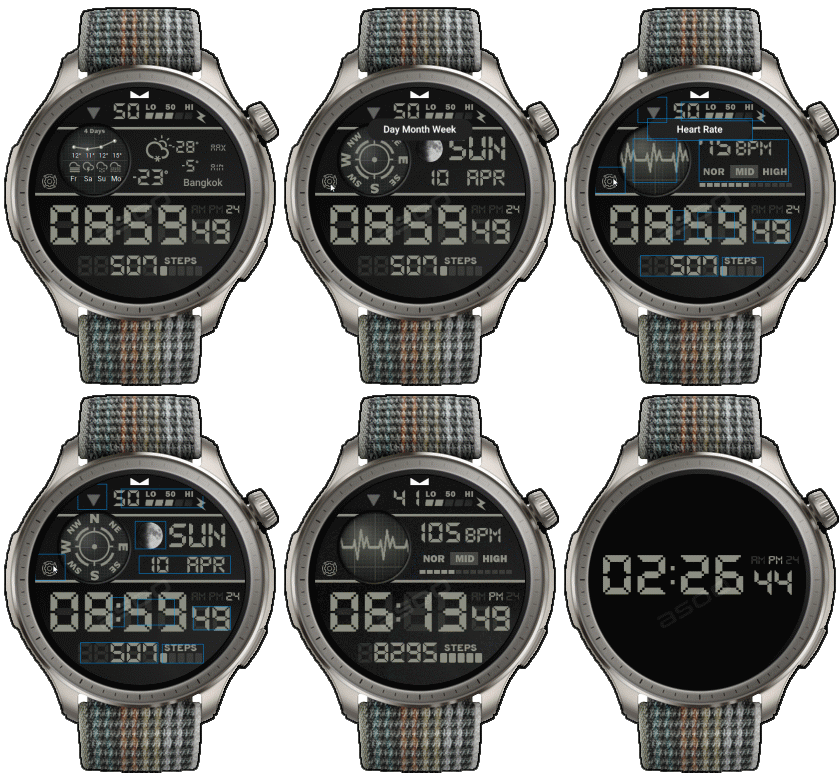
- Switch Windows ( weather , Dis and Cal , Date , Heart rate ) by click on icon Gear
- Sport list click on steps progress line
- If the compass doesn't work, please calibrate the compass first.
By click on icon triangle, then refreshing the screen again. The compass should work normally.
- The real watch face will not have a watermark (the watermark is only to show that the sample image is mine).
---------------------------------------------------------------------------------------
- Shortcuts
(1. Alarm , 2. sunrise/sunset , 3. temperature, 4. countdown , 5.PAI , 6. Steps , 7. Pulse ,
9.Stopwatch , 10.calendar , Power Save , oxygen blood , sportlist
------------------------------------------------------------------------------------------
Image showing shortcuts area
11-08-2024
- Add AOD ( only digital )
- Shortcut open calendar ( click on day area )
- Open power save by click on power progress
- Switch Windows ( weather , Dis and Cal , Date , Heart rate ) by click on icon Gear
- Sport list click on steps progress line
- If the compass doesn't work, please calibrate the compass first.
By click on icon triangle, then refreshing the screen again. The compass should work normally.
- In the real watch face will not have a watermark ( The watermark is only to inform you that the sample image is created by me. )
-----------------------------------------------------------------------------
Please note that some elements may not work on ZeppOS 1.0-2.x. So if you are using a device that uses ZeppOS 1.0-2.x and convert this watch face and find that some elements cannot be used, it is because ZeppOS 1.0-2.x does not support that function.
------------------------------------------------------------------------------It works in 24h format.
for the 12 h format to work. must be enabled in phone settings. (settings-system-date and time-disable 24-hour format.)
------------------------------------------------------------------------------
Tags
Share this face
Comments
You need to be logged in to post or reply to comments.
Recent community discussions
Request to make a watchface tor Active 3 Premium
Hey y'all! I hope you are all having a nice day. So I have created this watchface design. Therefore, I would like to politely request to make it. Additionally, there are a few irregularities and assymetry among the texts and icons of 'HR',...
Request for creating a watchface for Active 3 premium
I see. Thank you for your response....
Racing Chronograph Watch Face Request [Active Max]
Hi, I’m looking for a custom watch face for the Amazfit Active Max (480 × 480). I really like the design of the S4U RC ONE / RC ONE Racing watch faces available for Wea...
Realtime Pulse Graph balance 2
Thank you, it's perfect!...
Data master watchface balance 2
Thank you, asoo. Everything is ok now except one t...
Request for Active 3 Premium
Hello, Classic example of what age does to one. I didn't notice it. I'm sorry and feel ashamed. I'm extremely sorry. I will not bother you again with any request. Sorry again. But you're work is great. You're truly an artist. Bye...
[Port Request] IWC Schaffhausen for Amazfit Active 2 (Round)
GTR 4 shares the exact screen resolution with Active 2 (Round). Both has 466*466 screen. You can safely sync that watchface in your watch via Zepp Developer mode....





No comments. Be the first to comment.