BALLOZI INTERO Digital ( Amazfit Balance )

Balance en
Зверніть увагу, що всі циферблати, доступні на цьому сайті, є творчими роботами наших користувачів і не пов'язані з офіційними брендами або торговими марками. Вони створюються шанувальниками для шанувальників, надихаються популярними культурними феноменами, іграми, фільмами, або серіалами.
Наша мета - надати платформу для творчості та обміну, але ми також прагнемо поважати інтелектуальні права. Якщо ви володієте авторськими правами на будь-який контент, який, на вашу думку, порушує ваші права на цьому сайті, будь ласка, зв'яжіться з нами для вжиття відповідних заходів.

Опис
Note:
Thank SashaCX75 so much for Editor 11.1 Final VersionIf without a good editor like this, It would be difficult to make this watchface. , so who want to donate please donate to sashacx75
https://www.buymeacoffee.com/sashacx75
or.
(Paypal: [email protected])
----------------------------------------------------------------------------------------------------
Thank wax so much for code change background by click on screen
/gtr/view/27840
--------------------------------------------------------------------
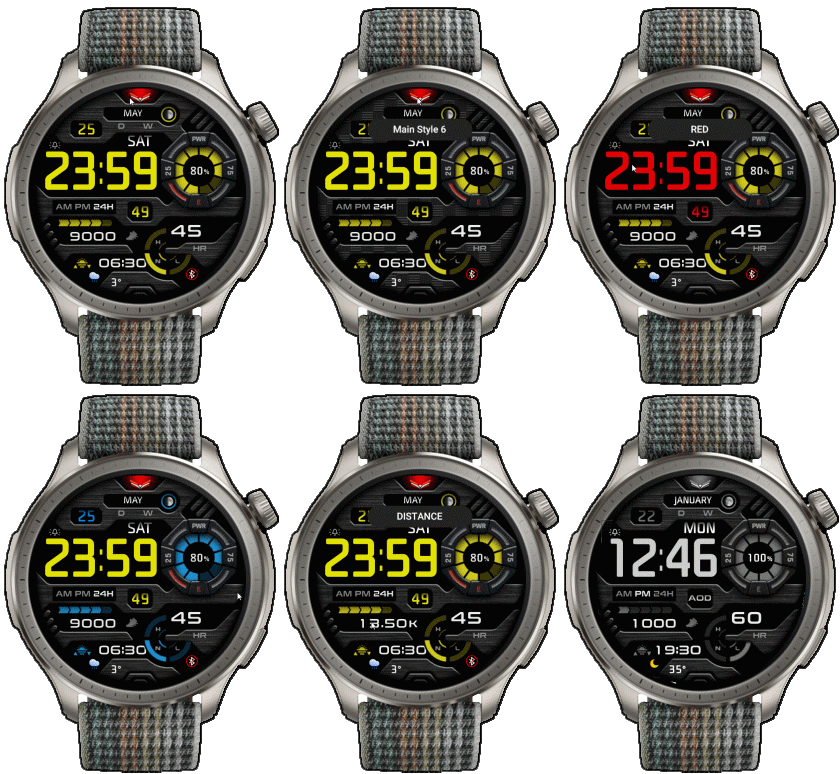
This watch face made by ported from image BALLOZI INTERO Digital
g o o g l e play
----------------------------------------------------------------------
I didn't design it , do not give credit to me.
----------------------------------------------------------------------- This watchface i do it for use by myself
- Please do not request any modify.
- This watch face, I will not accept any requests
- If have request in the comment i will not answer
- who is interest to modify, you can download and edit it by yourself.- All my work will be "FULL AOD". If you don't like it, you can enable watch's standard AOD. Once you enable watch standard AOD, full AOD of watchface will not be displayed. System will be use standard AOD from Watch
- Only tested on Amazfit Balance
- If the owner requests it to be removed Admin can delete immediately.
Thank you.
---------------------------------------------------------------------------------------- In AOD ( only AOD style)
- Shortcut open calendar ( click on "DAY Area" )
- Open power save by click on Power Area
- Open sportlist by click on steps icon
- change main style by click on 12 o'clock
- change color Digital time by click on Digital Hour area
- change color progress by click on 3 o'clock
- Switch Activity info. by click on Number ( Steps, Calories , Distance )
---------------------------------------------------------------------------------------
- Shortcuts
(1. Alarm , 2. sunrise/sunset , 3. temperature, 4. countdown , 5.PAI , 6. Steps , 7. Pulse , 8. SP02 , 9.Stopwatch , 10.calendar , Power Save ,
------------------------------------------------------------------------------------------
Image showing shortcuts area
21-07-2024
- Change a little layout
- Add weather, steps, heart rate, battery, date, calendar, moon,
- In AOD ( only AOD style)
- Shortcut open calendar ( click on "DAY Area" )
- Open power save by click on Power Area
- Open sportlist by click on steps icon
- change main style by click on 12 o'clock
- change color Digital time by click on Digital Hour area
- change color progress by click on 3 o'clock
- Switch Activity info. by click on Number ( Steps, Calories , Distance )
- Digital color can change 6 colors
- Main style can change 6 type
- Progress color can change 6 colors
Therefore, you can create your own watch face styles up to
216 designs
Steps progress will be activated when you have reached 10% of your steps goal, as the Steps progress display for this watchface uses the reverse image format.
GTR3pro , GTR4 :
/forum/viewtopic.php?p=18630#p18630
------------------------------------------------------------------------------
it works in 24h format.
for the 12 h format to work. must be enabled in phone settings. (settings-system-date and time-disable 24-hour format.)
------------------------------------------------------------------------------
Теги
Поділиться цим циферблатом
Коментарі
Вам необхідно увійти, щоб залишати коментарі або відповідати на них.
Недавні обговорення в спільноті
Request to make a watchface tor Active 3 Premium
I confirm in editor don't show weather font but in zepp player and real watch show weather font. I don't edit custom script but i don't find until now something don't fit. [...
Request for creating a watchface for Active 3 premium
I see. Thank you for your response....
Racing Chronograph Watch Face Request [Active Max]
Hi, I’m looking for a custom watch face for the Amazfit Active Max (480 × 480). I really like the design of the S4U RC ONE / RC ONE Racing watch faces available for Wea...
Realtime Pulse Graph balance 2
Thank you, it's perfect!...
Data master watchface balance 2
Thank you, asoo. Everything is ok now except one t...
Request for Active 3 Premium
Hello, Classic example of what age does to one. I didn't notice it. I'm sorry and feel ashamed. I'm extremely sorry. I will not bother you again with any request. Sorry again. But you're work is great. You're truly an artist. Bye...
[Port Request] IWC Schaffhausen for Amazfit Active 2 (Round)
GTR 4 shares the exact screen resolution with Active 2 (Round). Both has 466*466 screen. You can safely sync that watchface in your watch via Zepp Developer mode....





Немає коментарів. Залиште перший коментар.