G-338 ( Amazfit Balance )

Balance en
Please note that all watch faces available on this site are creative works by our users and are not affiliated with official brands or trademarks. They are created by fans for fans, inspired by popular cultural phenomena, games, movies, or series.
Our goal is to provide a platform for creativity and exchange, but we also strive to respect intellectual rights. If you hold copyright to any content that you believe infringes your rights on this site, please contact us for appropriate action.

Description
Note:
Thank SashaCX75 so much for Editor 11.1 BetaIf without a good editor like this, It would be difficult to make this watchface. , so who want to donate please donate to sashacx75
https://www.buymeacoffee.com/sashacx75
or.
(Paypal: [email protected])
----------------------------------------------------------------------------------------------------
Thank wax so much for code change background by click on screen
/gtr/view/27840
--------------------------------------------------------------------
This watch face made by ported from image 338
M D
----------------------------------------------------------------------
I didn't design it , do not give credit to me.
----------------------------------------------------------------------- This watchface i do it for use by myself
- Please do not request any modify.
- This watch face, I will not accept any requests
- If have request in the comment i will not answer
- who is interest to modify, you can download and edit it by yourself.- All my work will be "FULL AOD". If you don't like it, you can enable watch's standard AOD. Once you enable watch standard AOD, full AOD of watchface will not be displayed. System will be use standard AOD from Watch
- Only tested on Amazfit Balance
- If the owner requests it to be removed Admin can delete immediately.
Thank you.
---------------------------------------------------------------------------------------- Add AOD ( show only digital and compass will be stop for save battery )
- Shortcut open calendar ( click on day area )
- Open power save by click on center battery pointer
- Change main "color style" by click on icon "Amazfit logo"
- Switch Seconds Smooth and Normal by click on " AM PM"
- Turn ON/OFF Analog Hands by click on 9 o'clock
- Change Analog Hands style by click on Center screen
- Change color only window day and windows step by click on the left Amazfit logo
- if compass not active please click on icon compass for Calibrate first
---------------------------------------------------------------------------------------
- Shortcuts
(1. Alarm , 2. sunrise/sunset , 3. temperature, 4. countdown , 5.PAI , 6. Steps , 7. Pulse , 8. SP02 , 9.Stopwatch , 10.calendar , Power Save
------------------------------------------------------------------------------------------
Image showing shortcuts area
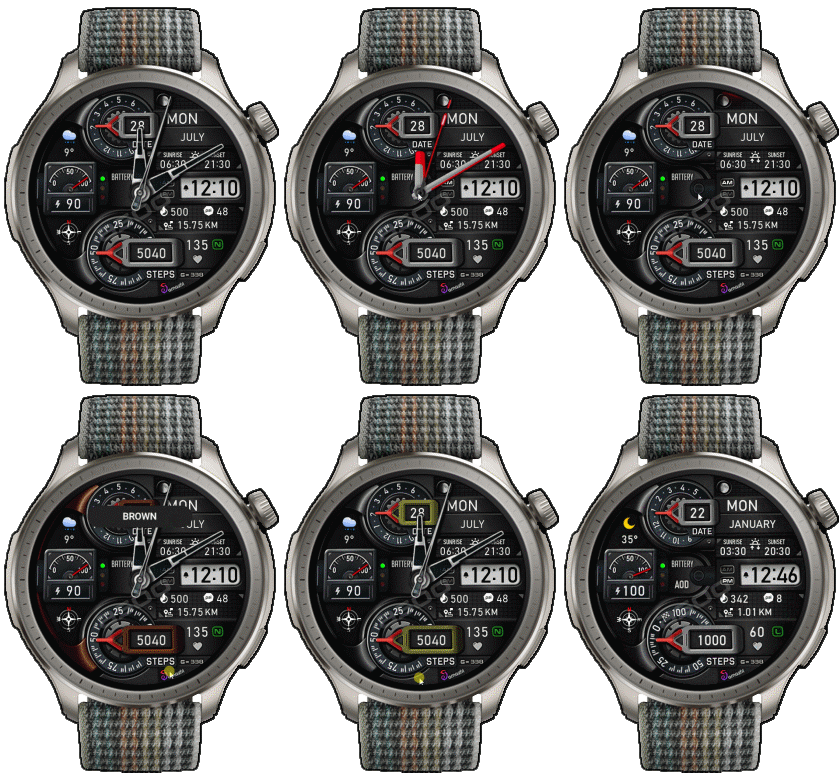
22-09-2026
- Upload smooth seconds analog to type2
some user say type4 not work on Balance2, it have issue in smooth seconds animation
27-09-2024
- upload Version 3 fixed issue smooth seconds , animation in firmware ( 3.22.15.7 )
04-08-2024
- Fixed some image Analog hands
- Add new analog hands ( now have 17 style )
- Delete old version
03-08-2024
- Upload version 2.02
- Fixed sunrise sunset ":"
- Modify Analog hand No.13
- Add function change color " windows Digital "
- delete old version
24-07-2024
- Upload Version 2.01 ( Modify main screen graphic, make it close to the original )
- Fix AOD Screen
24-07-2024
- upload version 2.0
- Change main "color style" ( window day and windows step will be change color too )
- Add button change color only window day and windows step by click on the left Amazfit logo
- Add new Analog hands
17-07-2024
- Ported
- Change little layout and images
- Add weather, steps, distance, calories, heart rate, battery, date, seconds, calendar, compass,
- Add AOD ( show only digital and compass will be stop for save battery )
- Shortcut open calendar ( click on day area )
- Open power save by click on center battery pointer
- Change main "color style" by click on icon "Amazfit logo"
- Switch Seconds Smooth and Normal by click on " AM PM"
- Turn ON/OFF Analog Hands by click on 9 o'clock
- Change Analog Hands style by click on Center screen
- if compass not active please click on icon compass for Calibrate first
- The watch face will not have a watermark (the watermark is only to show that the sample image is mine).
- Testing Version 11.1 it can be used correctly on Balance (ZeppOS 4.0).
However Some of the new features added will definitely not support ZeppOS 1.x.
------------------------------------------------------------------------------
It works in 24h format.
for the 12 h format to work. must be enabled in phone settings. (settings-system-date and time-disable 24-hour format.)
------------------------------------------------------------------------------
Tags
Share this face
Comments
You need to be logged in to post or reply to comments.
Recent community discussions
Request to make a watchface tor Active 3 Premium
I confirm in editor don't show weather font but in zepp player and real watch show weather font. I don't edit custom script but i don't find until now something don't fit. [...
Request for creating a watchface for Active 3 premium
I see. Thank you for your response....
Racing Chronograph Watch Face Request [Active Max]
Hi, I’m looking for a custom watch face for the Amazfit Active Max (480 × 480). I really like the design of the S4U RC ONE / RC ONE Racing watch faces available for Wea...
Realtime Pulse Graph balance 2
Thank you, it's perfect!...
Data master watchface balance 2
Thank you, asoo. Everything is ok now except one t...
Request for Active 3 Premium
Hello, Classic example of what age does to one. I didn't notice it. I'm sorry and feel ashamed. I'm extremely sorry. I will not bother you again with any request. Sorry again. But you're work is great. You're truly an artist. Bye...
[Port Request] IWC Schaffhausen for Amazfit Active 2 (Round)
GTR 4 shares the exact screen resolution with Active 2 (Round). Both has 466*466 screen. You can safely sync that watchface in your watch via Zepp Developer mode....





No comments. Be the first to comment.