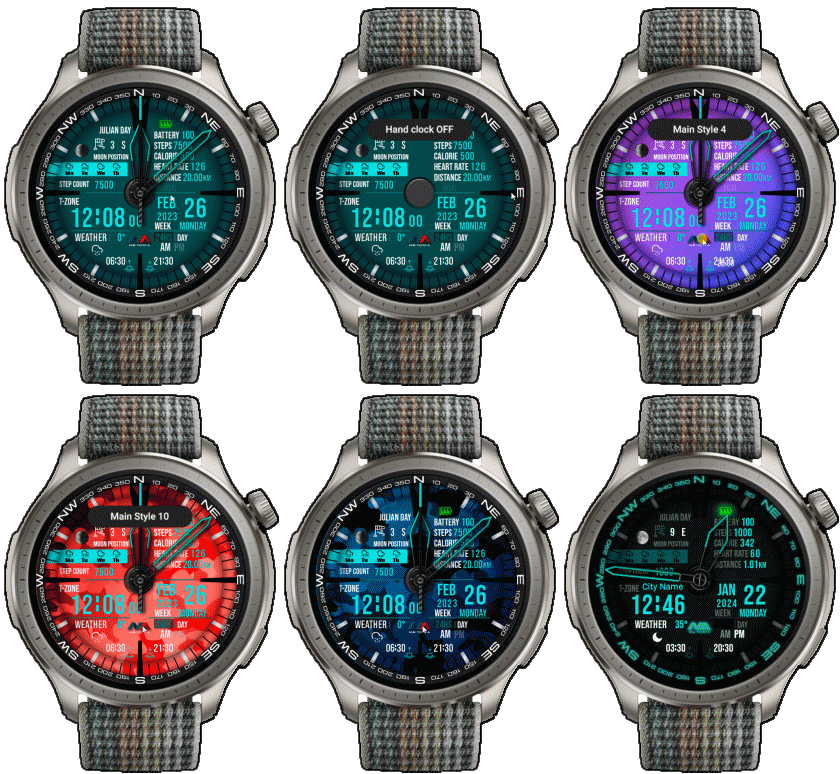
MA-TCM-4 ( Amazfit Balance )

Balance en
Please note that all watch faces available on this site are creative works by our users and are not affiliated with official brands or trademarks. They are created by fans for fans, inspired by popular cultural phenomena, games, movies, or series.
Our goal is to provide a platform for creativity and exchange, but we also strive to respect intellectual rights. If you hold copyright to any content that you believe infringes your rights on this site, please contact us for appropriate action.

Description
Note:
Thank SashaCX75 so much for Editor 11.1 betaIf without a good editor like this, It would be difficult to make this watchface. , so who want to donate please donate to sashacx75
https://www.buymeacoffee.com/sashacx75
or.
(Paypal: [email protected])
----------------------------------------------------------------------------------------------------
Thank wax so much for code change background by click on screen
/gtr/view/27840
--------------------------------------------------------------------
This watch face made by ported from image MA-TCM-4
f a c e r . i o
----------------------------------------------------------------------
I didn't design it , do not give credit to me.
----------------------------------------------------------------------- This watchface i do it for use by myself
- Please do not request any modify.
- This watch face, I will not accept any requests
- If have request in the comment i will not answer
- who is interest to modify, you can download and edit it by yourself.- All my work will be "FULL AOD". If you don't like it, you can enable watch's standard AOD. Once you enable watch standard AOD, full AOD of watchface will not be displayed. System will be use standard AOD from Watch
- Only tested on Amazfit Balance
- If the owner requests it to be removed Admin can delete immediately.
Thank you.
---------------------------------------------------------------------------------------- In AOD ( compass will be stop for save power)
- Shortcut open calendar ( click on "DAY Area" )
- Open power save by click on Power Area
- Open sportlist by click on Text "STEP COUNT"
- change main styles click on "MA" logo
- change color analog clock by click on center screen
- hidden analog hands by click on 3 o'clock
- If the compass doesn't work, please calibrate the compass first.
By click on 12 o'clock, then refreshing the screen again. The compass should work normally.
---------------------------------------------------------------------------------------
- Shortcuts
(1. Alarm , 2. sunrise/sunset , 3. temperature, 4. countdown , 5.PAI , 6. Steps , 7. Pulse , 8. SP02 , 9.Stopwatch , 10.calendar , Power Save , compass,
------------------------------------------------------------------------------------------
Image showing shortcuts area
17-12-2024
- upload Version 2.01 fixed issue image main4
27-09-2024
- upload Version 2 fixed issue smooth seconds , animation in firmware ( 3.22.15.7 )
25-06-2024 (1) (2)
- Upload Version 1.01 (2)
- Fixed text weather (2)
- Delete old Version (2)
- Change layout and images from square to circle
- Add weather, steps, calories, heart rate, battery, date, calendar, moon, compass
- In AOD ( compass will be stop for save power)
- Shortcut open calendar ( click on "DAY Area" )
- Open power save by click on Power Area
- Open sportlist by click on Text "STEP COUNT"
- change main styles click on "MA" logo
- change color analog clock by click on center screen
- hidden analog hands by click on 3 o'clock
- If the compass doesn't work, please calibrate the compass first.
By click on 12 o'clock, then refreshing the screen again. The compass should work normally.
------------------------------------------------------------------------------
it works in 24h format.
for the 12 h format to work. must be enabled in phone settings. (settings-system-date and time-disable 24-hour format.)
------------------------------------------------------------------------------
Tags
Share this face
Comments
You need to be logged in to post or reply to comments.
Recent community discussions
request for Balance 2
Can this be replicated in English for Balance 2? https://i.postimg.cc/GtkjppWt/Watchface.jpg ...
Everything and LiveView for balance 2
Thank you, asoo!...
Digital Clock watchface for balance 2.
Hello to all. I found this watchface from zepp store for amazfit bip max and would be great if someone from the watchface creators making it for amazfit balance 2. Thank you ...
[Balance 2] Third-party watch faces fail to download with error 403
QR Installation Update We've finished analyzing the changes introduced in the latest Zepp versions and have updated our server accordingly. QR code installation should now work again for both: - amazfitwatchfaces.com ...
Modular and Active Rhythm for Balance 2
Thank you! It's amazing as always....
Azureblue luminous for amazfit active 2
Hi you all, could someone please fix the swapped watch hands on the "AzureBlue Luminous" watch face for the Amazfit Active 2? The long hand is showing the hours, while the sh...
Number of week Amazfit active 3 premium
Hi Do you know about some watchface with number of week ? For example wk36 Thanks You could check out Drakowed's watch faces: https://amazfitwatchfaces.com/search/g...





Thank for you report now fixed . Please Download again 09.07.2024 22:23:14 Complaint