MA-XXM-4 ( Amazfit Balance )

Balance en
Por favor, note que todos os mostradores de relógio disponíveis neste site são obras criativas dos nossos usuários e não estão afiliados com marcas oficiais ou marcas registradas. São criados por fãs para fãs, inspirados em fenômenos culturais populares, jogos, filmes ou séries.
Nosso objetivo é fornecer uma plataforma para criatividade e troca, mas também nos esforçamos para respeitar os direitos intelectuais. Se você detém direitos autorais sobre qualquer conteúdo que acredita infringir seus direitos neste site, por favor, entre em contato conosco para ações apropriadas.

Descrição
Note:
Thank SashaCX75 so much for Editor 11.1 betaIf without a good editor like this, It would be difficult to make this watchface. , so who want to donate please donate to sashacx75
https://www.buymeacoffee.com/sashacx75
or.
(Paypal: [email protected])
----------------------------------------------------------------------------------------------------
Thank wax so much for code change background by click on screen
/gtr/view/27840
--------------------------------------------------------------------
This watch face made by ported from image MA-XXM-4
f a c e r . i o
----------------------------------------------------------------------
I didn't design it , do not give credit to me.
----------------------------------------------------------------------- This watchface i do it for use by myself
- Please do not request any modify.
- This watch face, I will not accept any requests
- If have request in the comment i will not answer
- who is interest to modify, you can download and edit it by yourself.- All my work will be "FULL AOD". If you don't like it, you can enable watch's standard AOD. Once you enable watch standard AOD, full AOD of watchface will not be displayed. System will be use standard AOD from Watch
- Only tested on Amazfit Balance
- If the owner requests it to be removed Admin can delete immediately.
Thank you.
---------------------------------------------------------------------------------------- In AOD ( only DIGITAL AND GRAY COLOR)
- Shortcut open calendar ( click on "DATE Area" )
- Open power save by click on battery Area
- Open sportlist by click on 3 o'clock
- ON/OFF Analog hands by click on center page
- Change color menu by click on MA logo
- Rotate the watchface bezel to the right, click at 12 o'clock. ( near air pressure icon )
- Rotate the watchface bezel to the left, click at 11 o'clock. ( near temp icon )
- Reset the watchface bezel, click at 6 o'clock. (near city name )
---------------------------------------------------------------------------------------
- Shortcuts
(1. Alarm , 2. sunrise/sunset , 3. temperature, 4. countdown , 5.PAI , 6. Steps , 7. Pulse , 8. SP02 , 9.Stopwatch , 10.calendar , Power Save , compass,
------------------------------------------------------------------------------------------
Image showing shortcuts area
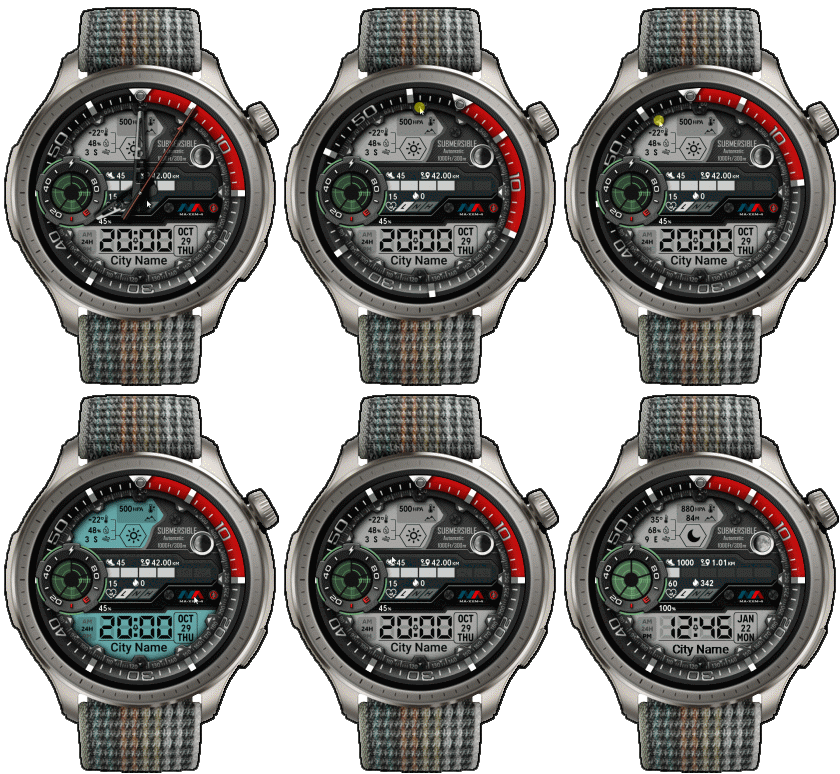
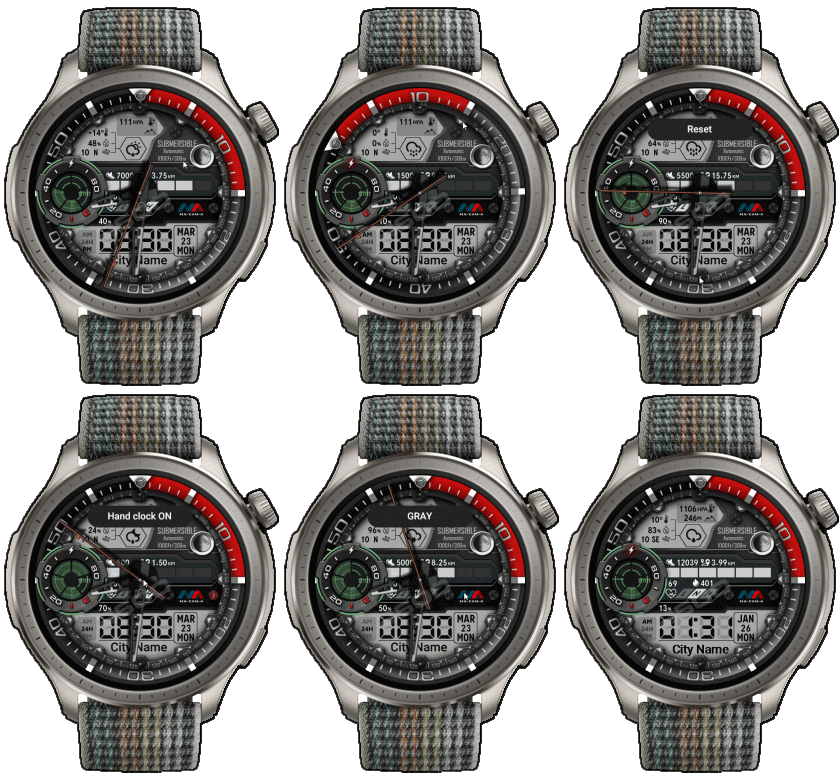
23-03-2026
- Upload Version 2.1
- Change to use seconds smooth type 2 ( because type 4 have some issue in new FW )
- Button Rotate the watchface bezel to the right, Change to use click at 1 o'clock.
17-08-2024
- Upload Version 2
- Change script about Rotate the bezel ( Modified to save more energy )
18-06-2024 (1) (2)
- Upload version 1.1 ( add shortcut rotate bezel to the left by click on 11 o'clock near temp. icon ) (2)
- Delete old Version (2)
- Ported
- Change little layout and images
- Add weather, steps, distance, calories, heart rate, battery, date, calendar, moon,
- In AOD ( only DIGITAL AND GRAY COLOR)
- Shortcut open calendar ( click on "DATE Area" )
- Open power save by click on battery Area
- Open sportlist by click on 3 o'clock
- ON/OFF Analog hands by click on center page
- Change color menu by click on MA logo
- Rotate the watchface bezel to the right, click at 12 o'clock. ( near air pressure icon )
- Rotate the watchface bezel to the left, click at 11 o'clock. ( near temp icon )
- Reset the watchface bezel, click at 6 o'clock. (near city name )
------------------------------------------------------------------------------
it works in 24h format.
for the 12 h format to work. must be enabled in phone settings. (settings-system-date and time-disable 24-hour format.)
------------------------------------------------------------------------------
Tags
Compatilhar este watch face
Comentários
Você precisa estar logado para postar ou responder aos comentários.
Discussões recentes na comunidade
Petal_V39_Darker_Palette_Weather
@taw_bip This isn’t quite relevant to the topic of this discussion. But here are a few suggestions regarding your dial. The colour of the text changes, but the icons remain w...
Change target steps internally (Balance 2) using JS?
Great news, it works!! Thank you very much. I've been able to adapt it to my needs. You're even better than my friend GPT (didn't help at all). I have tons of watch faces that I want to adapt....
Flex Dashboard Balance 2
I sent it to you to take a look, simply because you’re experienced and know how to read script code. I don’t have the knowledge to do it myself. I don't have the any doub...
GlucoseX Clarity Round balance 2
I'll chip in with my contribution to this thread as well, but I have no way to test if the hourly chart works. So, if anyone is interested in testing it and tweaking it if necessary, here is your chance. Fixed pulse graf 0...
Watch Face for Active Max conversion possible?
Thank you, I will give it a try....
Racing Chronograph Watch Face Request [Active Max]
Hello asoo, Thank you so much for all the work you've put into creating this watch face, and I'm really sorry I didn't see your message earlier. Unfortunately, I haven't b...
request for Balance 2, Garmin clone
This is my vision for it, though I am not 100% certain that it will be functional. https://i.postimg.cc/qMcQjCMt/standalone-Balamin.gif Down: https://amazfitwatchface...


Since I haven't used a GTR3pro, I can't answer the question. However, you can try to use the program.
"Watch face editor for Amazfit watch on ZeppOS" Version 11.0 by SashaCX75
/forum/viewtopic.php?p=11643#p11643
to convert to GTR3pro and test it on your GTR3pro by yourself.
I think it should work, but it might be missing some elements that zeppOS 1.0 doesn't support, such as height display.... 20.06.2024 09:17:49 Reclamar
If not, I understand you can download it from this page but, sorry for this naive question, how do I get to "transfer" it to the watch ?
Thanks for your help !
Cheers. 15.07.2024 18:07:52 Reclamar
/forum/viewforum.php?f=23
which is a program created from this web
Or you can install it yourself, you can read more from this forum.
/forum/viewtopic.php?p=17161#p17161 17.07.2024 23:36:03 Reclamar
Thanks for the comment.
And glad you enjoyed it. 16.11.2025 04:00:33 Reclamar
Change to use smooth seconds type2 ( Fixed issue )
You can download Version 2.1 at download 23.03.2026 02:28:29 Reclamar