MA-XXM-4 ( Amazfit Balance )

Balance en
Si prega di notare che tutti i quadranti orologio disponibili su questo sito sono opere creative dei nostri utenti e non sono affiliati con marchi ufficiali o marchi registrati. Sono creati da fan per fan, ispirati da fenomeni culturali popolari, giochi, film o serie.
Il nostro obiettivo è fornire una piattaforma per la creatività e lo scambio, ma ci impegniamo anche a rispettare i diritti intellettuali. Se detiene i diritti d'autore su qualsiasi contenuto che ritiene infranga i suoi diritti su questo sito, contattaci per un'azione appropriata.

Descrizione
Note:
Thank SashaCX75 so much for Editor 11.1 betaIf without a good editor like this, It would be difficult to make this watchface. , so who want to donate please donate to sashacx75
https://www.buymeacoffee.com/sashacx75
or.
(Paypal: [email protected])
----------------------------------------------------------------------------------------------------
Thank wax so much for code change background by click on screen
/gtr/view/27840
--------------------------------------------------------------------
This watch face made by ported from image MA-XXM-4
f a c e r . i o
----------------------------------------------------------------------
I didn't design it , do not give credit to me.
----------------------------------------------------------------------- This watchface i do it for use by myself
- Please do not request any modify.
- This watch face, I will not accept any requests
- If have request in the comment i will not answer
- who is interest to modify, you can download and edit it by yourself.- All my work will be "FULL AOD". If you don't like it, you can enable watch's standard AOD. Once you enable watch standard AOD, full AOD of watchface will not be displayed. System will be use standard AOD from Watch
- Only tested on Amazfit Balance
- If the owner requests it to be removed Admin can delete immediately.
Thank you.
---------------------------------------------------------------------------------------- In AOD ( only DIGITAL AND GRAY COLOR)
- Shortcut open calendar ( click on "DATE Area" )
- Open power save by click on battery Area
- Open sportlist by click on 3 o'clock
- ON/OFF Analog hands by click on center page
- Change color menu by click on MA logo
- Rotate the watchface bezel to the right, click at 12 o'clock. ( near air pressure icon )
- Rotate the watchface bezel to the left, click at 11 o'clock. ( near temp icon )
- Reset the watchface bezel, click at 6 o'clock. (near city name )
---------------------------------------------------------------------------------------
- Shortcuts
(1. Alarm , 2. sunrise/sunset , 3. temperature, 4. countdown , 5.PAI , 6. Steps , 7. Pulse , 8. SP02 , 9.Stopwatch , 10.calendar , Power Save , compass,
------------------------------------------------------------------------------------------
Image showing shortcuts area
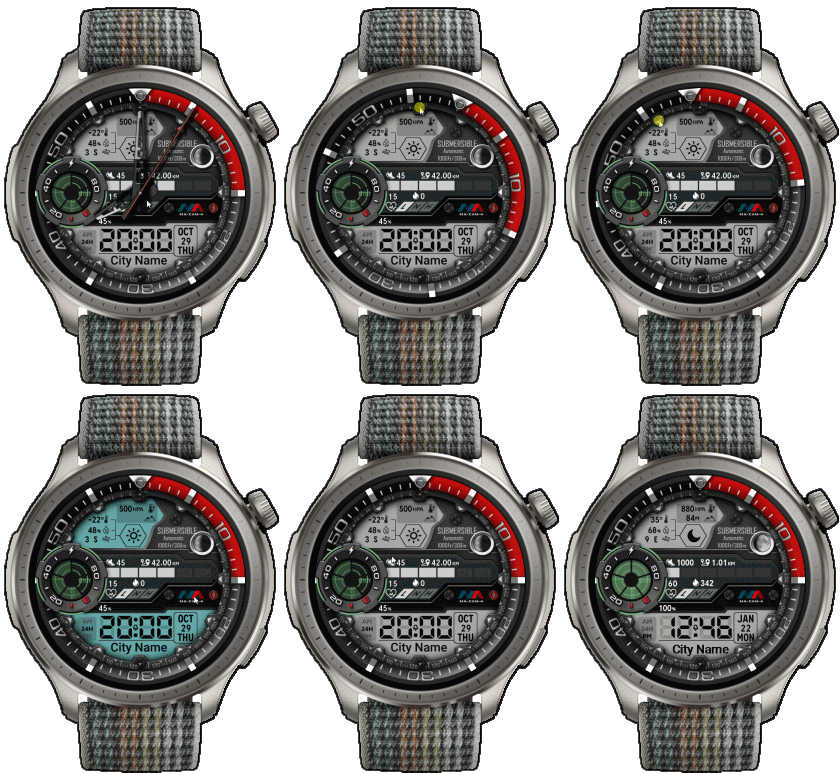
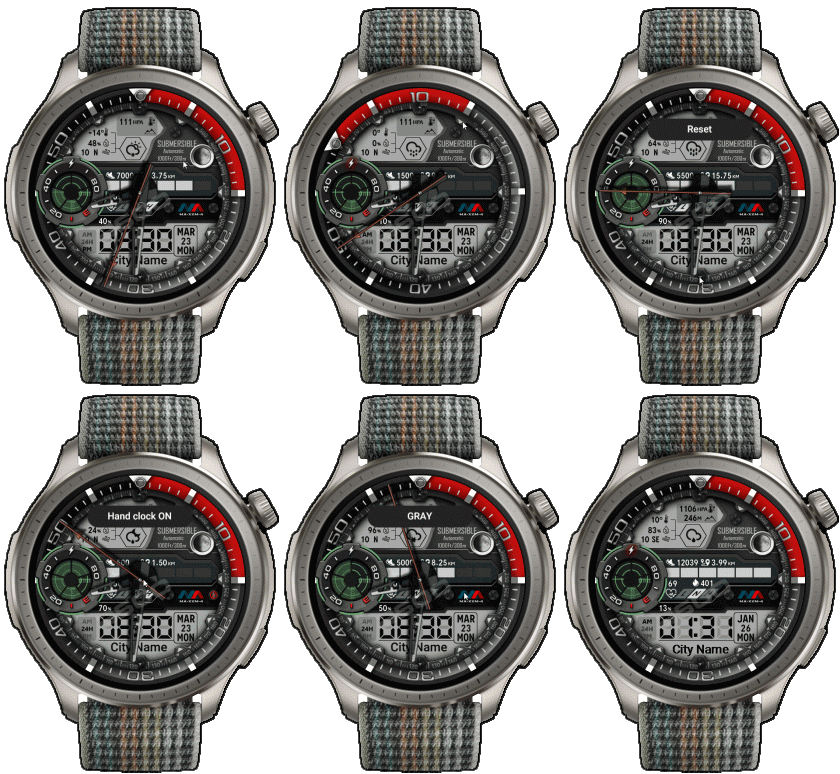
23-03-2026
- Upload Version 2.1
- Change to use seconds smooth type 2 ( because type 4 have some issue in new FW )
- Button Rotate the watchface bezel to the right, Change to use click at 1 o'clock.
17-08-2024
- Upload Version 2
- Change script about Rotate the bezel ( Modified to save more energy )
18-06-2024 (1) (2)
- Upload version 1.1 ( add shortcut rotate bezel to the left by click on 11 o'clock near temp. icon ) (2)
- Delete old Version (2)
- Ported
- Change little layout and images
- Add weather, steps, distance, calories, heart rate, battery, date, calendar, moon,
- In AOD ( only DIGITAL AND GRAY COLOR)
- Shortcut open calendar ( click on "DATE Area" )
- Open power save by click on battery Area
- Open sportlist by click on 3 o'clock
- ON/OFF Analog hands by click on center page
- Change color menu by click on MA logo
- Rotate the watchface bezel to the right, click at 12 o'clock. ( near air pressure icon )
- Rotate the watchface bezel to the left, click at 11 o'clock. ( near temp icon )
- Reset the watchface bezel, click at 6 o'clock. (near city name )
------------------------------------------------------------------------------
it works in 24h format.
for the 12 h format to work. must be enabled in phone settings. (settings-system-date and time-disable 24-hour format.)
------------------------------------------------------------------------------
Tag
Condividi questo quadrante
Commenti
Per rispondere ai commenti devi essere loggato .
Discussioni recenti della comunità
Digital Clock watchface for balance 2.
Hello to all. I found this watchface from zepp store for amazfit bip max and would be great if someone from the watchface creators making it for amazfit balance 2. Thank you ...
[Balance 2] Third-party watch faces fail to download with error 403
QR Installation Update We've finished analyzing the changes introduced in the latest Zepp versions and have updated our server accordingly. QR code installation should now work again for both: - amazfitwatchfaces.com ...
Modular and Active Rhythm for Balance 2
Thank you! It's amazing as always....
Azureblue luminous for amazfit active 2
Hi you all, could someone please fix the swapped watch hands on the "AzureBlue Luminous" watch face for the Amazfit Active 2? The long hand is showing the hours, while the sh...
Number of week Amazfit active 3 premium
Hi Do you know about some watchface with number of week ? For example wk36 Thanks You could check out Drakowed's watch faces: https://amazfitwatchfaces.com/search/g...
Electronic Style and Status Monitor for balance 2
Hello to all. Can someone help me and make these zepp watchfaces from zepp store for Bip max convert them for balance 2. Thank you. https://ze.mmk.pw/view/11206915/171619/1....
request Balance 2 iwc eternal
If i only had the background image.... This is the background image I used, and 30 layers of the moon. Hope it's still useful to you. Photo shop image : ...





Since I haven't used a GTR3pro, I can't answer the question. However, you can try to use the program.
"Watch face editor for Amazfit watch on ZeppOS" Version 11.0 by SashaCX75
/forum/viewtopic.php?p=11643#p11643
to convert to GTR3pro and test it on your GTR3pro by yourself.
I think it should work, but it might be missing some elements that zeppOS 1.0 doesn't support, such as height display.... 20.06.2024 09:17:49 Segnala
If not, I understand you can download it from this page but, sorry for this naive question, how do I get to "transfer" it to the watch ?
Thanks for your help !
Cheers. 15.07.2024 18:07:52 Segnala
/forum/viewforum.php?f=23
which is a program created from this web
Or you can install it yourself, you can read more from this forum.
/forum/viewtopic.php?p=17161#p17161 17.07.2024 23:36:03 Segnala
Thanks for the comment.
And glad you enjoyed it. 16.11.2025 04:00:33 Segnala
Change to use smooth seconds type2 ( Fixed issue )
You can download Version 2.1 at download 23.03.2026 02:28:29 Segnala