Color Overload

Compatible with
Active 2 Square Supported Languages
en
en
Uploaded: 01.08.2026 22:12
1 users have this item in favourites
Important Information for Users
Please note that all watch faces available on this site are creative works by our users and are not affiliated with official brands or trademarks. They are created by fans for fans, inspired by popular cultural phenomena, games, movies, or series.
Our goal is to provide a platform for creativity and exchange, but we also strive to respect intellectual rights. If you hold copyright to any content that you believe infringes your rights on this site, please contact us for appropriate action.
Please note that all watch faces available on this site are creative works by our users and are not affiliated with official brands or trademarks. They are created by fans for fans, inspired by popular cultural phenomena, games, movies, or series.
Our goal is to provide a platform for creativity and exchange, but we also strive to respect intellectual rights. If you hold copyright to any content that you believe infringes your rights on this site, please contact us for appropriate action.

Description
I currently have no plans to respond to requests for supporting additional features, languages, or watch models. You're welcome to make changes yourself and upload your own version, I only request that you let me know and link back to this page.
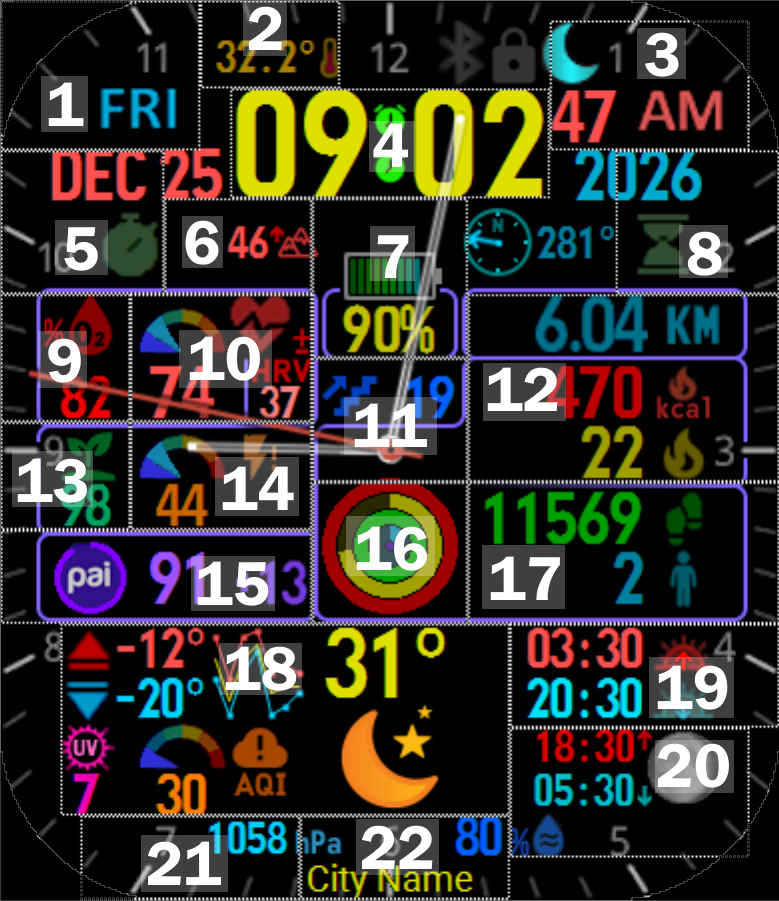
This is my attempt to fit as much information onto a watch face as possible. There are a lot of elements and buttons, so here's a guide, with an annotated image below:
# | Element(s) | Tap action | Hold action
** The Weather area shows high temp (red), low temp (light blue), 7-day forecast graph, current temp (yellow), UV index (pink), air quality index (orange), and current conditions (icon).
*** The Compass starts out inactive, but if you move the watch in a figure-8 motion it should show your current direction. Tapping to start the Compass app didn't work when I tried it, but if I get it to work I'll add another button.
In the past I've been asked about accepting donations for my work. I'm not doing this for money, I've built this for my personal use and decided to share in case others find it helpful. If you want to donate somewhere, consider supporting SashaCX75, the author of the Watch Face Editor that I used to create this, or support amazfitwatchfaces.com directly via their ads or app upgrade options. Alternatively, you can donate to some of my preferred charities: World Central Kitchen, Donors Choose, and MATHCOUNTS Foundation.
This is my attempt to fit as much information onto a watch face as possible. There are a lot of elements and buttons, so here's a guide, with an annotated image below:
# | Element(s) | Tap action | Hold action
- | Day of week | Sleep | --
- | Temperature | Temperature details | --
- | Seconds, AM/PM | Training Load | To Do List
- | Digital time | Alarm settings | World clock
- | Month, Stopwatch icon | Stopwatch | Calendar (month view)
- | Altitude | Altitude | --
- | Battery icon, % | Battery stats | Battery saver option
- | Hourglass icon, Year | Countdown (timer) | Pomodoro (focus timer)
- | % O2 | % O2 | --
- | Heart rate + gauge, HRV | Heart rate details | HRV details
- | Floors climbed, center of analog hands | Change analog hands* | Choose watch face
- | Distance, Active kcal, Active minutes | Activity details | --
- | BioCharge / HybridCharge | BioCharge / HybridCharge details | Morning greeting
- | Stress + gauge | Stress stats | One-touch measurement
- | PAI progress circle, total, daily increase | PAI stats | --
- | Activity progress circles | Weekly goals | Workout history
- | Steps, Standing | Step stats | Start new workout
- | Weather** | Weather details | Weather Service app (if installed)
- | Sunrise/sunset times | Sun details | --
- | Moonrise/moonset times, Moon phase | Moon details | --
- | Barometric pressure | App list | Barometer / Altitude
- | City name | App icons | Map
** The Weather area shows high temp (red), low temp (light blue), 7-day forecast graph, current temp (yellow), UV index (pink), air quality index (orange), and current conditions (icon).
*** The Compass starts out inactive, but if you move the watch in a figure-8 motion it should show your current direction. Tapping to start the Compass app didn't work when I tried it, but if I get it to work I'll add another button.
In the past I've been asked about accepting donations for my work. I'm not doing this for money, I've built this for my personal use and decided to share in case others find it helpful. If you want to donate somewhere, consider supporting SashaCX75, the author of the Watch Face Editor that I used to create this, or support amazfitwatchfaces.com directly via their ads or app upgrade options. Alternatively, you can donate to some of my preferred charities: World Central Kitchen, Donors Choose, and MATHCOUNTS Foundation.
Tags
Share this face
Comments
You need to be logged in to post or reply to comments.
Recent community discussions
Digital Technology ++ – minor edits for Amazfit Active 2
Thanks for the reply, Asoo! Really appreciate all your work on here....
Request for creating a watchface for Active 3 premium
Thank you very much mate :)...
request for Balance 2
Can this be replicated in English for Balance 2? https://i.postimg.cc/GtkjppWt/Watchface.jpg ...
Everything and LiveView for balance 2
Thank you, asoo!...
Digital Clock watchface for balance 2.
Hello to all. I found this watchface from zepp store for amazfit bip max and would be great if someone from the watchface creators making it for amazfit balance 2. Thank you ...
[Balance 2] Third-party watch faces fail to download with error 403
QR Installation Update We've finished analyzing the changes introduced in the latest Zepp versions and have updated our server accordingly. QR code installation should now work again for both: - amazfitwatchfaces.com ...
Modular and Active Rhythm for Balance 2
Thank you! It's amazing as always....





No comments. Be the first to comment.