Page 1 of 1
Getting actual miles to disply.
Posted: 19 Aug 2019, 12:14
by jcwill
How are developers getting actual miles walked to register on the Bip. I see that some have achieved this - how is this done? Also, are there a repository of coding syntax for the editor? Seems like developers are using items not in their image resource. Thanks/
Re: Getting actual miles to disply.
Posted: 19 Aug 2019, 13:16
by asoo
๋Just put
"SuffixMilesImageIndex": xxx in the "Distance "
xxx = Image name "Miles"
Ex.
Code: Select all
        "Distance": {
            "Number": {
                "TopLeftX": 37,
                "TopLeftY": 39,
                "BottomRightX": 88,
                "BottomRightY": 49,
                "Alignment": "TopCenter",
                "Spacing": 2,
                "ImageIndex": 21,
                "ImagesCount": 10
            },
            "SuffixImageIndex": 41,         <-------- image KM --------
            "DecimalPointImageIndex": 42,
            "SuffixMilesImageIndex": 299    <--------- image MI ------------  put this command line for switch betwen  KM to MI  by use MiFit
And pack the .json to .Bin with
AmazTool All 0.1.0.11 (
viewtopic.php?f=29&t=782 )
Re: Getting actual miles to disply.
Posted: 19 Aug 2019, 20:25
by jcwill
What do you mean xxx = Image name "Miles". What does your 299 represent?
Re: Getting actual miles to disply.
Posted: 20 Aug 2019, 00:12
by asoo
jcwill wrote: 19 Aug 2019, 20:25
What do you mean xxx = Image name "Miles". What does your 299 represent?
299 is name of picture ( 0299.png )
Ex.
0299.png is

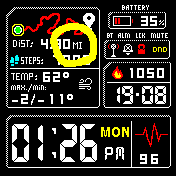
you can change xxx to name of your picture
**** name of picture in BIN is a number ( 0000.png to 9999.png )
Re: Getting actual miles to disply.
Posted: 20 Aug 2019, 12:30
by jcwill
I finally got the miles to display ... thank you. But for some reason after I make the ,bin it puts the wrong background in. when I'm editing it it's fine ... it's after I pack it is when it's doing it.