Page 1 of 1
[Balance 2] Third-party watch faces fail to download with error 403
Posted: 01 Sep 2026, 13:38
by SiberiaHusky
Hi, I just got an Amazfit Balance 2, and enabled Developer Mode in Zepp.
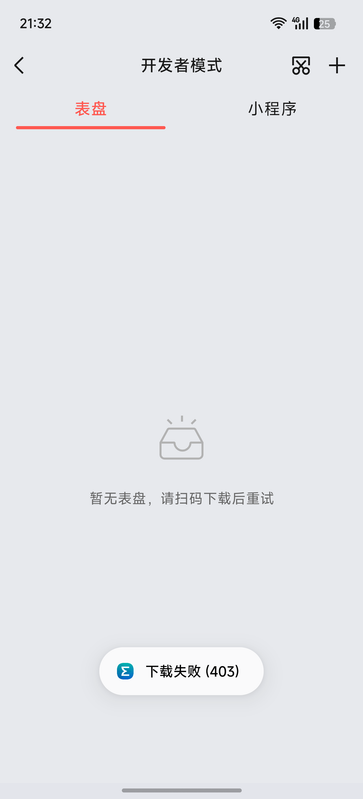
When I scanned the QR code from my phone's gallery, the Zepp app always shows “下载错误(403)” (Download failed (403)).
I tried several Balance 2 watch faces, and all have the same problem. Official watch faces download normally.
Is anyone else experiencing this? Any idea how to fix it?
Thanks!
Re: [Balance 2] Third-party watch faces fail to download with error 403
Posted: 01 Sep 2026, 15:01
by asoo
SiberiaHusky wrote: Today, 13:38
Hi, I just got an Amazfit Balance 2, and enabled Developer Mode in Zepp.
When I scanned the QR code from my phone's gallery, the Zepp app always shows “下载错误(403)” (Download failed (403)).
I tried several Balance 2 watch faces, and all have the same problem. Official watch faces download normally.
Is anyone else experiencing this? Any idea how to fix it?
Thanks!
I'm not sure which part "the QR code from my phone's gallery" that you said.
If you mean that you saved the QR code image from this website and planned to use it later,
and then encountered a problem installing it, that's because QR codes generated from the web have an expiration date. Once generated, you must scan and install it immediately; you cannot save it for later use.
Based on your question, that's all I can guess.
You can check out more instructions on installing QR codes here:
viewtopic.php?p=17161#p17161
Re: [Balance 2] Third-party watch faces fail to download with error 403
Posted: 01 Sep 2026, 16:06
by SiberiaHusky
asoo wrote: Today, 15:01
I'm not sure which part "the QR code from my phone's gallery" that you said.
If you mean that you saved the QR code image from this website and planned to use it later,
and then encountered a problem installing it, that's because QR codes generated from the web have an expiration date. Once generated, you must scan and install it immediately; you cannot save it for later use.
Based on your question, that's all I can guess.
You can check out more instructions on installing QR codes here:
viewtopic.php?p=17161#p17161
Yeah, I did save the QR code image from the website, but I scanned it in the Zepp app almost immediately—it wasn't even sitting in my gallery for more than 30 seconds.
Such a bummer.

Re: [Balance 2] Third-party watch faces fail to download with error 403
Posted: 01 Sep 2026, 16:44
by asoo
SiberiaHusky wrote: 55 minutes ago
asoo wrote: Today, 15:01
I'm not sure which part "the QR code from my phone's gallery" that you said.
If you mean that you saved the QR code image from this website and planned to use it later,
and then encountered a problem installing it, that's because QR codes generated from the web have an expiration date. Once generated, you must scan and install it immediately; you cannot save it for later use.
Based on your question, that's all I can guess.
You can check out more instructions on installing QR codes here:
viewtopic.php?p=17161#p17161
Yeah, I did save the QR code image from the website, but I scanned it in the Zepp app almost immediately—it wasn't even sitting in my gallery for more than 30 seconds.
Such a bummer.
If you scan the image you saved immediately, it should install successfully.
But as mentioned, saved images are not permanently valid, so scanning directly is recommended for best results.
I tried saving the QR code and scanning the image immediately. I was able to install on BipMAX without any problems, but after a while, the QR code became unusable for installation.
So if you can't install it, I'm not sure why either.