Page 1 of 1
Edit Background
Posted: 04 Aug 2025, 09:30
by marrud12
In Zepp WatchfaceMaker, when I delete a background of a selfcreated watchface and reload it with little changes, so it is in foreground and covers all digits, pointers and images created before.
How can I put the new background behind digits etc. to continue editing?
Re: Edit Background
Posted: 04 Aug 2025, 12:24
by asoo
marrud12 wrote: 04 Aug 2025, 09:30
In Zepp WatchfaceMaker, when I delete a background of a selfcreated watchface and reload it with little changes, so it is in foreground and covers all digits, pointers and images created before.
How can I put the new background behind digits etc. to continue editing?
If I guess correctly, your problem is likely caused by
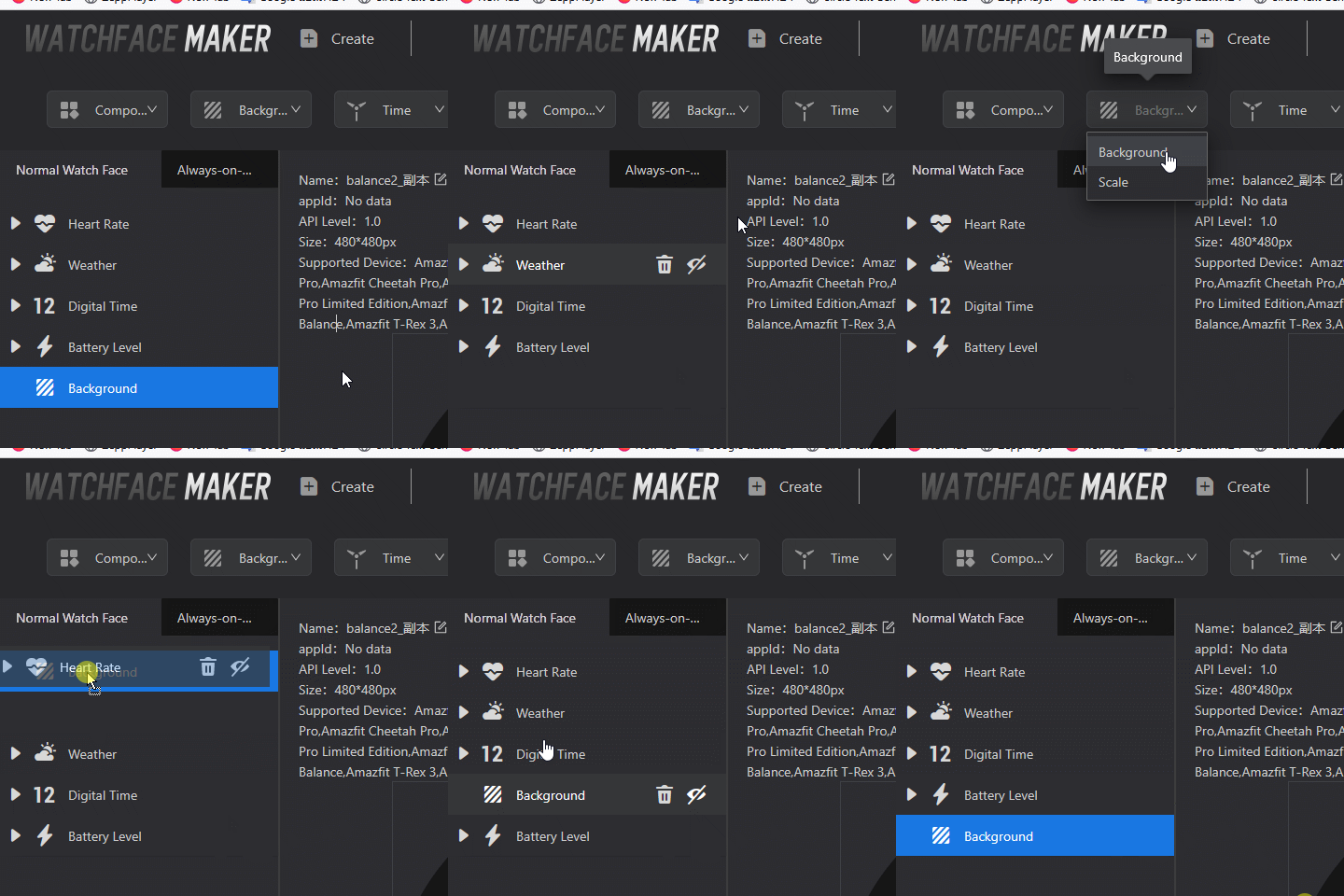
when you delete the background and re-add it, you'll notice that it's placed at the top, meaning it wil show on the top of all elements. So, you need to move the background to the end of the line.
Re: Edit Background
Posted: 04 Aug 2025, 14:47
by marrud12
Thanks, so simple, now it works!