Pagina 1 di 1
Help with color change on tap script
Inviato: 14 feb 2025, 05:07
da piotarock
Hello Devs,
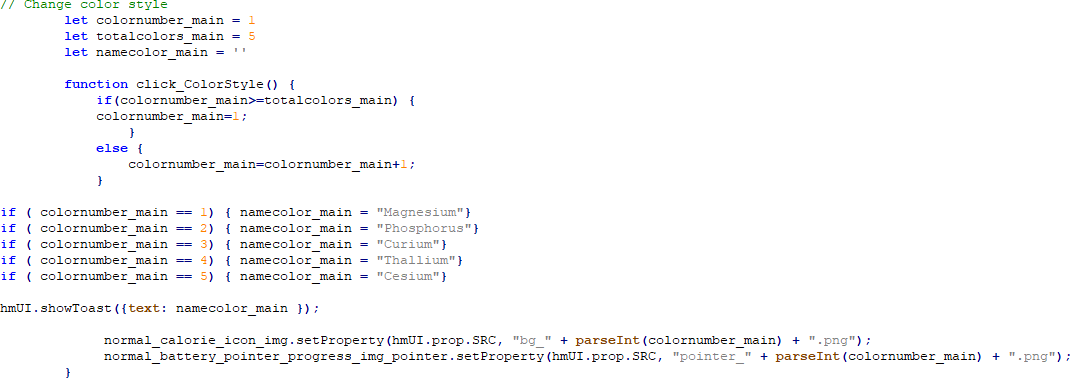
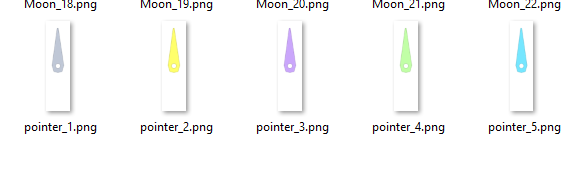
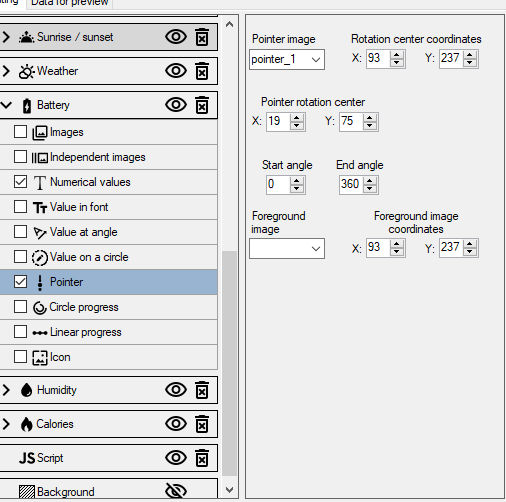
I am trying to make a watchface with color change on tap option. Everything is working well apart from the pointer. I want the pointer to change color together with the background (bg_) as shown in the attached images. However, while background is changing, the pointer is not changing. It seems I am missing something. Any help or guidance is appreciated. Thank you.
Re: Help with color change on tap script
Inviato: 14 feb 2025, 07:47
da Lattenknaller
Try this
pointer is not an img in the code, it must be treated differently
Codice: Seleziona tutto
	let colornumber_main = 1
        let totalcolors_main = 5
        let namecolor_main = ''
	let pointerstring = 'pointer_1.png'

        function click_ColorStyle() {
            if(colornumber_main>=totalcolors_main) {
            colornumber_main=1;
                }
            else {
                colornumber_main=colornumber_main+1;
            }

			if ( colornumber_main == 1) { namecolor_main = "Magnesium"
				pointerstring = "pointer_" + parseInt(colornumber_main) + ".png"
			}
			if ( colornumber_main == 2) { namecolor_main = "Phosphorus"
				pointerstring = "pointer_" + parseInt(colornumber_main) + ".png"
			}
			if ( colornumber_main == 3) { namecolor_main = "Curium"
				pointerstring = "pointer_" + parseInt(colornumber_main) + ".png"
			}
			if ( colornumber_main == 4) { namecolor_main = "Thallium"
				pointerstring = "pointer_" + parseInt(colornumber_main) + ".png"
			}
			if ( colornumber_main == 5) { namecolor_main = "Cesium"
				pointerstring = "pointer_" + parseInt(colornumber_main) + ".png"
			}
			if ( colornumber_main <= 5) {

	    normal_battery_pointer_progress_img_pointer.setProperty(hmUI.prop.MORE, {
              src: pointerstring,
              center_x: 93,
              center_y: 237,
              x: 19,
              y: 75,
              start_angle: 0,
              end_angle: 360,
              type: hmUI.data_type.BATTERY,
              show_level: hmUI.show_level.ONLY_NORMAL,
            });

			}

			hmUI.showToast({text: namecolor_main });
            		normal_calorie_icon_img.setProperty(hmUI.prop.SRC, "bg_" + parseInt(colornumber_main) + ".png");
        }
Re: Help with color change on tap script
Inviato: 14 feb 2025, 07:53
da piotarock
Thank you very much for the kind response. I will try it.
Re: Help with color change on tap script
Inviato: 14 feb 2025, 11:58
da piotarock
It worked like a charm. Thank you very much sir.
Re: Help with color change on tap script
Inviato: 15 feb 2025, 18:02
da SashaCX75
Lattenknaller ha scritto: 14 feb 2025, 07:47
Try this
pointer is not an img in the code, it must be treated differently
Changing properties with hmUI.prop.MORE is correct in this case. But I don't understand why to add an additional variable ‘pointerstring’? I would change the function like this
Codice: Seleziona tutto
let colornumber_main = 1
let totalcolors_main = 5
let namecolor_main = ''

function click_ColorStyle() {
    if (colornumber_main>=totalcolors_main) colornumber_main=1;
    else colornumber_main=colornumber_main + 1;

    if ( colornumber_main == 1) namecolor_main = "Magnesium";
    if ( colornumber_main == 2) namecolor_main = "Phosphorus";
    if ( colornumber_main == 3) namecolor_main = "Curium";
    if ( colornumber_main == 4) namecolor_main = "Thallium";
    if ( colornumber_main == 5) namecolor_main = "Cesium";

    hmUI.showToast({text: namecolor_main });

    normal_battery_pointer_progress_img_pointer.setProperty(hmUI.prop.MORE, {
      src: "pointer_" + parseInt(colornumber_main) + ".png",
      center_x: 93,
      center_y: 237,
      x: 19,
      y: 75,
      start_angle: 0,
      end_angle: 360,
      type: hmUI.data_type.BATTERY,
      show_level: hmUI.show_level.ONLY_NORMAL,
    });

    normal_calorie_icon_img.setProperty(hmUI.prop.SRC, "bg_" + parseInt(colornumber_main) + ".png");
}
Re: Help with color change on tap script
Inviato: 15 feb 2025, 21:14
da piotarock
Thank you SashaCX75. I tried your function and it also worked like a charm. Now I have two ways to do this...