Page 1 of 1
Design Watch face degrades image
Posted: 21 Jan 2019, 04:10
by Baseballtechguy
Hi All,
New here but created a 176x176 image to create a new watch face. After I run the process through the on-line tools and create a json record i then drag the json record onto watchface.exe it creates the .bin file. I then drag the .bin file onto watchface.exe to uncompress the file and it makes the directory with all the files in it. I noticed the png file I created get really pixelated and looks bad. It looked A LOT CLEARER before running it through the watchface.exe. Ideas for me to keep the quality of the original?
Re: Design Watch face degrades image
Posted: 23 Jan 2019, 18:49
by PeaZzz
Wild guess: The Bip's color palette is smaller. It'll convert your 16.7M color image to 16 collors?
Re: Design Watch face degrades image
Posted: 26 Jan 2019, 10:54
by cloud12077
I ran into that issue when I started making faces too. As PeaZzz said, it's due to the limited 16 bit color limit.
Re: Design Watch face degrades image
Posted: 26 Jan 2019, 15:48
by Mike76
cloud12077 wrote: 26 Jan 2019, 10:54
I ran into that issue when I started making faces too. As PeaZzz said, it's due to the limited 16 bit color limit.
The Amazfit Bip supports only 8 colors. Before editing watchfaces it is worth to take a look at Watchface Reference on AmazfitCentral:
http://amazfitcentral.com/2018/02/05/am ... son-docs/
Re: Design Watch face degrades image
Posted: 30 Jan 2019, 12:28
by cloud12077
Mike76 wrote: 26 Jan 2019, 15:48
cloud12077 wrote: 26 Jan 2019, 10:54
I ran into that issue when I started making faces too. As PeaZzz said, it's due to the limited 16 bit color limit.
The Amazfit Bip supports only 8 colors. Before editing watchfaces it is worth to take a look at Watchface Reference on AmazfitCentral:
http://amazfitcentral.com/2018/02/05/am ... son-docs/
I stand corrected. Thank you Mike76, btw love your work.
Re: Design Watch face degrades image
Posted: 15 Feb 2019, 16:11
by asadulhuq
I am a new watch face designer. I use Windows paint application to color watch face objects. However, color warnings appear when a watch face is being compiled. I am not sure whether 8 or 16 bit color should be used. For example how to apply 8 bit red color with windows paint? Any suggestion is appreciated. Thanks.
Re: Design Watch face degrades image
Posted: 16 Feb 2019, 03:07
by TXK
asadulhuq wrote: 15 Feb 2019, 16:11
I am a new watch face designer. I use Windows paint application to color watch face objects. However, color warnings appear when a watch face is being compiled. I am not sure whether 8 or 16 bit color should be used. For example how to apply 8 bit red color with windows paint? Any suggestion is appreciated. Thanks.
The position and style of the tool icon in the 【Windows paint application】 are the same.
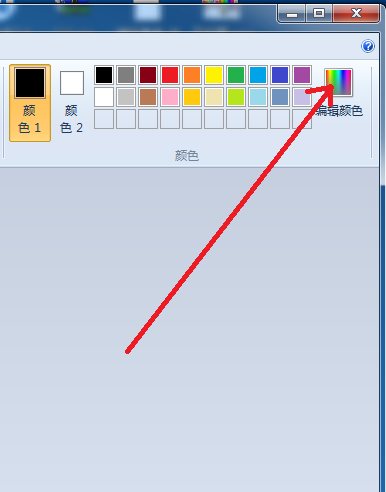
- 无标题.png (29.11 KiB) Viewed 2200 times
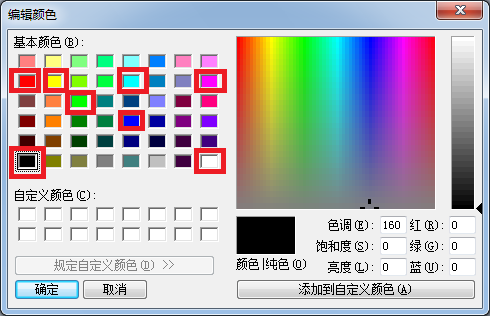
- 无标题.png (25.48 KiB) Viewed 2201 times
Re: Design Watch face degrades image
Posted: 16 Feb 2019, 11:59
by asadulhuq
Thanks for hints. But Chinese characters in the application is a problem for me.
Re: Design Watch face degrades image
Posted: 16 Feb 2019, 14:40
by TXK
asadulhuq wrote: 16 Feb 2019, 11:59
Thanks for hints. But Chinese characters in the application is a problem for me.
The position and style of the tool icon in the 【Windows paint application】 are the same.
Re: Design Watch face degrades image
Posted: 16 Feb 2019, 17:26
by asadulhuq
Thanks.
Re: Design Watch face degrades image
Posted: 16 Feb 2019, 17:51
by asadulhuq
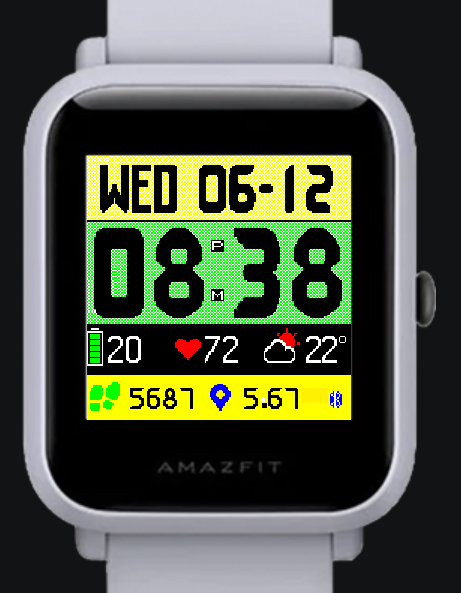
I get following error/warning and hence compilation of the watch face cannot be completed. You may please notice the watch face image below which I am trying to compile.
********
Debug|Reading config...
Debug|Reading referenced images from 'C:\Users\Asadul Huq\Desktop\MyBIPFace\NEWFace\1528565345112'
Trace|Loading images for 2 'Background'
Trace|Loading images for 2.1 'Image'
Trace|Loading image 0...
Trace|Image was loaded from file C:\Users\Asadul Huq\Desktop\MyBIPFace\NEWFace\1528565345112\0000.png
Warn|Dithering applied for an image. Resource in watch face will u
se only supported colors. You can't get back original image by unpacking watch face.
Trace|Loading images for 3 'Time'
*******
I cannot figure out exactly how to choose an acceptable color. I am using windows Paint application.
Any information regarding this problem is appreciated.