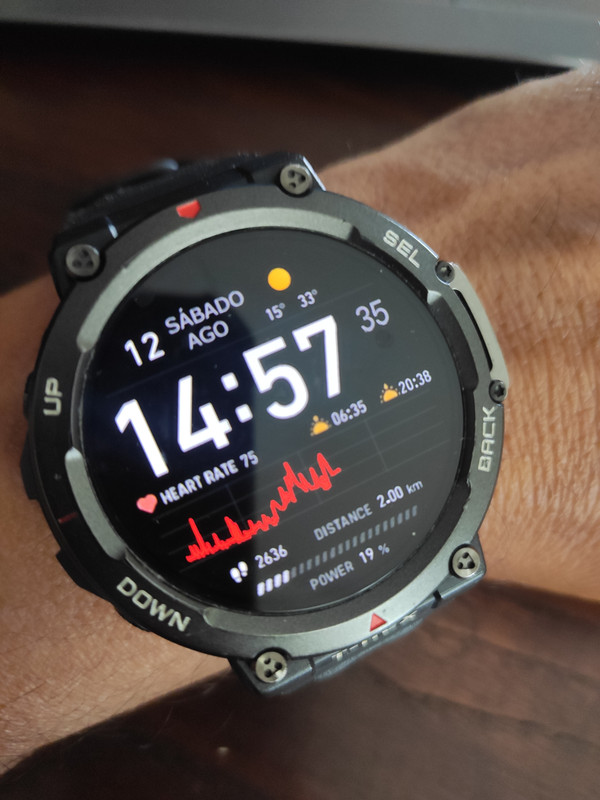
I'm not sure you mean graphic or graph.
If you mean graphic, you probably mean a picture used to show the heart rate zone.
In GTR3 there are 6 images to show different heart rate zones.
In this section, you need to create a custom script by adding it yourself to the file.
An example of a dial with a heart rate graph.
Code specific to the part related to the heart rate graph.
Код: Виділити все
   /*
    ** Watch_Face_Editor tool
    ** watchface js version v2.1.1
    ** Copyright © SashaCX75. All Rights Reserved
    */

    try {
    (() => {
        //start of ignored block
        const __$$app$$__ = __$$hmAppManager$$__.currentApp;
        function getApp() {
            return __$$app$$__.app;
        }
        function getCurrentPage() {
            return __$$app$$__.current && __$$app$$__.current.module;
        }
        const __$$module$$__ = __$$app$$__.current;
        const h = new DeviceRuntimeCore.WidgetFactory(new DeviceRuntimeCore.HmDomApi(__$$app$$__, __$$module$$__));
        const {px} = __$$app$$__.__globals__;
        const logger = Logger.getLogger('watchface_SashaCX75');
        //end of ignored block

        //dynamic modify start


        let normal_background_bg_img = ''
        let normal_g_heart = ''


        //dynamic modify end

        __$$module$$__.module = DeviceRuntimeCore.WatchFace({
            init_view() {
                //dynamic modify start


            normal_background_bg_img = hmUI.createWidget(hmUI.widget.IMG, {
              x: 0,
              y: 0,
              w: 454,
              h: 454,
              src: 'main.png',
              show_level: hmUI.show_level.ONLY_NORMAL,
            });


/////////////////////  Show graph heart rate  /////////////////////

normal_g_heart=hmUI.createWidget(hmUI.widget.GRADKIENT_POLYLINE,{
x: 50,
y: 100,
w: 350,
h: 100,
line_color:16738816,
line_width:2,
type:hmUI.data_type.HEART,
show_level:hmUI.show_level.ONLY_NORMAL
});


                                    let heartArr = hmSensor.createSensor(hmSensor.id.HEART).today;
                                    let min_heart = Math.min(...heartArr)
                                    let max_heart = Math.max(...heartArr)


///////////////////////  show value  main , max , min /////////////////////////

              let heart_num = hmUI.createWidget(hmUI.widget.TEXT_IMG, {
                                        x: 198,
                                        y: 410,
                                 type: hmUI.data_type.HEART,
                                font_array:["Act_font_0.png","Act_font_1.png","Act_font_2.png","Act_font_3.png","Act_font_4.png","Act_font_5.png","Act_font_6.png","Act_font_7.png","Act_font_8.png","Act_font_9.png"],
                                h_space: 0,
                                align_h: hmUI.align.CENTER_H,
                                padding: false,
                                isCharacter: true,
                                invalid_image: "Act_font_0.png",
                                isCharacter: true,
                                unit_sc:"bpm.png",
                                unit_tc: "bpm.png",
                                unit_en: "bpm.png",
});


                         let maxText = hmUI.createWidget(hmUI.widget.TEXT_IMG, {
                                        x: 300,
                                        y: 372,
                                text: max_heart,
                                type: hmUI.data_type.HEART,
                                font_array:["Act_font_0.png","Act_font_1.png","Act_font_2.png","Act_font_3.png","Act_font_4.png","Act_font_5.png","Act_font_6.png","Act_font_7.png","Act_font_8.png","Act_font_9.png"],
                                h_space: 2,
                                align_h: hmUI.align.LEFT,
                                padding: false,
                                isCharacter: true,
                            });


                            let minText = hmUI.createWidget(hmUI.widget.TEXT_IMG, {
                                        x: 300,
                                        y: 372,
                                text: min_heart,
                                type: hmUI.data_type.HEART,
                                font_array:["Act_font_0.png","Act_font_1.png","Act_font_2.png","Act_font_3.png","Act_font_4.png","Act_font_5.png","Act_font_6.png","Act_font_7.png","Act_font_8.png","Act_font_9.png"],
                                h_space: 2,
                                align_h: hmUI.align.LEFT,
                                padding: false,
                                isCharacter: true,
  });

////////////////// End /////////////////////////


            normal_image_img = hmUI.createWidget(hmUI.widget.IMG, {
              x: 202,
              y: 196,
              src: 'Act_font_1.png',
              show_level: hmUI.show_level.ONLY_NORMAL,
            });


////////////////////  resume_Call ////////////////////


                           const widgetDelegate = hmUI.createWidget(hmUI.widget.WIDGET_DELEGATE, {

                                   resume_call: (function () {

                                   var jstime = hmSensor.createSensor(hmSensor.id.TIME);
                                    var is24 = jstime.is24Hour;

                                     if (is24){ normal_image_img.setProperty(hmUI.prop.SRC, "Act_font_1.png");
                                        } else { normal_image_img.setProperty(hmUI.prop.SRC, "Act_font_2.png");
                                     }


                                    let heartArr = hmSensor.createSensor(hmSensor.id.HEART).today;
                                    let min_heart = Math.min(...heartArr)
                                    let max_heart = Math.max(...heartArr)

                                    heart_num.setProperty(hmUI.prop.MORE, {
                                        x: 198,
                                        y: 410,
                                        type: hmUI.data_type.HEART,
                             font_array:["Act_font_0.png","Act_font_1.png","Act_font_2.png","Act_font_3.png","Act_font_4.png","Act_font_5.png","Act_font_6.png","Act_font_7.png","Act_font_8.png","Act_font_9.png"],
                                        h_space: 2,
                                        align_h: hmUI.align.CENTER_H,
                                        padding: false,
                                        isCharacter: true,
                                        invalid_image: "Act_font_0.png",
                                unit_sc:"bpm.png",
                                unit_tc: "bpm.png",
                                unit_en: "bpm.png",
                                    });


                                    maxText.setProperty(hmUI.prop.MORE, {
                                        x: 300,
                                        y: 322,
                                        text: max_heart,
                                        type: hmUI.data_type.HEART,
                              font_array:["Act_font_0.png","Act_font_1.png","Act_font_2.png","Act_font_3.png","Act_font_4.png","Act_font_5.png","Act_font_6.png","Act_font_7.png","Act_font_8.png","Act_font_9.png"],
                                        h_space: 2,
                                        align_h: hmUI.align.LEFT,
                                        padding: false,
                                        isCharacter: true,
                                    });

                                    minText.setProperty(hmUI.prop.MORE, {
                                        x: 300,
                                        y: 372,
                                        text: min_heart,
                                        type: hmUI.data_type.HEART,
                               font_array:["Act_font_0.png","Act_font_1.png","Act_font_2.png","Act_font_3.png","Act_font_4.png","Act_font_5.png","Act_font_6.png","Act_font_7.png","Act_font_8.png","Act_font_9.png"],
                                        h_space: 2,
                                        align_h: hmUI.align.LEFT,
                                        padding: false,
                                        isCharacter: true,
                                    });

                                }),
                                pause_call: (function () {
                                   console.log('ui pause');
                              }),
                            });


                //dynamic modify end
            },
            onInit() {
                logger.log('index page.js on init invoke');
            },
            build() {
                this.init_view();
                logger.log('index page.js on ready invoke');
            },
            onDestroy() {
                logger.log('index page.js on destroy invoke');
            }
        });
        ;
    })();
} catch (e) {
    console.log('Mini Program Error', e);
    e && e.stack && e.stack.split(/\n/).forEach(i => console.log('error stack', i));
    ;
}