wamsleyg wrote: 29 Sep 2022, 01:59
I am wanting to convert this watch face for a T Rex, firstborn_g-651201-4852593c8a, to be compatible for a GTR 3 to use on my T Rex 2. I have read many of the forums trying to learn how to do this for the last three days. And I just can not seem to figure out how to do this conversion. Have downloaded Watch_Face_Editor_(AmazFit_Type_GT3) 2 and others but can not figure out the steps to do this conversion. Could anyone help me learn how to make this conversion,please?
Thanks for any help that can be provided!
As far as I know now don't have program convert T-Rex to T-Rex2 , if you would like to do , you must to unpack T-Rex and bring all resource to make a T-Rex2.
1. First , You must to Unpacke T-rex by use "AmazFit WatchFace editor for Windows by SashaCX75"
viewtopic.php?p=3789#p3789
2. Resize all images to be compatible with GTR3. I this work you can make it on
"AmazFit WatchFace editor for Windows by SashaCX75" in function convert. by use converted to GTR47, because the size of the GTR47 is the same as the GTR3, when you're done, you'll have a ready-to-use image to create a GTR3 on the editor.
3. Bring all resource after convert to make GTR3 , T-Rex2 on Editor
"Amazfit GT3 Series Watch Face Editor (GTR 3, GTR 3 Pro, GTS 3)"
viewtopic.php?p=11643#p11643
note :
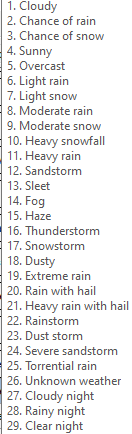
icon weather T-rex has only 26 images and may be arranged unlike T-Rex2.
Therefore, after obtaining images from converting in item 2, check for correctness and increase the number of icons to complete 29 icons according to the requirements of T-rex2 before use (details of icon arrangement can be found in editor)
Weather list :