Page 1 of 1
changing face to imperial [gtr 3 pro]
Posted: 26 Jul 2022, 18:52
by Qasimja
i downloaded a watchface to my gtr 3 pro using amazefaces app on my iphone but the distance ran is in km and i live in the usa is there anyway to change it? i already checked in the zepp app and its set to imperial.
Re: changing face to imperial
Posted: 26 Jul 2022, 20:49
by GIK-Team
Qasimja wrote: 26 Jul 2022, 18:52
i downloaded a watchface to my gtr 3 pro using amazefaces app on my iphone but the distance ran is in km and i live in the usa is there anyway to change it? i already checked in the zepp app and its set to imperial.
Can you show what watch faces you use?
Re: changing face to imperial
Posted: 27 Jul 2022, 00:11
by Qasimja
Re: changing face to imperial
Posted: 27 Jul 2022, 08:32
by GIK-Team
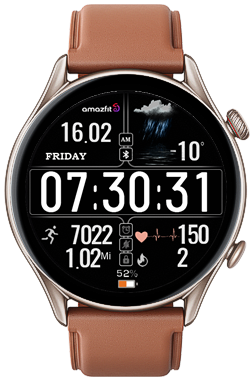
This watch face is designed to display distance in kilometers, so the options will not help you change this setting.
Re: changing face to imperial
Posted: 27 Jul 2022, 14:21
by Qasimja
is there anyway i can filter on the amazefaces app to show watches that have miles because i havent seen one yet for the gtr 3 pro that has miles only kilometers
Re: changing face to imperial
Posted: 27 Jul 2022, 20:10
by GIK-Team
Qasimja wrote: 27 Jul 2022, 14:21
is there anyway i can filter on the amazefaces app to show watches that have miles because i havent seen one yet for the gtr 3 pro that has miles only kilometers
When you switch in the settings, does the number change? I see that in the dial of the “km” label this is a picture, but the field itself takes the system settings. This means that the digital value must change.
Re: changing face to imperial
Posted: 27 Jul 2022, 20:47
by Qasimja
yea it shows i was just wanting to switch the "KM" to "MI" but i guess thats not possible
Re: changing face to imperial
Posted: 27 Jul 2022, 22:33
by GIK-Team
Qasimja wrote: 27 Jul 2022, 20:47
yea it shows i was just wanting to switch the "KM" to "MI" but i guess thats not possible
Is the distance correct? I understand correctly that the problem is only in the picture that shows “KM”?
Re: changing face to imperial
Posted: 28 Jul 2022, 00:37
by Qasimja
GIK-Team wrote: 27 Jul 2022, 22:33
Qasimja wrote: 27 Jul 2022, 20:47
yea it shows i was just wanting to switch the "KM" to "MI" but i guess thats not possible
Is the distance correct? I understand correctly that the problem is only in the picture that shows “KM”?
yea thats basically what i was asking about just curious if it could be changed to "MI"
Re: changing face to imperial
Posted: 28 Jul 2022, 08:40
by GIK-Team
Qasimja wrote: 28 Jul 2022, 00:37
yea thats basically what i was asking about just curious if it could be changed to "MI"
Moved your topic to the appropriate forum.
asoo, could you help me with this question, please? Thanks!
Re: changing face to imperial
Posted: 28 Jul 2022, 09:45
by asoo
GIK-Team wrote: 28 Jul 2022, 08:40
Qasimja wrote: 28 Jul 2022, 00:37
yea thats basically what i was asking about just curious if it could be changed to "MI"
Moved your topic to the appropriate forum.
@asoo, could you help me with this question, please? Thanks!
Of course, I'd be more than happy to help.
- This watchface can switch between Km and Mi , after you change on your zepp
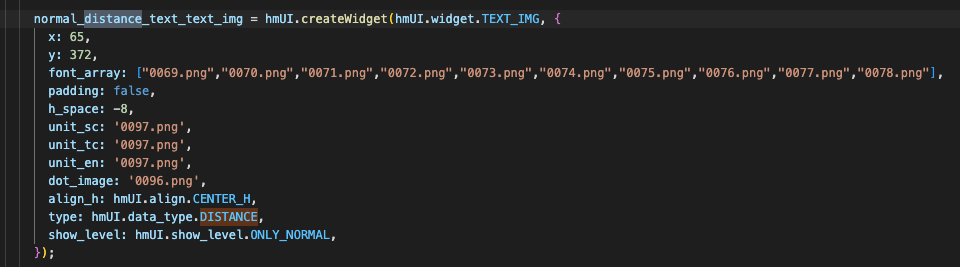
- This watchface has added a script to show Mi. by adding with manual by use "notepad" for edit index.json
By those who are interested can add themselves by adding the command line as below.
Code: Select all
            normal_distance_text_text_img = hmUI.createWidget(hmUI.widget.TEXT_IMG, {
              x: 65,
              y: 372,
              font_array: ["0069.png","0070.png","0071.png","0072.png","0073.png","0074.png","0075.png","0076.png","0077.png","0078.png"],
              padding: false,
              h_space: -8,
              unit_sc: '0097.png',
              unit_tc: '0097.png',
              unit_en: '0097.png',

// script for show Mi after you select Mi on zepp

	imperial_unit_sc:"0097-1.png",
	imperial_unit_tc:"0097-1.png",
	imperial_unit_en:"0097-1.png",

//------------------------------------------------------------
              dot_image: '0096.png',
              align_h: hmUI.align.CENTER_H,
              type: hmUI.data_type.DISTANCE,
              show_level: hmUI.show_level.ONLY_NORMAL,
            });
Re: changing face to imperial
Posted: 28 Jul 2022, 22:04
by Qasimja
asoo wrote: 28 Jul 2022, 09:45
Of course, I'd be more than happy to help.
thank you