Página 1 de 3
Huami watchface editor
Publicado: 11 Jun 2021, 10:18
por sk1nzz
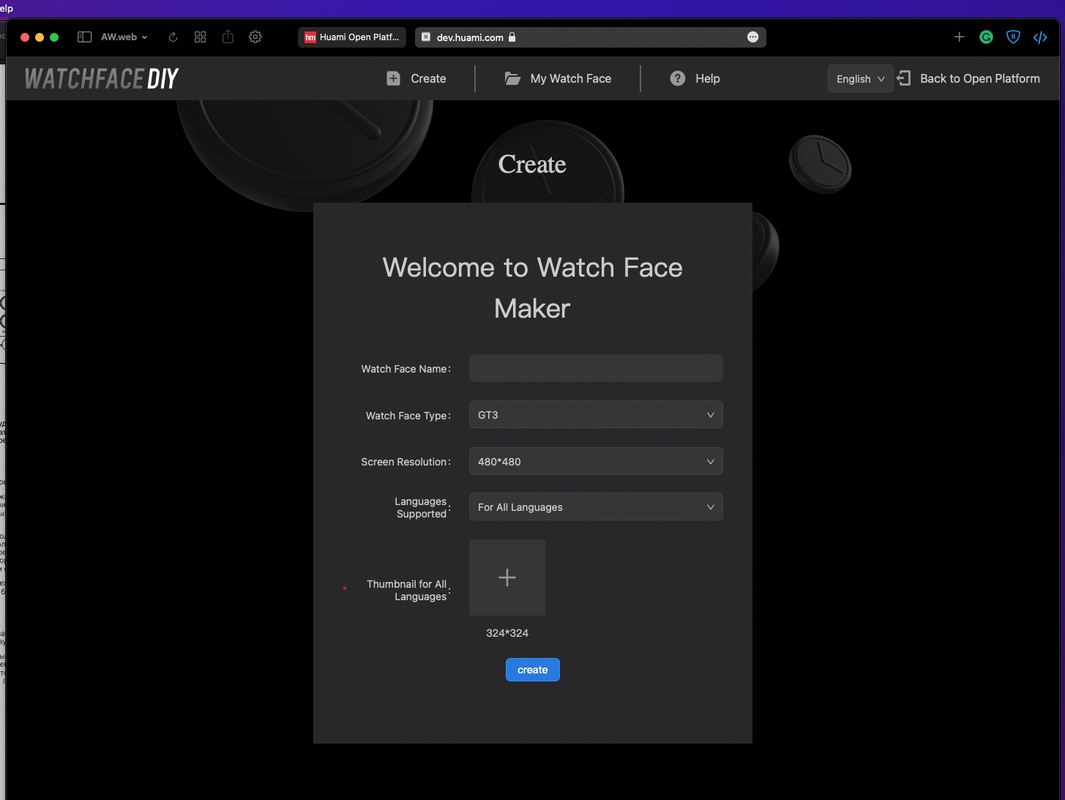
Hi! You can use the official Huami web editor to create watchfaces for these models. It's available on
https://dev.huami.com/watchface/index.html#/create. However, this tool requires submitting your personal information (passport, photos, etc.) to get approved. This way isn't good for your privacy, and the approval takes too much time. You can bypass this and access the editor. Sign up on this site (
https://dev.huami.com/#/user/register/reg), but don't complete step 2 which requires your personal data. Then enter the code below in your browser's JS console while in the editor:
You will get full access to this editor. It even saves your watchfaces with uploaded resources to your account. The only bad thing in this editor is that you can't unpack existing .bin files.
If you get issues with the editor again, run the code above again.
Original post on 4pda (Russian)
Re: Bip U / GTS 2 mini watchface editor
Publicado: 11 Jun 2021, 22:04
por paolino76
Professional... think about how they store our data correctly!
Re: Bip U / GTS 2 mini watchface editor
Publicado: 23 Jun 2021, 13:14
por jazzrock71
I tried to paste that line into console, but it didn't work.... anyone can help me?
Re: Bip U / GTS 2 mini watchface editor
Publicado: 25 Jun 2021, 10:12
por sk1nzz
jazzrock71 escribió: 23 Jun 2021, 13:14
I tried to paste that line into console, but it didn't work.... anyone can help me?
Make sure you reloaded the page after running this code.
Re: Bip U / GTS 2 mini watchface editor
Publicado: 03 Jul 2021, 01:12
por vitorprado
Is there a tutorial to help to create a WF for GTS 2 Mini? I've created one, but it's all buged.
I really don't know whats wrong, I used the correct resolution (306x354px).
Re: Bip U / GTS 2 mini watchface editor
Publicado: 06 Jul 2021, 07:17
por morganwable
I'm also having issues with the Huami editor - for me, it refuses to even export my work-in-progress test. Is there documentation of this tool, or a tutorial I can find somewhere? I'm a bit lost.
------------------------------
Edit: I don't think it's possible to actually export watch faces this way, I just got an error having to do with my certification not having been processed yet. I deleted my draft, bit the bullet, and applied for the developer certification. Yuck. I simply don't want to have to upgrade to the GTS 2 non-mini, I don't have that kind of money right now.
Either way, this tool seems rather buggy and confusing and I really, really wish someone would add Mini support to the GTS editor.
Re: Bip U / GTS 2 mini watchface editor
Publicado: 06 Jul 2021, 08:39
por sk1nzz
There is only a Russian tutorial on YouTube, but it has English captions:
https://youtu.be/H1Pfj-KoZU4
Re: Bip U / GTS 2 mini watchface editor
Publicado: 06 Jul 2021, 17:28
por morganwable
Oof. That's it?
This video is already somewhat out of date - the interface options in the tool are a bit different. I guess I'll just try to figure it out.
If I make any progress, I will share my findings.
Re: Bip U / GTS 2 mini watchface editor
Publicado: 11 Jul 2021, 23:21
por nahasnaji
I bought a GTS 2 mini for my birthday and I'm truly sad.
I tried to edit some casio watch faces and it is IMPOSSIBLE to unpack the .bin files from GTS or Bip. I tried dozen programs (even Amazfit tools ones), spent hours of my birthday in this thing and I couldn't unpack any model.
I know that GTS 2 mini isn't that expensive, but I will miss the money I've spent in this watch.
So a tip: If you wanna buy a smartwatch with great options of watchface, disconsider GTS 2 mini. I'm very, very disappointed with this device.
Re: Bip U / GTS 2 mini watchface editor
Publicado: 12 Jul 2021, 13:32
por CyclingAsia
Evening all,
(first post)... Just a quick one to let people know the original localStorage command is missing a trailing ';'. If posted in the chrome console (and chrome derivative browsers), the command isn't executed.
I noticed that if I returned to the
https://dev.huami.com/#/home page, the localStorage value was cleared. To solve this I've created a tampermonkey script that automatically executes the localStorage.setItem command.
Just install the tampermonkey extension,
create a new script,
copy and paste the following.
Código: Seleccionar todo
// ==UserScript==
// @name         Amazfit watch editor
// @namespace    http://tampermonkey.net/
// @version      0.1
// @description  enables the editor without giving up ID
// @author       CyclingAsia
// @match        https://dev.huami.com/watchface/*
// @icon         https://www.google.com/s2/favicons?domain=huami.com
// @grant        none
// ==/UserScript==

(function() {
    localStorage.setItem('examineType', '2');
})();
Re: Bip U / GTS 2 mini watchface editor
Publicado: 28 Jul 2021, 17:35
por NeverEndingRageDude
Hello, anyone out there, who uses this editor have any idea on how to make "Frame Animation"? No matter what i try, editor downloads all the frames in .png format, but doesnt use them. It is apparent by file size when exported (.bin with and .bin w/o anim have the same size) and obviously is not used on watches themselves. I use GTS2mini.
Re: Bip U / GTS 2 mini watchface editor
Publicado: 02 Ago 2021, 06:29
por nothing.tn
I want to unpack file .bin gts 2 mini, how do I do that? Please!
Re: Bip U / GTS 2 mini watchface editor
Publicado: 02 Ago 2021, 07:05
por miraksterrik
NeverEndingRageDude escribió: 28 Jul 2021, 17:35
Hello, anyone out there, who uses this editor have any idea on how to make "Frame Animation"? No matter what i try, editor downloads all the frames in .png format, but doesnt use them. It is apparent by file size when exported (.bin with and .bin w/o anim have the same size) and obviously is not used on watches themselves. I use GTS2mini.
I created several, the editor is very picky about the pictures, and their number. I had a set of .png images and only one of them was loaded, which had a small piece of a transparent background and it was displayed in Photoshop as a layer and not as a fixed background. Try to resave pictures
Re: Bip U / GTS 2 mini watchface editor
Publicado: 14 Ago 2021, 07:43
por Max88
I have seen many watchfaces published here for gts 2 mini with gif preview.
Do anyone know how to make them? On huami site i don't see any option about it, i when i export wf it only gives a bin file, not an image or a gif.
Re: Bip U / GTS 2 mini watchface editor
Publicado: 22 Ago 2021, 02:20
por Mindelle
Guys, please, maybe someone knows... I made watchface in the Huami editor, and when I synchronized it with my GTS 2 Mini it's just constantly reboots. To get rid of it I had to charge my watch so they could synchronize with the phone and then manually change watchface from this broken one to any other in the Zepp. Maybe someone knows WHY is this happening and HOW to make my watchface work...
Re: Bip U / GTS 2 mini watchface editor
Publicado: 15 Sep 2021, 03:28
por nahasnaji
Guys, when I try to select a resolution in Huami editor, it only says "no data".
How can I solve this problem?
GTS 2 Mini is such a headache... I'm almost selling it.
Re: Bip U / GTS 2 mini watchface editor
Publicado: 15 Sep 2021, 06:48
por Julien
Look for my posts, a bin decompiler is work in progress. Contribute on GitHub if you can!
Re: Bip U / GTS 2 mini watchface editor
Publicado: 15 Sep 2021, 12:44
por miraksterrik
nahasnaji escribió: 15 Sep 2021, 03:28
Guys, when I try to select a resolution in Huami editor, it only says "no data".
How can I solve this problem?
GTS 2 Mini is such a headache... I'm almost selling it.
I had such a problem, what is wrong with the cache, it seems to me, it helped me to log out and log in again
Re: Bip U / GTS 2 mini watchface editor
Publicado: 15 Sep 2021, 16:12
por nahasnaji
neFAST escribió: 15 Sep 2021, 06:48
Look for my posts, a bin decompiler is work in progress. Contribute on GitHub if you can!
Have you ever tried any of the Amazfit GTS Tools?
In some of then, you can unpack bin files, but I can't remember its name. But you can find tehm on GitHub, if I'm not mistaken.
It is very useful to understand .json codes
Re: Bip U / GTS 2 mini watchface editor
Publicado: 21 Oct 2021, 14:58
por Floof
CyclingAsia escribió: 12 Jul 2021, 13:32
Evening all,
(first post)... Just a quick one to let people know the original localStorage command is missing a trailing ';'. If posted in the chrome console (and chrome derivative browsers), the command isn't executed.
I noticed that if I returned to the
https://dev.huami.com/#/home page, the localStorage value was cleared. To solve this I've created a tampermonkey script that automatically executes the localStorage.setItem command.
Just install the tampermonkey extension,
create a new script,
copy and paste the following.
Código: Seleccionar todo
// ==UserScript==
// @name         Amazfit watch editor
// @namespace    http://tampermonkey.net/
// @version      0.1
// @description  enables the editor without giving up ID
// @author       CyclingAsia
// @match        https://dev.huami.com/watchface/*
// @icon         https://www.google.com/s2/favicons?domain=huami.com
// @grant        none
// ==/UserScript==

(function() {
    localStorage.setItem('examineType', '2');
})();
While this was working great for a while, it looks like the site got updated and the Tampermonkey script doesn't work anymore. Any ideas?

Re: Bip U / GTS 2 mini watchface editor
Publicado: 23 Oct 2021, 11:43
por CyclingAsia
Floof escribió: 21 Oct 2021, 14:58
CyclingAsia escribió: 12 Jul 2021, 13:32
Evening all,
(first post)... Just a quick one to let people know the original localStorage command is missing a trailing ';'. If posted in the chrome console (and chrome derivative browsers), the command isn't executed.
I noticed that if I returned to the
https://dev.huami.com/#/home page, the localStorage value was cleared. To solve this I've created a tampermonkey script that automatically executes the localStorage.setItem command.
Just install the tampermonkey extension,
create a new script,
copy and paste the following.
Código: Seleccionar todo
// ==UserScript==
// @name         Amazfit watch editor
// @namespace    http://tampermonkey.net/
// @version      0.1
// @description  enables the editor without giving up ID
// @author       CyclingAsia
// @match        https://dev.huami.com/watchface/*
// @icon         https://www.google.com/s2/favicons?domain=huami.com
// @grant        none
// ==/UserScript==

(function() {
    localStorage.setItem('examineType', '2');
})();
While this was working great for a while, it looks like the site got updated and the Tampermonkey script doesn't work anymore. Any ideas?
I've just had a quick look and I am still able to load
https://dev.huami.com/watchface/index.html#/open
There was a point where I thought things had stopped working when I couldn't save anything - I was getting auth errors in the network tab. I resolved that by going to the dev.huami.com home page, logging out and then logging back in. Once I refreshed the auth token, I was able to get back into the editor.
Re: Bip U / GTS 2 mini watchface editor
Publicado: 04 Nov 2021, 09:24
por wing0826
someone can login to
https://dev.huami.com/watchface/index.html ?
i can not login now...
Re: Bip U / GTS 2 mini watchface editor
Publicado: 04 Nov 2021, 14:46
por GIK-Team
Re: Bip U / GTS 2 mini watchface editor
Publicado: 04 Nov 2021, 17:11
por wing0826
thanks
where are you? china?
Re: Bip U / GTS 2 mini watchface editor
Publicado: 04 Nov 2021, 18:02
por GIK-Team
wing0826 escribió: 04 Nov 2021, 17:11
thanks
where are you? china?
Ukraine.